
Guide
How to get a reminder before your ID or driver’s license expires
Check the expiry date on your driver’s license or state ID, then add a reminder on your iPhone a few months before it. In Reminders, add "Renew driver’s license", set the date in the reminder’s details, and add an Early Reminder for a second alert. Attach a photo of the card so the details are with it. Your state’s driver’s licensing agency decides how early you can renew and what to bring, so check its site, which USAGov lists by state.

Find every date you carry
Start by laying out every card that expires. For most people that is:
| Card or document | Where the date is | Who renews it |
|---|---|---|
| Driver’s license | On the front | Your state’s driver’s licensing agency |
| State ID card | On the front | Your state’s driver’s licensing agency |
| US passport book or card | On the photo page, or the front of the card | The State Department |
| Professional or trade license | On the license | Your state licensing board |
| Insurance cards | On the card or in the policy | Your insurer |
| Credit and debit cards | On the card | Your bank, usually by mail |
The first three are the ones that hurt when they lapse, because replacing them takes time and documents. The rest of this page uses a driver’s license as the example; the steps are the same for each.
Set the reminder on iPhone
- Open Reminders and tap New Reminder.
- Type the reminder, for example “Renew driver’s license, expires 12 Jun 2027”.
- Open the reminder’s details and set the Date: about 3 months before the expiry date is a comfortable start, earlier if you need to gather documents.
- Tap Early Reminder and choose a second alert, such as 2 weeks before.
- Add a photo of the card, or scan a document, from the reminder’s details. Apple’s guide shows both. The license number and address are then right there when you sit down to renew.
If you have iOS 26.2 or later, Apple says you can turn on Urgent to get an alarm when the reminder is due, even with your iPhone silenced or a Focus on. That is useful for the final reminder.
You can also ask Siri. Apple’s examples include “Remind me tomorrow at 3:00 p.m. to call Tara”; the same phrasing works for a date: “Remind me on March 12 to renew my driver’s license.”
If you live in your calendar instead, Apple notes that in iOS 18 and later you can create a reminder from the Calendar app, and your scheduled reminders appear there alongside your events.
How early to set it
Three things decide how much time you need:
- Your state’s renewal window. Each state decides how early you can renew and whether you can do it online. USAGov lists every state’s driver’s licensing agency, so start there.
- Documents. If you are upgrading to a REAL ID, or your name or address has changed, you will need papers. USAGov says your state decides the documents, and most ask for proof of identity, Social Security number and residency in the state. Gathering them takes time. The REAL ID documents checklist lists them.
- An appointment. If your state needs an in-person visit, book it early rather than in the last week.
For a passport, give yourself much longer. USAGov’s advice is to renew early because processing times vary, and some countries want months of validity left on arrival. See when to renew your passport.
Don’t wait for the letter
Whether you get a renewal notice depends on your state, and a notice sent to an old address never arrives. Your own reminder is the one you can count on. When you move, update your address with your state’s agency so official notices find you.
A once-a-year check
Reminders only work for the dates you typed in. Once a year, on a day you will remember, such as your birthday or New Year’s Day, spend five minutes on the whole set:
- Lay out every card from the table above, including the ones in a drawer.
- Check that each expiry date has a reminder, and add any that are missing.
- Check that the address on each card still matches where you live.
- Replace any copy in your files that still shows an old card, so the copy you reach for is the current one.
Make the check itself a reminder that repeats every year.
Keep a copy of each card
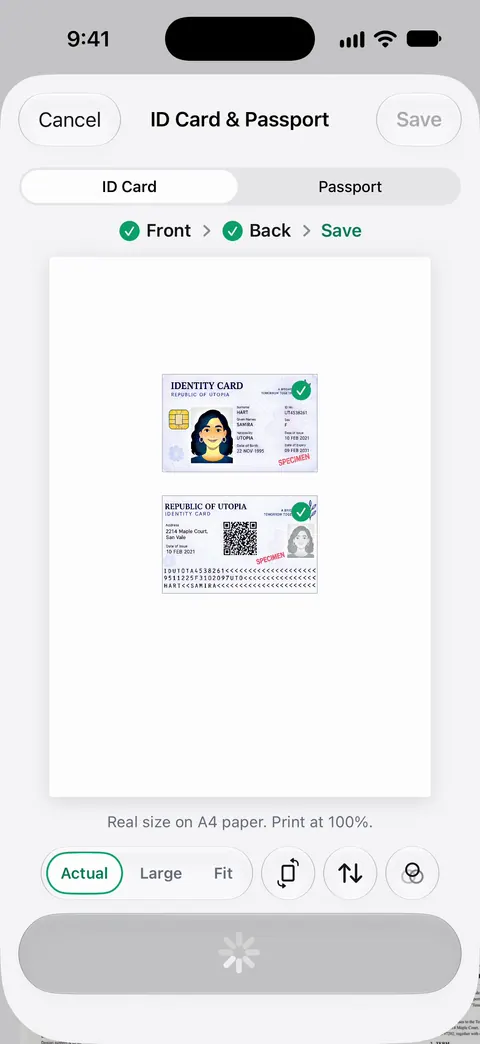
A clear copy of your license and other cards helps in two ways. When you renew, the details are in front of you. If your wallet is lost or stolen, you know exactly what to replace and the numbers to give. The stolen wallet guide lists what to do first, and the ID scanning guide shows how to get both sides on one page.
Keep those copies somewhere private and locked, since together they are much of what someone would need to pretend to be you.
Where Scanner One helps, and where it doesn’t
Scanner One does not renew anything, and it does not talk to your DMV. Your state’s agency handles renewals.
It does keep a clean copy of every card. ID cards and passports are scanned with both sides on one printable page. Documents stay on your iPhone unless you share them or turn on iCloud Sync. You can lock the app with Face ID.
When a document has a due date or an expiry date, its info card shows it with Remind Me, which sends a notification the day before a payment is due or a week before something expires. That is the same idea as the Reminders steps above, kept next to the card itself.
Needs You gathers bills due, return windows and IDs about to expire on Home, from your own papers. So once your license or passport is scanned, its expiry can show up on Home ahead of time, without a reminder you typed yourself.
With Siri and Shortcuts you can open, find, share and ask your documents by voice, and see what’s due. If you share a copy of an ID from a free account, On a free account, pages you share, print or export carry a small “Scanned with Scanner One” label at the bottom right. Pro removes it.
For most people, one reminder per card in the Reminders app is all that is needed. The same habit works for warranty end dates.
Questions and answers
Will the DMV remind me when my license expires?
That depends on your state, and a notice sent to an old address never arrives. Check your state’s driver’s licensing agency site to see what it sends, and set your own reminder as well so you are never relying on the mail.
How early can I renew my driver’s license?
Each state sets its own window, and some let you renew online. Your state’s driver’s licensing agency site, which USAGov lists by state, has the rules.
Can Siri set the reminder for me?
Yes. Ask Siri something like "Remind me on March 1 to renew my driver’s license". Apple’s Reminders guide gives examples of the phrasing. Then open the reminder to add an early alert and a photo of the card.
Should I upgrade to a REAL ID when I renew?
If you want to use your license to fly within the US or enter some federal facilities, yes. USAGov says you can choose a REAL ID when you apply for or renew your license, and that your state decides which documents you need, usually proof of identity, Social Security number and residency.
Sources
What this page says about Scanner One was checked against the app on .
- Apple Support, Add details in Reminders on iPhone — set a date, a recurring reminder and an Early Reminder, and add a photo or scan a document; read 2026-11-13
- Apple Support, Use Reminders on your iPhone, iPad, or iPod touch — asking Siri to schedule a reminder, urgent reminders in iOS 26.2, and creating reminders from Calendar; read 2026-11-13
- USAGov, State motor vehicle services — links to each state’s agency for getting or renewing a driver’s license and REAL ID; read 2026-11-13
- USAGov, How to get a REAL ID and use it for travel — your state decides the process and documents; proof of identity, Social Security number and residency; the star on a compliant card; read 2026-11-13
- USAGov, How to renew an adult passport — renew early because processing times vary; last updated 23 March 2026
- Scanner One on the App Store — the app’s own listing
Get Scanner One
Scanner One is free, with generous limits: scanning, clean PDFs and text search never stop.

Scanner OneScan, sign and ask anything
Scanner One is free, with generous limits: scanning, clean PDFs and text search never stop.