
Guide
Scan both sides of an ID card onto one page
The iPhone’s scanners in Notes, Files and Preview save each side of a card as its own page, so scanning front then back gives a 2-page PDF. Many offices accept that. When a form asks for both sides on one page, you need a tool that places the two scans on one sheet, such as an ID card mode in a scanner app. Before sending, write who the copy is for across it, and send it only to the person who asked.

Scan the front and back as one PDF
Even if you can’t get both sides on one page, put them in one file. Two separate files with look-alike names are how the back side gets lost.
- Lay the card on a plain, dark surface. A dark table gives the scanner a clear edge to find around a light card.
- Start a scan: in Notes, tap the Attachments button in a note, then Scan Documents; in Files, tap the More button, then Scan Documents; in Preview (iOS 26 and later), tap Scan Documents.
- Turn the flash off. ID cards are laminated, and the flash leaves a white spot over the photo or the numbers.
- Capture the front. Cards are small, so the scanner can miss them in automatic mode: switch to manual capture, tap the Shutter button and drag the corners to the card’s corners. Tap Keep.
- Flip the card over in the same spot and capture the back the same way.
- Tap Done. In Files, choose a location and tap Save.
You now have a 2-page PDF: front on page 1, back on page 2. Rename it with what it is and who it’s for, such as “Driver’s license, front and back, for lease application”.
Make it readable
- Get close. The card should fill most of the frame. A small card in a big frame comes out soft once someone zooms in to read a number.
- Tilt to lose the glare. If a bright patch sits on the photo or the barcode, tilt the card a few degrees, or move the light, and capture again.
- Keep it in color. Officials often want to see the colors and security features. A black-and-white copy of an ID may be refused.
When a form asks for both sides on one page
Some landlords, employers and offices ask for “a copy of both sides of your ID on one page”, because that’s what a photocopier produces. The iPhone’s scanners don’t do this: every capture becomes its own page, and none of Apple’s scanners lays two captures out side by side.
Your options:
- Ask whether 2 pages are fine. Often they are. The person needs to see both sides, not a particular layout.
- Lay it out yourself. Save each side as an image, place both on one page in a document app such as Pages, and export a PDF. It works, but takes a few minutes and some care to keep the images sharp.
- Use a scanner app with an ID card mode, which captures both sides and places them on one printable page for you. See the last section.
Mark the copy before you send it
A clean copy of your ID can be reused by anyone who gets hold of it. A short label across it makes it less useful for anything else.
- Open the PDF in Preview.
- Tap the Markup button, tap the Add button, then add text.
- Type something like “Copy for Oak Street lease application, Nov 2026” and drag it across a corner of the card, without covering the photo or the details they need to check.
If the PDF will sit in someone’s inbox, Preview can also lock it with a password from the Actions menu next to the file name (tap Lock), and you can tell them the password by phone or text. More ways to label a document are in adding a watermark to a PDF.
Send only what’s asked
- Check what the request needs. Proving your address may need a utility bill rather than your ID: see proving your address. For a REAL ID, check the REAL ID documents list for what to bring and in what form.
- Prefer their upload form to email when they have one.
- Don’t leave copies in Photos if you scanned with the Camera. A PDF in a folder is easier to keep track of and delete.
Where to keep the copy
Once it’s sent, decide whether you need to keep the scan at all. If you do, keep it somewhere you control: a folder in Files rather than an email thread or your photo library. On My iPhone keeps it on the phone only; iCloud Drive syncs it to your other devices. For the same choices in more detail, including locking the file, see scanning a passport photo page. Insurance cards, student cards and work badges scan the same way as an ID card.
Where Scanner One helps, and where it doesn’t
This is exactly the layout the built-in scanners don’t make. ID cards and passports are scanned with both sides on one printable page. From Home you can bring in pictures from Photos and files from the Files app, or scan an ID card. The screenshot shows a card’s front and back saved together on one page, ready to print or send.
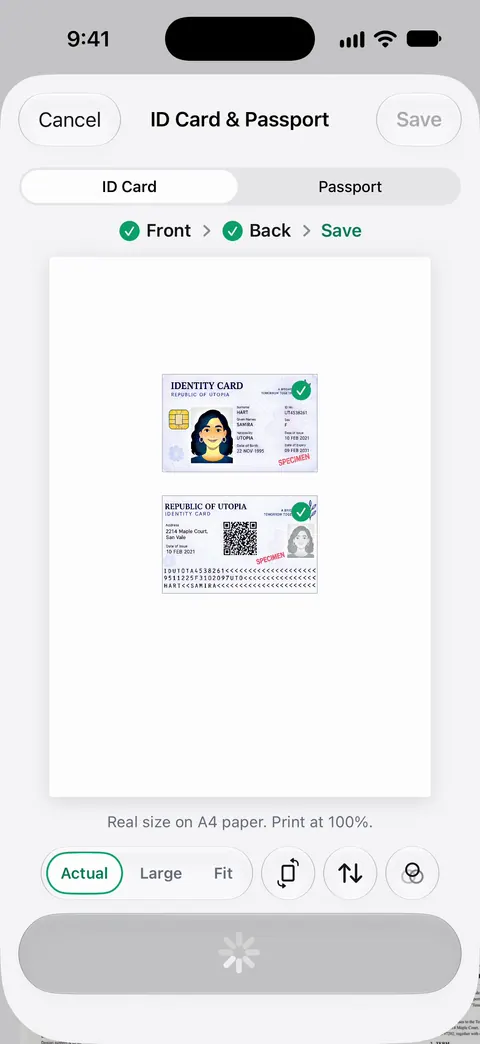
For marking the copy, use the PDF tools. The PDF tools merge, split, compress, password-protect, add page numbers and watermarks, and extract text. A watermark such as “Copy for lease application” goes across the whole page. Redaction can hide a number the receiver doesn’t need: Redaction is permanent. Pro adds redaction, the smart eraser, edit text, auto-export and five alternate app icons.
The limits: Free accounts can run the PDF tools and the Word, Excel and CSV exports 3 times a week, from one shared allowance. On a free account, pages you share, print or export carry a small “Scanned with Scanner One” label at the bottom right. Pro removes it. Documents stay on your iPhone unless you share them or turn on iCloud Sync.
When the built-in way is enough: if a 2-page PDF is accepted, a Notes or Preview scan is all you need. The ID mode earns its place when you’re asked for the one-page layout, or when you send ID copies often. More in ID cards and passports, and the passport version of this guide is scanning a passport photo page.
Questions and answers
How do I scan both sides of my driver’s license on iPhone?
In Notes, Files or Preview, start Scan Documents, capture the front, flip the card in the same spot, capture the back, then tap Done. You get one PDF with the front on page 1 and the back on page 2.
Can the iPhone put both sides of an ID on one page?
Not with the built-in scanners: they make one page per capture. You can lay out two images on one page in a document app and export a PDF, or use a scanner app with an ID card mode.
Is it safe to email a copy of my ID?
Email is not a private channel, so send an ID copy only when the person really needs it, preferably through their own secure upload if they have one. Mark the copy with who it is for and the date, and delete the sent email if you don’t need it.
Why does my ID scan have a white glare spot?
The laminate reflects the flash or a lamp. Turn the flash off, move to soft daylight, and tilt the card or the phone slightly until the spot slides off the text and photo.
Sources
What this page says about Scanner One was checked against the app on .
- iPhone User Guide (iOS 27), Scan text and documents in Notes — scanning additional pages into one PDF, manual capture and corners; read 2026-11-13
- iPhone User Guide (iOS 27), Scan text and documents in Preview — Preview combines the pages into one PDF; read 2026-11-13
- iPhone User Guide (iOS 27), Annotate a PDF or image in Preview — Markup, then the Add button, to put text on a page; read 2026-11-13
- iPhone User Guide (iOS 27), Lock PDFs in Preview — locking a PDF with a password; read 2026-11-13
- Scanner One on the App Store — the app’s own listing
Get Scanner One
Scanner One is free, with generous limits: scanning, clean PDFs and text search never stop.

Scanner OneScan, sign and ask anything
Scanner One is free, with generous limits: scanning, clean PDFs and text search never stop.