
Feature
Ask your documents
Ask your documents anything. When does the lease end? What did I spend at the shop? The answer comes back with the page it came from. Open a document and tap Ask AI, then type your question. Free accounts can ask the on-device AI 3 questions a day. Cloud AI is off until you switch it on, and page images are a separate permission. Check important answers on the page they cite, and don’t treat an answer about a contract as legal advice.

What it does
Ask your documents anything. When does the lease end? What did I spend at the shop? The answer comes back with the page it came from. Instead of scrolling through twelve pages for the notice period or the total, you ask the way you would ask a person who has read the paper:
- “When does the lease end, and how much notice do I have to give?”
- “What is the total due on this invoice, and by when?”
- “What did I spend at the hardware store?”
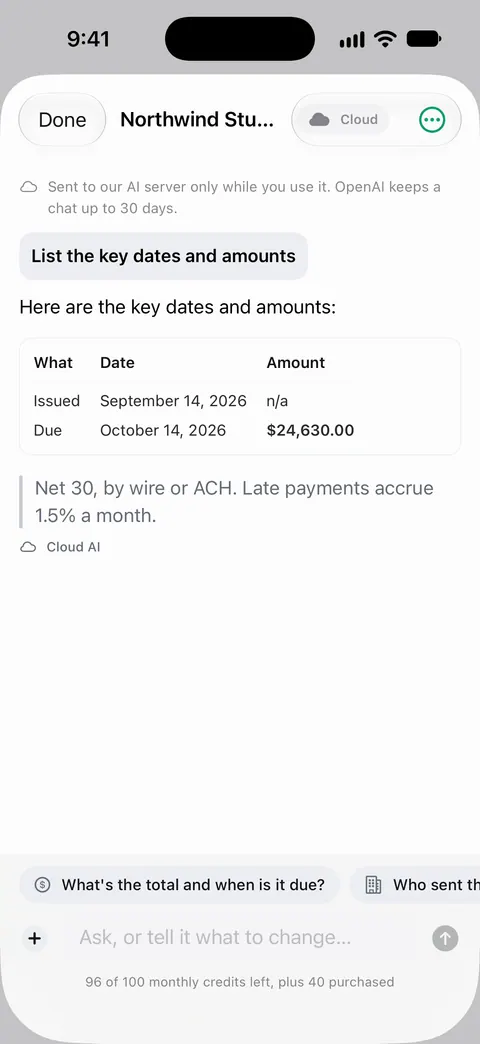
- “List the key dates and amounts in this policy.”
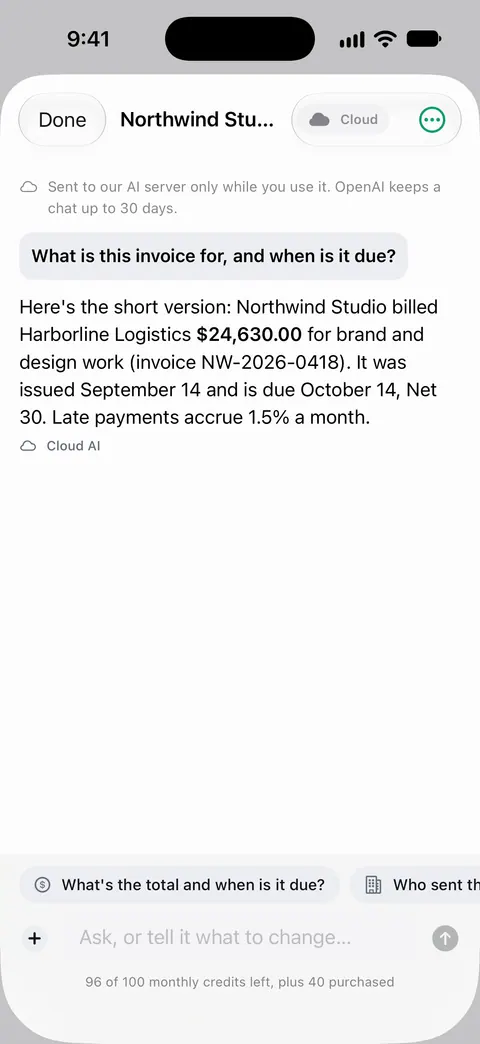
How to ask
- Open the document you have a question about.
- Tap Ask AI.
- Type your question in plain words. Be specific: “the deposit amount” works better than “money stuff”.
- Read the answer, then open the page it came from to check the exact wording when it matters.
Answers aren’t only sentences. Ask for the key dates and amounts and they can come back as a table; ask about two documents and you can get them side by side.
On the device first, the cloud only if you choose
Cloud AI is off until you switch it on, and page images are a separate permission. Documents stay on your iPhone unless you share them or turn on iCloud Sync. So unless you switch cloud AI on, your questions are for the on-device AI. Free accounts can ask the on-device AI 3 questions a day. Pro removes every limit.
Cloud AI is a separate choice. Pro Max, the plan with cloud AI, costs $149.99 a year in the US. Credits for cloud AI come in packs of 100 for $2.99, 400 for $9.99 and 1,000 for $21.99 in the US. Switching it on is your decision, in Settings, and page images need their own permission on top of that. If you are weighing it up, our guides to on-device AI or cloud AI and whether it is safe to upload documents to an AI chatbot explain what changes when a page leaves your phone.
Asking well
- Name the thing you want. “Notice period”, “deductible”, “late fee”, “renewal date”.
- Ask one thing at a time for answers you can check quickly.
- Ask for the page. Ask your documents anything. When does the lease end? What did I spend at the shop? The answer comes back with the page it came from. Use that to read the original sentence.
- Ask for a table when you want several dates or amounts at once. Our guide to pulling dates and amounts out of documents shows other ways too.
- Scan clearly first. A blurry scan gives any reader, person or AI, less to go on.
What it can’t do
- It can be wrong. Any AI can misread a table or mix up two dates. The page reference is there so you can check.
- It is not advice. It can tell you what a lease or a policy says; it cannot tell you what you should do about it. For contracts, our guides on getting the gist of a long contract and what to check before you sign list what to read yourself.
- Your papers can’t answer everything. Whether a fee is legal in your state, or what a company will agree to, isn’t written in your lease.
Where Scanner One helps, and where it doesn’t
If you know the exact word you are looking for, plain search is faster and exact: Search looks inside the text of every document and shows the matching line and page. And a one-page letter is quicker to read than to ask about.
Asking helps with long documents, tables of numbers and questions that need a few facts put together. Free accounts can try it every day. Our guide to asking questions about a PDF covers other ways to do it.
In 1.0.1, a related tool compares two versions of the same paper: What changed compares the new version of a lease or policy with the one you signed.
Questions and answers
Do my documents go to the cloud when I ask a question?
Not unless you choose that. Cloud AI is off until you switch it on, and page images are a separate permission. Documents stay on your iPhone unless you share them or turn on iCloud Sync.
How many questions can I ask for free?
Free accounts can ask the on-device AI 3 questions a day. Pro removes every limit.
What does cloud AI cost?
Pro Max, the plan with cloud AI, costs $149.99 a year in the US. Credits for cloud AI come in packs of 100 for $2.99, 400 for $9.99 and 1,000 for $21.99 in the US. Prices differ by country, and the App Store shows yours before you pay.
Can I trust the answers?
Treat them as a fast first read, not the final word. Ask your documents anything. When does the lease end? What did I spend at the shop? The answer comes back with the page it came from. For anything that matters, like a date, an amount or a notice period, open that page and read the sentence yourself.
Can it explain what a contract means for me?
It can find and quote what a contract says, which saves time. It is not a lawyer: for what a clause means for you, or before you sign something important, ask a qualified person.
Sources
What this page says about Scanner One was checked against the app on .
- Scanner One on the App Store — the app’s own listing: ask your documents anything, with the page each answer came from; cloud AI off until switched on
Get Scanner One
Scanner One is free, with generous limits: scanning, clean PDFs and text search never stop.

Scanner OneScan, sign and ask anything
Scanner One is free, with generous limits: scanning, clean PDFs and text search never stop.