
Feature
Scanner One Free and Pro: what each includes, and the prices
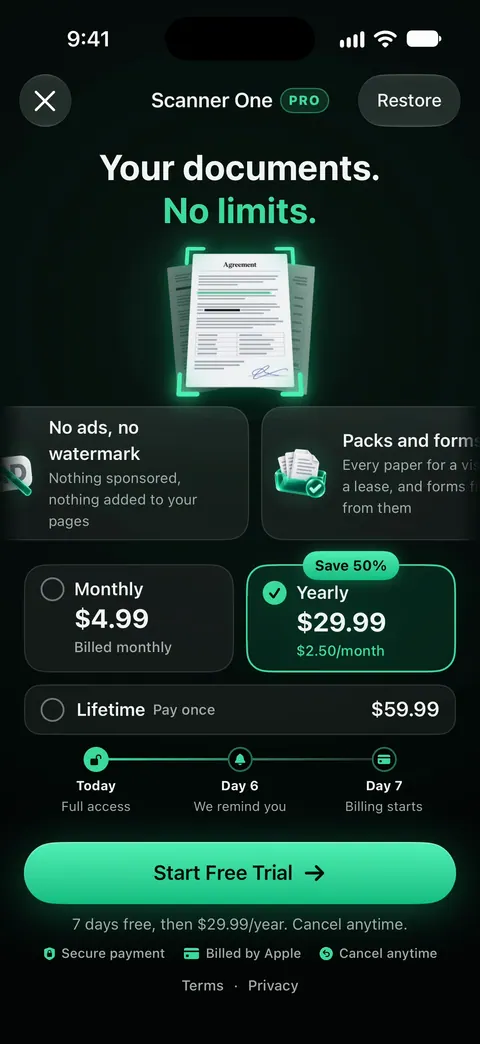
Scanner One is free, with generous limits: scanning, clean PDFs and text search never stop. Pro removes every limit. In the US, Pro is $4.99 a month, $29.99 a year with a free week to start, or $59.99 once. Prices differ by country, and the App Store shows yours before you pay. Subscriptions renew automatically and you can cancel anytime.

Free vs Pro at a glance
Scanner One is free, with generous limits: scanning, clean PDFs and text search never stop. Text recognition runs on every page for everyone, free or Pro. The limits apply to the extras, each counted by the month, the week or the day, as the table shows.
| Free | Pro | |
|---|---|---|
| Scanning and clean PDFs | No limit | No limit |
| Text recognition and search | Every page | Every page |
| Smart filing (name, tags, folder) | 10 documents a month | No limit |
| Sign and mark up | 3 documents a month | No limit |
| Clean Up, the smart eraser | 3 documents a month | No limit |
| PDF tools and Word, Excel, CSV exports | 3 a week, shared | No limit |
| Questions to the on-device AI | 3 questions a day | No limit |
| Redaction, Edit Text, auto-export, alternate app icons | Not included | Included |
| The “Scanned with Scanner One” label on what you share | Yes | No |
Pro removes every limit. Pro adds redaction, the smart eraser, edit text, auto-export and five alternate app icons. Pro means no ads and no watermark.
The free label on shared pages
On a free account, pages you share, print or export carry a small “Scanned with Scanner One” label at the bottom right. Pro removes it.
The label is on the pages you share, print or export. It matters when you send a document to a landlord, an employer or an office. If that is a problem for a particular document, Pro is the way to send it without the label. Our roundup of scanner apps that do not mark your scans compares how other apps handle this.
The plans and their prices
Pro comes monthly, yearly with a free week, or once for life. These are the US prices; prices differ by country, and the App Store shows yours, in your currency, before you pay.
| Plan | US price | How it is billed |
|---|---|---|
| Pro monthly | $4.99 a month | Renews every month |
| Pro yearly | $29.99 a year | a free week first, then renews every year |
| Pro Lifetime | $59.99 once | one payment, yours forever |
| Pro Max | $149.99 a year | The plan with cloud AI, renews every year |
Lifetime is one payment, yours forever. If you dislike subscriptions, that is the plan to look at; scanner apps you can buy once compares the others.
Cloud AI: Pro Max and credits
On-device AI is the default. Cloud AI is off until you switch it on, and page images are a separate permission. If you want cloud AI, there are two ways to pay for it:
- Pro Max, the plan with cloud AI, costs $149.99 a year in the US.
- Credits for cloud AI come in packs of 100 for $2.99, 400 for $9.99 and 1,000 for $21.99 in the US.
You don’t need either to scan, search or ask the on-device AI. Read Ask your documents and the privacy page before you switch cloud AI on.
Renewing and cancelling
Subscriptions renew automatically and you can cancel anytime. Subscriptions are billed through your Apple Account, so you manage them in Apple’s settings, not in a Scanner One account. Scanner One needs no account and does no tracking.
To cancel, from Apple’s steps:
- Open Settings on your iPhone or iPad and tap your name.
- Tap Subscriptions.
- Tap the Scanner One subscription.
- Tap Cancel Subscription. You may need to scroll down to find it.
If there is no Cancel button, or you see an expiration message in red, the subscription is already canceled. On the yearly plan’s free week, Apple says to cancel at least 24 hours before the trial ends if you don’t want it to renew. Lifetime is a single payment, so there is nothing to cancel.
Which to choose
- Stay free if you scan a few papers a month and send them rarely. Scanning, text recognition and search never stop.
- Monthly if you need Pro for one busy month, like a move, a visa application or tax season, and then cancel.
- Yearly if you scan and send every week. Try it with the free week first.
- Lifetime if you plan to use it for years and dislike renewals.
- Pro Max or credits only if you want cloud AI.
Free apps compared side by side are in the free scanner apps for iPhone, with Scanner One disclosed as ours.
New in Pro with 1.0.1. Pro adds What changed, filling forms from your documents, Pack checks and folder sharing. Folders can be shared through iCloud. Joining is free; sharing is part of Pro.
Where Scanner One helps, and where it doesn’t
If you only scan the odd page, you may not need any app: Notes and Files on your iPhone scan for free, and our guides say when they are enough. The free version of Scanner One adds a scanner that never stops, text recognition on every page and search, with the limits above on the extras. On a free account, pages you share, print or export carry a small “Scanned with Scanner One” label at the bottom right. Pro removes it. For help with a purchase, see the support page.
Questions and answers
Is Scanner One free?
Scanner One is free, with generous limits: scanning, clean PDFs and text search never stop. Pro removes every limit.
How much is Scanner One Pro?
In the US: $4.99 a month, $29.99 a year with a free week to start, or $59.99 once for Lifetime. Prices differ by country; the App Store shows yours before you pay.
Do free scans have a watermark?
On a free account, pages you share, print or export carry a small "Scanned with Scanner One" label at the bottom right. Pro removes it.
How do I cancel Scanner One Pro?
On your iPhone or iPad, open Settings, tap your name, tap Subscriptions, tap the subscription, then tap Cancel Subscription. If you are on the free week and don’t want to be charged, Apple says to cancel at least 24 hours before the trial ends.
What is Pro Max?
Pro Max, the plan with cloud AI, costs $149.99 a year in the US. Credits for cloud AI come in packs of 100 for $2.99, 400 for $9.99 and 1,000 for $21.99 in the US. Cloud AI is off until you switch it on, and page images are a separate permission.
Sources
What this page says about Scanner One was checked against the app on .
- Apple Support, Cancel a subscription from Apple — how to cancel in Settings, and cancelling a trial at least 24 hours before it ends; published 2026-09-29
- Scanner One on the App Store — the app’s own listing: free limits, what Pro adds, and the plans
Get Scanner One
Scanner One is free, with generous limits: scanning, clean PDFs and text search never stop.

Scanner OneScan, sign and ask anything
Scanner One is free, with generous limits: scanning, clean PDFs and text search never stop.