
Comparison
Scanner Pro alternatives for iPhone
Readdle lists watermark-free scans and OCR among Scanner Pro Plus features, sold as a weekly or yearly plan, and the app now needs iOS 18.0. Alternatives depend on what you want: Genius Scan’s free Basic plan has no watermark; TurboScan Pro is a one-time $12.99 app that runs on iOS 13.0; Prizmo sells OCR as a one-time pack; the Notes, Files and Preview apps are free; and Scanner One, our app, reads every page for free but marks shared pages on its free version.

Scanner One is our app. It is one of the alternatives here, with its limits stated. Facts about other apps come from their App Store pages and developer sites, read on November 13, 2026.
What Scanner Pro does, and what is behind Plus
Scanner Pro, from Readdle, is a well-made scanner. Its App Store description lists automatic edge detection, perspective correction and shadow removal, signing and filling forms, export to PDF, Word, PowerPoint or JPG, iCloud sync across devices, and auto-upload to cloud services. It also says you can share unlimited scans by email or with any app, completely free.
Readdle’s help page says the free app lets everyone create, organize and share scans, and lists these among the features of Scanner Pro Plus: watermark-free scans, OCR (a searchable text layer), auto-upload to the cloud, a PDF converter and translation. Plus is sold as a 1-week or a 1-year plan. On the US App Store, the Scanner Pro Plus purchases are listed from $3.99 to $59.99, beside an Expense Report purchase at $4.99 and a Fax Pack at $0.99.
Two more facts matter when you compare. The current version needs iOS 18.0 or later, and the privacy label lists Identifiers under Data Used to Track You.
Scanner Pro alternatives compared
Checked on November 13, 2026.
| App | Price model | In-app purchases listed | Watermark on free scans, per the developer | Text recognition | Needs |
|---|---|---|---|---|---|
| Scanner Pro (for reference) | Free, Plus by the week or year | $0.99 to $59.99 | Watermark-free is listed as a Plus feature | Plus | iOS 18.0 |
| Notes, Files, Preview (Apple) | Built into iOS | None | Not mentioned in Apple’s steps | Preview: Embed Text on export | Preview: iOS 26 or 27 |
| Genius Scan | Free Basic, Ultra $39.99 a year | $1.99 to $49.99 | No: “without any watermark” | Ultra | iOS 17.0 |
| TurboScan Pro | $12.99 paid app | None | Not stated | Not mentioned | iOS 13.0 |
| Prizmo | Free, one-time Premium Pack $23.99, optional Cloud Plan | $3.99 to $49.99 | Removed by the one-time pack | Unlimited with the pack | iOS 17.5 |
| Scanner One (ours) | Pro comes monthly, yearly with a free week, or once for life. | $4.99 a month, $29.99 a year, $59.99 once | Yes: “Scanned with Scanner One”; Pro removes it | Text recognition runs on every page for everyone, free or Pro. | iOS 17 or later |
Each alternative, honestly
Notes, Files and Preview: free, already installed
Apple’s steps in Notes: open a note, tap the Attachment button, tap Scan Documents, and let Auto mode capture each page, then tap Done. Files does the same from its More button and asks where to Save. On iOS 26 and 27, Preview scans from its start screen, fills and signs PDF forms, and can lock a PDF with a password.
Pick the built-in scanner if you mainly used Scanner Pro’s free version to scan and send.
Genius Scan: free, with no watermark
The Grizzly Labs’ pricing page says Basic is free, has no limit on the number of documents and produces documents without any watermark. OCR, cloud exports and sync are in Ultra at $39.99 a year. The label lists no data used to track you.
Pick Genius Scan if the watermark was your reason for looking.
TurboScan Pro: one price, older iPhones welcome
TurboScan Pro costs $12.99 once on the US App Store, lists no in-app purchases, and its privacy label says Data Not Collected. It needs iOS 13.0 or later, so it runs on iPhones that Scanner Pro’s current version no longer supports. Its description lists SureScan for sharper pages, folders and smart search, Face ID lock and iCloud Drive backup. Its page doesn’t describe text recognition.
Pick TurboScan Pro for an older iPhone, or if you are done with subscriptions.
Prizmo: one-time OCR and exports
Prizmo’s description says the Premium Pack is a one-time purchase that unlocks all limitations, including unlimited on-device OCR and watermark removal; the in-app purchase list shows Premium Pack (non-recurring) at $23.99. It lists searchable PDF and Word (DOCX) exports, auto-upload to iCloud, Dropbox, OneDrive or WebDAV, and Shortcuts support. The label says Data Not Collected.
Pick Prizmo if you used Scanner Pro Plus mainly for OCR and auto-upload.
Scanner One: text, tools and filing in one app
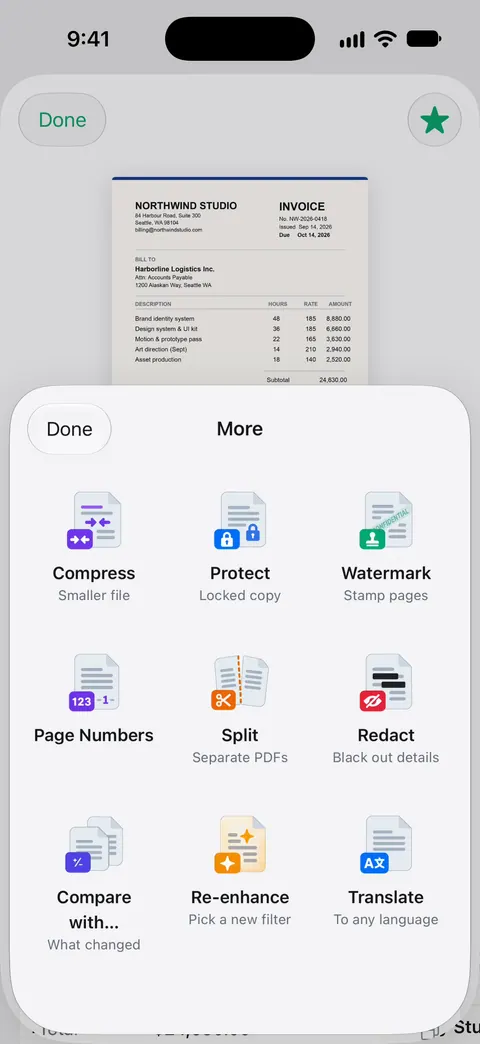
Point your camera at any piece of paper. Scanner One finds the edges, straightens the page, cleans it up and saves a real PDF. Then it reads the text, names the document, tags it and puts it in the right folder. Text recognition runs on every page for everyone, free or Pro. The PDF tools merge, split, compress, password-protect, add page numbers and watermarks, and extract text.
Pick this if
- You want free and unmarked: Genius Scan Basic, or the built-in scanner.
- Your iPhone can’t run iOS 18: TurboScan Pro (iOS 13.0), Genius Scan (iOS 17.0) or Scanner One (iOS 17 or later).
- You want to pay once: TurboScan Pro, Prizmo’s Premium Pack, or Scanner One Lifetime at $59.99 once.
- You want OCR without paying: Preview’s Embed Text on iOS 26 or later, or Scanner One.
Where Scanner One helps, and where it doesn’t
Where it helps a Scanner Pro user: Text recognition runs on every page for everyone, free or Pro. Search looks inside the text of every document and shows the matching line and page. Scanner One exports to Word, keeping headings, lists and tables, and to Excel and CSV. Pro adds redaction, the smart eraser, edit text, auto-export and five alternate app icons.
Where it doesn’t: On a free account, pages you share, print or export carry a small “Scanned with Scanner One” label at the bottom right. Pro removes it. That is the same kind of mark people leave Scanner Pro’s free version over, so if you send scans from a free account, Genius Scan Basic is the better free pick. Free accounts can run the PDF tools and the Word, Excel and CSV exports 3 times a week, from one shared allowance. Free accounts can sign and mark up 3 documents a month. Scanner One runs on iPhone and iPad. There is no fax. To compare the two apps directly, see Scanner One vs Scanner Pro, and for more unmarked options, scanner apps that don’t mark your scans.
Questions and answers
Does Scanner Pro add a watermark on the free version?
Readdle’s help page lists 'watermark-free scans: doesn’t add any unnecessary watermarks to your scans' as a Scanner Pro Plus feature. Its App Store description also says you can share unlimited scans by email or with any app for free.
What iOS version does Scanner Pro need?
The US App Store page, read on November 13, 2026, says Scanner Pro needs iOS 18.0 or later. TurboScan Pro needs iOS 13.0, Genius Scan iOS 17.0, and Scanner One iOS 17 or later.
I bought Scanner Pro years ago. Do I lose my features?
Readdle’s help page says features unlocked when you bought the app stay available to you without limits. Only the newer Plus features need the subscription.
Is PDF Expert a replacement for Scanner Pro?
They do different jobs. PDF Expert, also from Readdle, is a PDF reader and editor: its description lists filling and signing forms for free and editing, converting and merging in Premium. Scanner Pro is the scanner.
Sources
What this page says about Scanner One was checked against the app on .
- Scanner Pro on the App Store — in-app purchases, privacy label, iOS 18.0 requirement, features; read 2026-11-13
- Readdle Support, Use Scanner Pro for free or subscribe — free scanning, and Plus features including watermark-free scans and OCR, 1-week and 1-year plans; no date on the page
- The Grizzly Labs, Genius Scan pricing — Basic free with no watermark; Ultra $39.99 a year; read 2026-11-13
- TurboScan Pro on the App Store — $12.99 paid app, no in-app purchases, Data Not Collected, iOS 13.0; read 2026-11-13
- Scanner One on the App Store — the app’s own listing
Get Scanner One
Scanner One is free, with generous limits: scanning, clean PDFs and text search never stop.

Scanner OneScan, sign and ask anything
Scanner One is free, with generous limits: scanning, clean PDFs and text search never stop.