
Comparison
CamScanner alternatives for iPhone
Good CamScanner alternatives on iPhone are the free scanner in Notes, Files and Preview, Genius Scan (its free Basic plan has no document limits and no watermark, per its pricing page), TurboScan (its privacy label says Data Not Collected), Adobe Scan (free, with a Premium subscription) and Scanner One, our app. Pick by what bothered you: the watermark, the subscription, the data collected, or the lack of an iPad version.

Scanner One is our app. It is included below with its limits, beside apps we don’t make. Facts about other apps come from their own App Store pages and developer sites, read on November 13, 2026.
Why people look for a CamScanner alternative
CamScanner does a lot: an ID and passport mode, text recognition, e-signatures, password-locked folders. The reasons people leave tend to be specific, and its own pages explain most of them.
- The watermark. CamScanner’s own blog wrote in November 2022 that scans from the free app carry a “scanned by CamScanner” watermark, and that US basic accounts could now remove it at export without a subscription. Its App Store page today doesn’t mention the watermark either way.
- The subscription. The App Store description says subscriptions are billed weekly, monthly, quarterly or annually. The in-app purchases listed include Premium Account (1 Month) at $9.99, CamScanner Premium (1 week) at $9.99 and Premium Account (1 year) at $59.99.
- The privacy label. CamScanner’s label lists Identifiers and Usage Data under Data Used to Track You.
- No iPad version. The page marks it Designed for iPhone; the Compatibility section lists iPhone, iPod touch and Mac.
If none of that bothers you, CamScanner may still suit you. If one of them does, the table shows which alternative answers it.
CamScanner alternatives compared
Checked on November 13, 2026, on the US App Store and the developers’ own pages.
| App | Price model | In-app purchases listed | Free-scan watermark, per the developer | Data used to track you (label) | iPad |
|---|---|---|---|---|---|
| CamScanner (for reference) | Free, subscriptions billed weekly to annually | $0.99 to $69.99 | Yes in 2022, removable for US basic accounts | Identifiers, Usage Data | Not listed |
| Notes, Files, Preview (Apple) | Built into iOS | None | Not mentioned in Apple’s steps | Part of iOS | Yes |
| Genius Scan | Free Basic, Ultra $39.99 a year | $1.99 to $49.99 | No: “without any watermark” | None listed | iPadOS 17.0 |
| TurboScan | Free, one purchase; Pro is a $12.99 paid app | $14.99 | Not stated | Data Not Collected | iPadOS 13.0 |
| Adobe Scan | Free, Premium subscription | $3.99 to $69.99 | Not stated | Identifiers | iPadOS 18.0 |
| Scanner One (ours) | Pro comes monthly, yearly with a free week, or once for life. | $4.99 a month, $29.99 a year, $59.99 once | Yes on free: “Scanned with Scanner One”; Pro removes it | No account, no tracking | iPhone and iPad |
Each alternative, honestly
The iPhone’s own scanner: free, nothing to install
Apple’s steps: in Notes, open a note, tap the Attachment button, then Scan Documents. In Auto mode the page captures itself; tap Done when you have all the pages. In Files, tap the More button, then Scan Documents, pick a folder and tap Save. In iOS 26 and 27, Preview has Scan Documents on its start screen and can lock a PDF with a password.
Apple’s pages describe scanning, signing and locking a PDF; they don’t describe business card scanning or Word export. For a few pages a month, it is enough. See how to scan to PDF on iPhone.
Genius Scan: the closest free swap
The Grizzly Labs’ pricing page says Basic is free, has no limit on the number of documents you can scan, and produces full resolution documents without any watermark. Its help center says the basic version has no ads. Text recognition (OCR), cloud exports and Genius Cloud sync are in Ultra, at $39.99 a year. The privacy label lists Contact Info and User Content as linked to you, and nothing used to track you.
Pick Genius Scan if the watermark was your reason for leaving and you don’t need OCR on the free plan.
TurboScan: the least data on its label
TurboScan’s privacy label says Data Not Collected, and its description says all scanning happens on your iPhone. It lists features like SureScan, which takes three pictures of the same page for a sharper scan, and arranging several receipts or cards on one page. The free app lists one in-app purchase, TurboScan Premium at $14.99; its page doesn’t say what the free version limits. TurboScan Pro is a separate paid app at $12.99 with no in-app purchases.
Pick TurboScan if what bothered you most was the privacy label.
Adobe Scan: if you live in Acrobat
Adobe Scan is free to download and its description covers business cards, receipts, IDs, whiteboards and export to Word, Excel or PowerPoint. A subscription combines scans into one file and raises OCR from 5 to 100 pages, per the description. Scans are saved to Adobe Document Cloud automatically, and the label lists Identifiers as data used to track you.
Pick Adobe Scan if you already pay for Acrobat or want your scans in Adobe’s cloud.
Scanner One: ours, with its limits stated
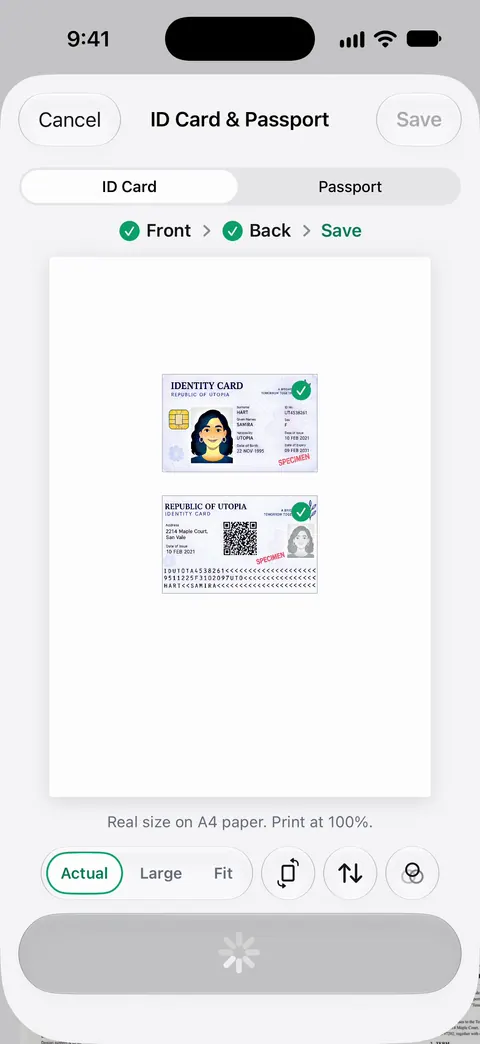
Point your camera at any piece of paper. Scanner One finds the edges, straightens the page, cleans it up and saves a real PDF. Then it reads the text, names the document, tags it and puts it in the right folder. ID cards and passports are scanned with both sides on one printable page. Scanner One needs no account and does no tracking.
Pick Scanner One if you want text recognition, ID scanning and PDF tools in one app without an account. Read the limits below before you choose it for sending documents.
How to switch without losing anything
- Export your CamScanner documents as PDFs to the Files app (On My iPhone or iCloud Drive), so they exist outside any one app.
- Check that each PDF opens in Files before you delete anything.
- Import them into the new app. In Scanner One: From Home you can bring in pictures from Photos and files from the Files app, or scan an ID card.
- If you paid for CamScanner, cancel the subscription the way Apple describes: in Settings, tap your name, tap Subscriptions, tap the subscription, then Cancel Subscription. Then remove the app.
Where Scanner One helps, and where it doesn’t
Where it helps a CamScanner user: Text recognition runs on every page for everyone, free or Pro. Search looks inside the text of every document and shows the matching line and page. ID cards and passports are scanned with both sides on one printable page. Documents stay on your iPhone unless you share them or turn on iCloud Sync.
Where it doesn’t: Scanner One is free, with generous limits: scanning, clean PDFs and text search never stop. Free accounts can run the PDF tools and the Word, Excel and CSV exports 3 times a week, from one shared allowance. Free accounts can sign and mark up 3 documents a month. And the part that matters most if the watermark is why you are leaving CamScanner: On a free account, pages you share, print or export carry a small “Scanned with Scanner One” label at the bottom right. Pro removes it. If you send scans to other people and won’t pay, Genius Scan’s Basic plan or the built-in scanner are the honest picks. Pro means no ads and no watermark. Scanner One Pro Lifetime is a one-time purchase of $59.99 in the US.
For a feature-by-feature look, see Scanner One vs CamScanner, and for the label details, scanner apps and their privacy labels.
Questions and answers
Does CamScanner still put a watermark on free scans?
CamScanner’s own blog said in November 2022 that free scans carry a 'scanned by CamScanner' watermark, and that US basic accounts could now remove it when saving, without a subscription. Its current App Store page doesn’t say either way, so check the export screen for a remove watermark option.
Is CamScanner available for iPad?
The US App Store page marks CamScanner as Designed for iPhone, and its Compatibility section lists iPhone, iPod touch and Mac, not iPad. Genius Scan, Adobe Scan, TurboScan and Scanner One all list iPad.
What is the cheapest way to replace CamScanner?
The scanner in Notes and Files costs nothing and needs no download. Of the apps here, Genius Scan’s Basic plan is free with no document limit, and TurboScan Pro is a one-time $12.99 paid app with no in-app purchases listed.
Which CamScanner alternative collects the least data?
On the App Store privacy labels we read on November 13, 2026, TurboScan says Data Not Collected. Genius Scan lists no data used to track you. CamScanner lists Identifiers and Usage Data as data used to track you.
Sources
What this page says about Scanner One was checked against the app on .
- CamScanner on the App Store — in-app purchases, billing periods, privacy label, Designed for iPhone; read 2026-11-13
- CamScanner blog, CamScanner Unlocks an Advanced Feature to American IOS and Android Users — the 'scanned by CamScanner' watermark and its removal for US basic accounts; post dated 2022-11-22
- The Grizzly Labs, Genius Scan pricing — Basic free with no document limit and no watermark, Ultra $39.99 a year; read 2026-11-13
- TurboScan on the App Store — one in-app purchase, Data Not Collected privacy label; read 2026-11-13
- Apple Support, Cancel a subscription from Apple — the steps to cancel an App Store subscription on iPhone; page published 2026-09-29
- Scanner One on the App Store — the app’s own listing
Get Scanner One
Scanner One is free, with generous limits: scanning, clean PDFs and text search never stop.

Scanner OneScan, sign and ask anything
Scanner One is free, with generous limits: scanning, clean PDFs and text search never stop.