
Guide
Delete scanned documents for good on iPhone
On iPhone, deleting a scan only moves it to Recently Deleted, where it waits 30 days. To remove it for good, delete it, then open Recently Deleted in the same app and delete it there: in Files, Browse > Recently Deleted; in Photos, Collections > Recently Deleted; in Notes, the Recently Deleted folder. Apple says files deleted from Recently Deleted are gone immediately and can’t be recovered. Then check the places copies hide: Mail, Messages, Downloads and other apps.

You scanned a passport for a visa, a pay stub for a landlord, a medical letter for an insurer. The job is done, and you want the copy gone. On iPhone that takes two steps in each app, and a quick look at the places copies end up that people forget. If you only want to keep document photos out of your camera roll in the first place, see keep scans out of your photo library.
Why “Delete” isn’t the end
Files, Photos and Notes all have a safety net: deleted items move to Recently Deleted and wait 30 days before they are removed for good. That’s good when you delete something by mistake, but it means a scan you deleted last week is still on your phone, and in iCloud if you use it.
The fix is simple: delete, then delete again from Recently Deleted.
In the Files app
Apple’s steps:
- Open Files and tap Browse.
- Under Locations, open the place the scan is stored.
- Touch and hold the file, then tap Delete. For several, tap the More button, tap Select, pick the files, then tap Delete.
- Go back to Browse and, under Locations, tap Recently Deleted.
- Tap the More button, tap Select, choose the files, and delete them.
Apple says files deleted from Recently Deleted are deleted immediately and are not recoverable. It also says that deleting from iCloud Drive on one device removes the file from every device signed in to the same Apple Account, so you don’t need to repeat this on your iPad.
In Photos
If you ever photographed a document with the Camera, it’s in Photos. Apple’s steps:
- Open Photos, open the photo, and tap the Delete button. For several, tap Select, tap each one, then tap Delete.
- Tap Collections, then under Utilities tap Recently Deleted, then View Album, and unlock with Face ID or your passcode.
- Tap Select, choose the photos, tap the More button, then tap Delete.
With iCloud Photos on, Apple says deleting removes the photo from all your devices. To find document photos you’d forgotten, look in Collections > Utilities: Apple’s Photos sorts things like identity documents, receipts and handwriting into their own collections there.
In Notes
A document scanned in Notes is saved as a PDF inside the note. To remove it, delete the note, or delete the scan inside it. Apple’s steps:
- In the notes list, swipe left on the note and tap Delete.
- In the folder list, tap Recently Deleted.
- Swipe left on the note, tap Delete, then tap Delete Note.
Apple says deleted notes also go to Recently Deleted on iCloud.com and your other devices, and are removed everywhere after 30 days.
In iCloud on the web
If the scan was in iCloud Drive, Apple says iCloud.com can recover files deleted in the last 30 days, both from iCloud Drive and from other apps (through Data Recovery). Once you have deleted a file from Recently Deleted, it can’t be restored there either. If you want to be sure, go to icloud.com/iclouddrive, select Recently Deleted in the sidebar, and check it’s empty.
The copies people forget
Deleting the scan in one app doesn’t touch the copies it made on the way. Check:
- Mail: the Sent folder, and any attachment you downloaded from an email.
- Messages and WhatsApp: a document sent in a chat stays in that chat, on both phones. Delete the message, and ask the other person to delete it too.
- Downloads: Files > Browse > Downloads, where attachments and web uploads often land.
- Other cloud services: Google Drive, Dropbox or OneDrive each have their own trash.
- The scanning app itself: many keep their own Recently Deleted, separate from Files.
- The people you sent it to. You can’t delete their copy. You can ask.
Before you delete: is it really done?
Some papers you’ll need again. Tax records, proof of purchase and anything legal may need keeping for years; check which papers to keep after scanning before you empty anything. And if you’re giving away or selling your phone, moving scans to a new iPhone covers what to do first.
Where Scanner One helps, and where it doesn’t
Scanner One works like Apple’s apps here: Deleted documents wait in Recently Deleted for 30 days before they are deleted for good. The Recently Deleted screen shows the days left before each document goes, so you can see what is still there.
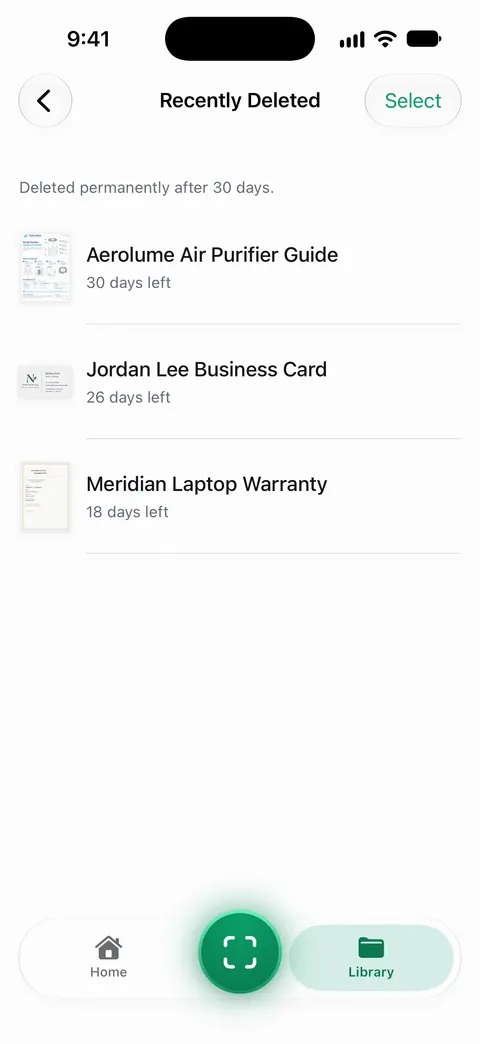
Documents stay on your iPhone unless you share them or turn on iCloud Sync. So a scan you never shared and never synced lives only in the app, and once it is deleted for good there, the copies to chase are the ones you sent.
What it can’t do:
- It can’t delete copies in Mail, Messages, Photos or other apps, or on anyone else’s phone.
- If you turned on iCloud Sync, check your other devices once the deletion has synced.
- For a scan you still need but want hidden, lock the app instead: You can lock the app with Face ID.
The backup guide covers the opposite problem: making sure you don’t lose what you meant to keep.
Questions and answers
How long do deleted files stay on iPhone?
30 days in Files, Photos and Notes. Each keeps deleted items in Recently Deleted for 30 days before removing them for good, unless you delete them there sooner.
If I delete a scan on my iPhone, is it deleted from iCloud too?
Yes, if it was in iCloud Drive or iCloud Photos. Apple says deleting from iCloud Drive on one device removes the file from every device signed in to the same Apple Account, and the same applies to photos with iCloud Photos on.
Can a permanently deleted file be recovered?
Not from Recently Deleted or iCloud.com. Apple says files deleted from Recently Deleted are deleted immediately and are not recoverable, and that iCloud.com can’t restore files you permanently remove. Copies you emailed or shared are a different matter.
Where is Recently Deleted in the Files app?
Open Files, tap Browse, and under Locations tap Recently Deleted.
Sources
What this page says about Scanner One was checked against the app on .
- Apple Support, Delete files or recover deleted files in the Files app on your iPhone or iPad (article 104953) — Recently Deleted keeps files 30 days, files deleted from it are gone immediately, iCloud Drive deletions apply to every device; published 2025-09-15
- Apple iPhone User Guide, Delete or hide photos and videos on iPhone — deleted photos kept 30 days in Recently Deleted, locked by default, and deleting with iCloud Photos removes them from every device; iOS 27 guide, undated, read 2026-11-13
- Apple iPhone User Guide, Delete and recover notes in Notes on iPhone — deleted notes kept 30 days in Recently Deleted, and how to delete one permanently; iOS 27 guide, undated, read 2026-11-13
- Apple iCloud User Guide, Recover deleted files on iCloud.com — files deleted from iCloud Drive and other apps in the last 30 days can be recovered on iCloud.com, but not files you permanently remove; read 2026-11-13
- Scanner One on the App Store — the app’s own listing: Recently Deleted
Get Scanner One
Scanner One is free, with generous limits: scanning, clean PDFs and text search never stop.

Scanner OneScan, sign and ask anything
Scanner One is free, with generous limits: scanning, clean PDFs and text search never stop.