
Feature
Shared folders through iCloud
Folders can be shared through iCloud. Joining is free; sharing is part of Pro. Share one folder, such as Household or Mom’s papers, and the people you invite see the same documents. Think about what goes in it first: everyone you share a folder with can see what is in it. Scanner One needs no account and does no tracking.

What it does
Folders can be shared through iCloud. Joining is free; sharing is part of Pro.
A household’s papers rarely belong to one person. The lease is in both names. The car insurance covers two drivers. A parent’s medical letters need to reach the child who handles appointments. Until now, that meant forwarding PDFs, or one person holding everything. A shared folder gives everyone the same set of papers.
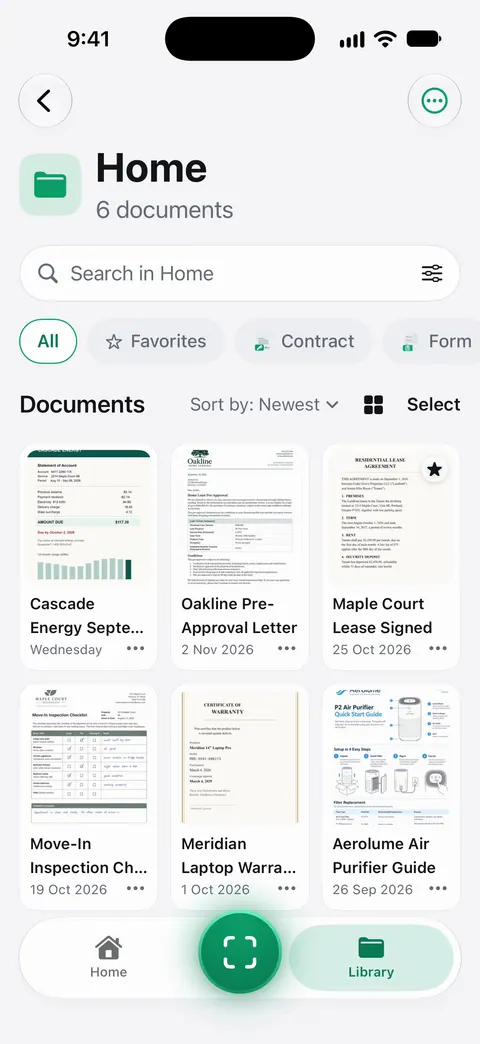
Good uses for a shared folder
- Household: the lease or mortgage, utility bills, insurance, the car papers.
- A parent you help: their ID copies, Medicare or insurance letters, bank statements they asked you to look at. See helping a parent with paperwork.
- Kids: school forms, vaccination records, passports for a family trip.
- Emergencies: the digital half of an emergency document binder, so someone else can reach the papers if you can’t.
How to set one up
- Decide what the folder is for, and name it so everyone knows: “Household”, “Dad’s papers”, “Kids”.
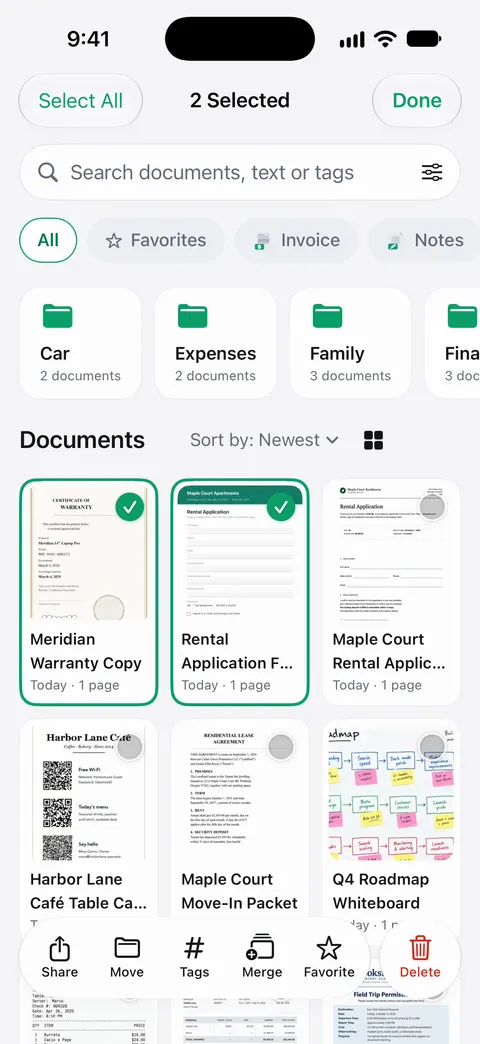
- Move only the papers that belong there into it. From the Library, select documents and use Move.
- Share the folder through iCloud and invite the people who need it. Sharing is part of Pro.
- The people you invite join for free.
Our guide to sharing a folder of documents with your family walks through choosing what to share and keeping it tidy.
Think before you share
A shared folder is convenient, and it is also a copy of sensitive papers in more than one place.
- Share the folder, not the Library. Keep personal papers, like your own medical records, in folders you don’t share. Sharing is per folder.
- Everyone in the folder sees everything in it. Before you move a document in, ask whether everyone in the folder should see it.
- People change. When a roommate moves out or a family situation changes, think again about who should still have the folder.
- Know how iCloud protects data. Apple’s iCloud data security overview explains standard data protection, where data is encrypted in transit and on Apple’s servers, and Advanced Data Protection, which extends end-to-end encryption to more of your iCloud data.
- Lock the app. You can lock the app with Face ID.
What it doesn’t do
- It isn’t email. People outside your shared folder still get documents the usual way, by Share & Export.
- It isn’t a backup on its own. A shared folder is the same documents in more hands. For copies you could restore, see backing up scanned documents.
- There is no Scanner One account. Scanner One needs no account and does no tracking. Sharing goes through iCloud.
Where Scanner One helps, and where it doesn’t
The iPhone can share a folder already. In the Files app, touch and hold a folder in iCloud Drive, tap Share, and choose Share a Link; Apple’s page explains how to limit it to people you choose and whether they can edit. If your family keeps its PDFs in Files, that may be all you need.
A shared folder in Scanner One helps when the papers are already in Scanner One, read, named and searchable, and you want the same set in the hands of the people who handle them with you. Folders can be shared through iCloud. Joining is free; sharing is part of Pro. Pro adds What changed, filling forms from your documents, Pack checks and folder sharing. Plans are on Free and Pro, privacy on the privacy page.
Questions and answers
Do the people I share with need Pro?
No. Folders can be shared through iCloud. Joining is free; sharing is part of Pro.
Do we need a Scanner One account to share?
Scanner One needs no account and does no tracking. Sharing goes through iCloud.
Can I share just one folder and keep the rest private?
Yes, sharing is per folder. Documents stay on your iPhone unless you share them or turn on iCloud Sync.
How does iCloud protect shared data?
Apple’s iCloud data security overview explains it: with standard data protection, data is encrypted in transit and on Apple’s servers; Advanced Data Protection extends end-to-end encryption to more kinds of iCloud data. Read Apple’s page for what applies to your account.
Sources
What this page says about Scanner One was checked against the app on .
- Apple Support, Share files and folders in iCloud Drive on iPhone (iPhone User Guide, iOS 27) — the Files app’s way to share a folder, with People you choose and edit or view-only access; read 2026-11-13
- Apple Support, iCloud data security overview — how iCloud protects data with standard data protection and with Advanced Data Protection; published 2026-01-05
- Scanner One on the App Store — the app’s 1.0.1 release notes: share a folder through iCloud; joining is free, sharing is part of Pro
Get Scanner One
Scanner One is free, with generous limits: scanning, clean PDFs and text search never stop.

Scanner OneScan, sign and ask anything
Scanner One is free, with generous limits: scanning, clean PDFs and text search never stop.