
Feature
Smart filing: named, tagged and filed
Then it reads the text, names the document, tags it and puts it in the right folder. So a scan lands in your Library with a name you can recognize and in a folder, not as one more untitled scan. You can change the folder and tags afterwards from the Library. Free accounts get smart filing for 10 documents a month. Pro removes every limit. Text recognition runs on every page for everyone, free or Pro.

What it does
A scan saved with a date for a name, in one long list, is hard to find a year later. Scanner One does the filing for you: Then it reads the text, names the document, tags it and puts it in the right folder.
- A name you would recognize: the company and what the paper is, not “Scan 14”.
- Tags that cut across folders, so a receipt can be in “Home” and also tagged for taxes or a reimbursement.
- A folder, so the bill goes with the bills and the lease with the apartment.
It happens as you save, using the text that was just read from the page. Text recognition runs on the device, in 29 languages.
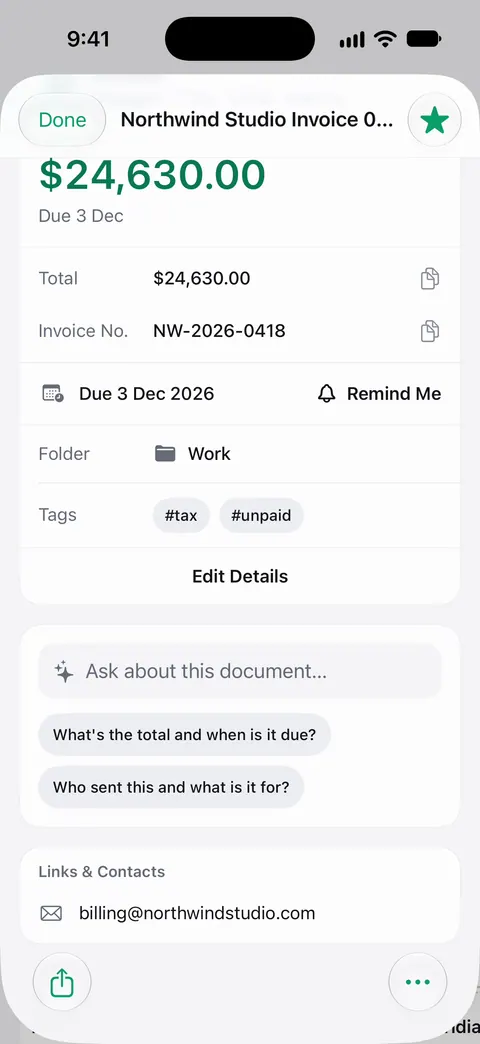
How it fits into a scan
- Scan the paper or bring it in from Photos or Files.
- Save. The pages are read, and the document is named, tagged and filed.
- Open the document to see its info card: the kind of document, the details found on it, its folder and its tags.
- If something is off, fix it in the Library: select the document, then use Move for the folder or Tags for the tags.
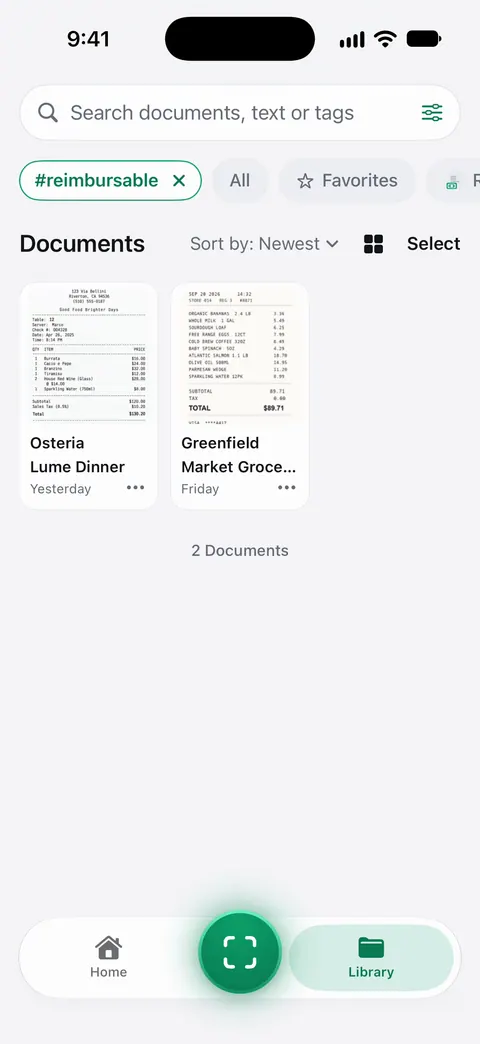
Why names, tags and folders all matter
Each one helps you find a paper a different way, and it is worth knowing which to lean on:
| You remember | Use | Example |
|---|---|---|
| What it is | The name | “Lease, Maple Street” |
| What it is for | A tag | everything tagged for taxes, across folders |
| Where it belongs | The folder | Car, Health, Home, Work |
| A word on the page | Search | the landlord’s name, a policy number |
Our guide to naming scanned documents has a naming pattern that works in any app, and organizing documents on iPhone suggests a short folder list for a household.
Checking it without slowing down
- Glance at the name when you save. It takes a second and catches the odd miss early.
- Keep folders few. A dozen broad folders are easier to keep straight than fifty narrow ones. Tags do the fine sorting.
- Use a tag for a project or a deadline, like a move, a visa application or a tax year, and you can pull everything for it together later.
- Don’t worry about perfect names for receipts. Search looks inside their text anyway.
The free allowance, and after it
Free accounts get smart filing for 10 documents a month. Scanning and text recognition don’t stop when that runs out: Scanner One is free, with generous limits: scanning, clean PDFs and text search never stop. Text recognition runs on every page for everyone, free or Pro. Pro removes every limit. The plans are on Free and Pro.
For a big first sort, like a box of old papers, it helps to know the monthly number before you start. Our paperless at home plan breaks the job into rounds, and the paperless weekend is a three-pass method.
Where Scanner One helps, and where it doesn’t
You can file scans by hand in any app: the Files app has folders and tags, and a good naming habit goes a long way. If you scan a few papers a month and like choosing names yourself, that is enough.
Smart filing helps when papers arrive faster than you sort them. Then it reads the text, names the document, tags it and puts it in the right folder. Free accounts get smart filing for 10 documents a month. It is a first draft of your filing, so check it now and then, and keep the categories that matter to you.
In 1.0.1, the papers you have filed also feed Home: Needs You gathers bills due, return windows and IDs about to expire on Home, from your own papers.
Questions and answers
How many documents does smart filing handle for free?
Free accounts get smart filing for 10 documents a month. Pro removes every limit.
Is text recognition limited too?
No. Text recognition runs on every page for everyone, free or Pro. So every scan stays searchable by the words on it, whatever its name.
Can I change where a document was filed?
Yes. In the Library, select the document and use Move to put it in another folder, or Tags to change its tags.
Does smart filing send my documents anywhere?
Documents stay on your iPhone unless you share them or turn on iCloud Sync. Cloud AI is off until you switch it on, and page images are a separate permission.
Sources
What this page says about Scanner One was checked against the app on .
- Scanner One on the App Store — the app’s own listing: reads the text, names the document, tags it and puts it in the right folder
Get Scanner One
Scanner One is free, with generous limits: scanning, clean PDFs and text search never stop.

Scanner OneScan, sign and ask anything
Scanner One is free, with generous limits: scanning, clean PDFs and text search never stop.