
Guide
Share a folder of documents with your family
Put the papers in one iCloud Drive folder in the Files app. Touch and hold the folder, tap the Share button, tap the menu under the folder’s name and choose Share a Link. Keep access on People you choose, decide whether people can edit or only view and download, and send the invitation. Everyone needs an Apple Account with iCloud Drive turned on. Family Sharing shares iCloud+ storage, not the files themselves.

Share a folder in iCloud Drive
A shared folder is the most useful way to keep household papers where the people who need them can find them: the lease, the insurance policies, the car documents, the children’s records. These are Apple’s steps for iOS 27.
- In the Files app, go to iCloud Drive and create a folder for the shared papers (tap the More button, then New Folder).
- Touch and hold the folder.
- Tap the Share button, tap the menu under the folder’s name, then tap Share a Link.
- Tap People you choose can edit to change the settings:
- People you choose lets in only the people you invite or approve. You can turn on Access Requests so others with the link can ask.
- Anyone with the link lets in whoever has the link. Avoid this for personal papers.
- Under New Participants Can, choose whether people can edit, or only view and download.
- Choose how to send the invitation, such as Messages or Mail.
Once someone accepts, the folder appears in their Files app. Changes anyone makes show up for everyone.
What to know about shared folders
Apple lists a few behaviors worth remembering:
- Everything you, or anyone else, adds to a shared folder is shared automatically.
- The link includes the folder or file name. If the name itself is private, ask people not to forward the link.
- If you move a shared file to another folder, its link stops working and people lose access.
- In some apps, people may need to reopen a file to see the latest changes.
Add people, change access, or stop sharing
All from the Files app:
- Add someone: tap Shared, touch and hold the folder, tap Manage Shared Folder, then Add Participant.
- Change one person’s access: touch and hold the folder, tap Manage Shared Folder, tap their name and choose an option, or remove them.
- Change access for everyone: Manage Shared Folder > Sharing Options.
- Stop sharing: touch and hold the folder, tap Manage Shared Folder, then Stop Sharing. The folder is removed from the other people’s iCloud Drive and the link stops working.
Share a folder of notes
If your household scans live in Notes, share a Notes folder instead.
- In Notes, open the folder you want to share and tap the Share button.
- Tap People you choose can edit to set who can open it and whether they can edit or only view.
- Send the invitation.
Apple says everyone must be signed in to their Apple Account with Notes turned on in iCloud. You can’t collaborate on a locked note, or on a folder that contains locked notes. To see who changed what, touch and hold the folder and tap Show Folder Activity.
What Family Sharing adds
Family Sharing doesn’t share files, but it helps around them. Apple says you and up to five family members can share subscriptions, including iCloud+ storage, as well as purchases, locations, and passwords and passkeys. So one iCloud+ plan can give the whole family room for their documents.
Two more family settings are worth setting up while you’re at it, both in Settings > your name > Sign-In & Security:
- Recovery Contacts can help you get back into your account if you’re locked out.
- Legacy Contact lets someone you choose access the data in your account after your death.
Keep shared papers private
Sharing changes who can see a document, and it can change how it’s protected. Apple’s iCloud security overview says that with standard data protection, iCloud content you share is not end-to-end encrypted. With Advanced Data Protection, shared folders in iCloud Drive and shared Notes keep end-to-end encryption as long as everyone in the share has Advanced Data Protection turned on. Sharing with “anyone with the link” doesn’t support it.
A few habits help:
- Share a folder for the household, not your whole drive. Keep a separate private folder for your own papers.
- Use View only for papers people need to see but shouldn’t change, such as IDs and policies.
- Leave out what isn’t needed. A shared folder for the car doesn’t need your pay stubs.
- Review the list of people once a year, and after any change in the family.
Where Scanner One helps, and where it doesn’t
The Files app’s shared folders are free and work for any file, from any app. If your family’s papers are already in iCloud Drive, they’re all you need.
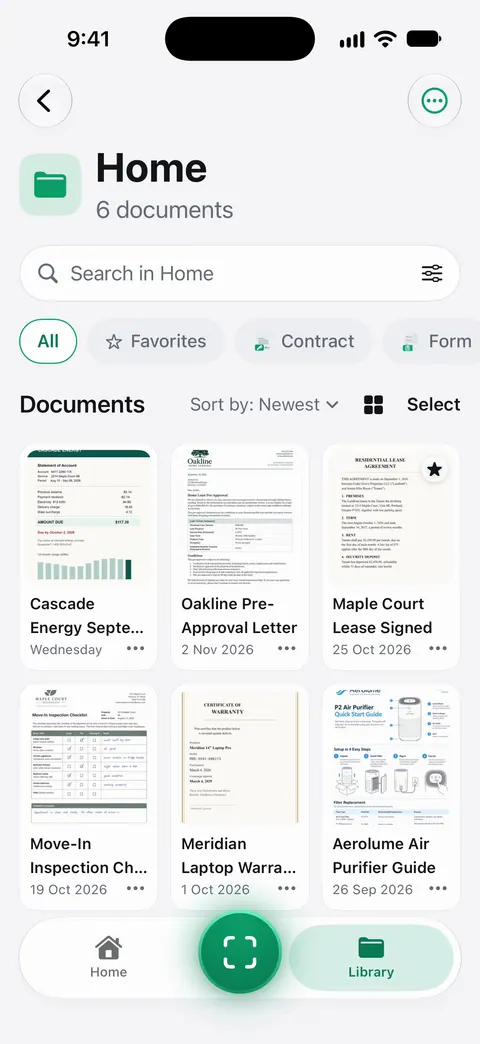
Scanner One adds sharing to the place where your scans are already filed and searchable. Folders can be shared through iCloud. Joining is free; sharing is part of Pro. So the folder you already use for the house, the car or the children’s papers can be the one you share, and family members join it for free.
The limits, plainly:
- Pro adds What changed, filling forms from your documents, Pack checks and folder sharing. Pro comes monthly, yearly with a free week, or once for life.
- Scanner One runs on iPhone and iPad. Family members on other devices can’t join from Scanner One; use an iCloud Drive folder for them.
- On a free account, pages you share, print or export carry a small “Scanned with Scanner One” label at the bottom right. Pro removes it.
- Documents stay on your iPhone unless you share them or turn on iCloud Sync.
For a parent’s paperwork, the situation guide on helping a parent with paperwork shows what to gather, and the shared folders feature page has the details.
Questions and answers
Does Family Sharing share my documents with my family?
No. Family Sharing shares subscriptions such as iCloud+ storage, purchases, location and passwords. To share documents, share an iCloud Drive folder or a Notes folder with the people you choose.
Can my family see everything in my iCloud Drive?
No. Only the files and folders you share are visible to them, and only to the people you invite (or anyone with the link, if you choose that). Everything else stays private.
What happens if I move a file out of the shared folder?
Apple says moving a shared item to another folder breaks its link, and people lose access. Items you add to a shared folder are shared automatically.
Can someone without an iPhone open a shared folder?
Apple says iCloud Drive works on Mac, Windows (with iCloud for Windows) and at iCloud.com, so a family member on a Windows PC can be included with an Apple Account.
Do shared folders in Scanner One cost extra?
Folders can be shared through iCloud. Joining is free; sharing is part of Pro. Scanner One Pro costs $29.99 a year in the US, with a one-week free trial.
Sources
What this page says about Scanner One was checked against the app on .
- Apple iPhone User Guide, Share files and folders in iCloud Drive on iPhone — sharing a folder with Share a Link, People you choose, permissions, adding people and stopping sharing; iOS 27 guide, undated, read 2026-11-13
- Apple iPhone User Guide, Set up iCloud Drive on iPhone — iCloud Drive on iPhone, Mac, Windows and iCloud.com; iOS 27 guide, undated, read 2026-11-13
- Apple iPhone User Guide, Share notes and collaborate on iPhone — sharing a folder of notes, what participants need, and that locked notes can’t be shared; iOS 27 guide, undated, read 2026-11-13
- Apple iPhone User Guide, Set up Family Sharing on iPhone — what a Family Sharing group shares: subscriptions including iCloud+, purchases, location, passwords; iOS 27 guide, undated, read 2026-11-13
- Apple iPhone User Guide, Share features with your family — recovery contacts and legacy contacts; iOS 27 guide, undated, read 2026-11-13
- Apple Support, iCloud data security overview (article 102651) — how shared iCloud content is encrypted, with and without Advanced Data Protection; published 2026-01-05
- Scanner One on the App Store — the app’s own listing and release notes: shared folders through iCloud
Get Scanner One
Scanner One is free, with generous limits: scanning, clean PDFs and text search never stop.

Scanner OneScan, sign and ask anything
Scanner One is free, with generous limits: scanning, clean PDFs and text search never stop.