
Checklist
Documents to get after a baby is born
In the hospital, fill in the birth certificate form and say yes to applying for your baby’s Social Security number; the card then comes by mail. Order certified copies of the birth certificate from your state’s vital records office. Add the baby to your health insurance quickly: on a Marketplace plan you have 60 days, and employer plans set their own window. If you’ll travel abroad, the baby needs a passport, applied for in person with both parents. Keep the hospital discharge papers and the immunization record.

The first weeks with a baby are not the time for errands, so it helps that most of these papers start with one form in the hospital. This checklist follows SSA’s publications (April and November 2026), USA.gov and HealthCare.gov, read on 13 November 2026.
This is general information, not legal, tax or medical advice. Deadlines for adding a baby to insurance differ by plan, and state vital records rules differ by state. Check with your plan and your state.
In the hospital
- The birth certificate form. The hospital gives you a form or worksheet to register the birth. Check the spelling of every name and the date before you sign. A mistake here follows the child.
- Say yes to the Social Security number. When you fill in the birth certificate application, SSA says you’ll be asked whether you want to apply for your baby’s number. If you say yes, you’ll be asked for both parents’ Social Security numbers, but you can still apply without them. The state passes the details to SSA, which assigns a number and mails the card.
- Discharge papers. Keep everything the hospital gives you when you leave: the discharge summary, any newborn screening results and the first immunization record.
Birth certificate
- Certified copies come from the vital records office of the state where the baby was born. USA.gov points to the CDC’s directory of state offices and says to ask how to order online, by mail or in person.
- Order more than one. You’ll need certified copies for the passport, sometimes for insurance, and for school later. A photocopy won’t do for any of them.
Social Security number and card
If you applied in the hospital, wait for the card in the mail. If you didn’t, or it never came:
- Start online at SSA’s number and card page, then finish at a Social Security office or card center. SSA says to bring documents within 45 days of starting.
- Proof of your baby’s citizenship and age: the US birth certificate.
- Proof of your baby’s identity: SSA prefers the child’s US passport; if there isn’t one, it may accept a certified medical record from the doctor, clinic or hospital, a religious record, an adoption decree or a state nondriver ID.
- Proof of your identity: your driver’s license, state ID or US passport.
- Originals or certified copies only. SSA can’t accept photocopies or notarized copies.
SSA verifies the birth record with the office that issued it, which it says may add up to 12 weeks. The number and card are free. SSA asks you to report anyone who tries to charge for them to its Office of the Inspector General. A side note for 2026: SSA is issuing a commemorative Freedom 250 card design to children born in the US from 2 July to 31 December 2026 whose numbers are requested at the hospital.
Health insurance
- Add the baby to your plan. HealthCare.gov says a birth gives you 60 days to enroll or change plans on the Marketplace, and coverage can start the day the baby was born.
- Employer plans have their own deadline for adding a child. Call HR or the plan in the first week.
- What they’ll ask for: the baby’s name and date of birth, then the Social Security number once it arrives, and sometimes the birth certificate.
- Medicaid or CHIP: if you’re on it, report the birth to your state agency.
A passport, if you’ll travel
US citizen children need their own passport for most countries. A child under 16 applies in person with a parent, preferably both, and the passport lasts 5 years. You’ll need the certified birth certificate, both parents’ IDs, and a 2x2 photo of the baby. Full list: documents for a first US passport. For the trip itself, see documents to travel with a child.
Taxes
SSA says you need the child’s number to claim them as a dependent. Keep the card with your tax papers, and see documents to file your taxes when the season comes.
If you’re adopting
SSA says it can assign a number before the adoption is final, but you may want to wait and apply in the child’s new name. To claim the child for tax purposes while the adoption is pending, SSA points to IRS Form W-7A.
Mistakes new parents make
- Signing the birth worksheet with a misspelled name.
- Ticking “no” to the Social Security number in the hospital, and then making an office trip with a newborn.
- Waiting for the Social Security card before calling the insurer. Call first and ask what they need and by when.
- Bringing photocopies to a Social Security office.
- Ordering only one certified birth certificate.
Where Scanner One helps, and where it doesn’t
Scanner One doesn’t register a birth, request a Social Security number or order certificates. Those go through the hospital, your state and SSA.
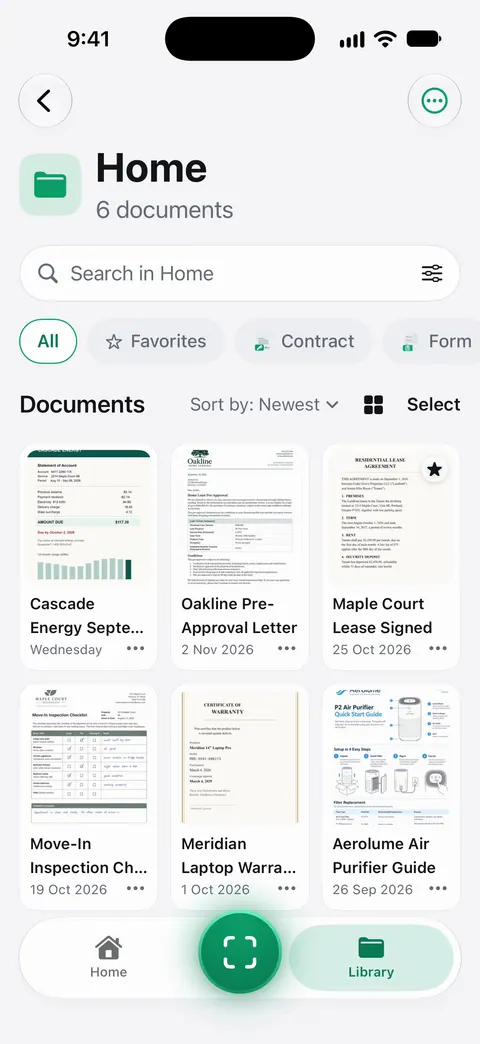
It helps you keep copies of all of it in one place, so the originals can stay in a safe drawer. Point your camera at any piece of paper. Scanner One finds the edges, straightens the page, cleans it up and saves a real PDF. Then it reads the text, names the document, tags it and puts it in the right folder. A scan can have many pages, and you can reorder them. Put the immunization record and discharge papers next to the rest of the family’s medical records. Documents stay on your iPhone unless you share them or turn on iCloud Sync. You can lock the app with Face ID.
A note on sharing copies: On a free account, pages you share, print or export carry a small “Scanned with Scanner One” label at the bottom right. Pro removes it.
Coming in 1.0.1. Folders can be shared through iCloud. Joining is free; sharing is part of Pro. Packs: say what you’re applying for, like a visa, a lease or your taxes, and see which papers you have and what’s missing.
Questions and answers
How do I get a Social Security number for my newborn?
The easiest way, SSA says, is in the hospital: when you fill in the birth certificate application, say yes to applying for a number. The state shares the details with SSA, which mails the card. If you don’t, you can start online later and finish at a Social Security office with original documents.
Do I need my baby’s Social Security number for taxes?
Yes. SSA says you need an SSN to claim your child as a dependent on your income tax return. A child may also need one for a bank account, savings bonds, medical coverage and government services.
How long do I have to add a newborn to my health insurance?
On a HealthCare.gov Marketplace plan, 60 days from the birth, and coverage can start on the day the baby was born. Employer plans set their own deadline, often shorter, so call HR or the plan right away.
Does a newborn need a passport to travel?
Yes, for most international trips. US citizen children need their own passport. A child under 16 applies in person with a parent, preferably both, and the passport is valid for 5 years.
Sources
What this page says about Scanner One was checked against the app on .
- Social Security Administration, Social Security Numbers for Children (Publication 05-10023) — applying at the hospital, why a child needs a number, documents if you apply later, adoption; dated April 2026
- Social Security Administration, Your Social Security Number and Card (Publication 05-10002) — the hospital route, birth record checks that can add up to 12 weeks, the 2026 commemorative card; dated November 2026
- USA.gov, How to get a certified copy of a U.S. birth certificate — order from the vital records office of the birth state; last updated 2025-11-17
- HealthCare.gov, Special Enrollment Period — 60 days after a birth or adoption, coverage can start on the day of the event; read 2026-11-13
- USA.gov, Get a passport for a minor under 18 — children apply in person, a parent must be present and sign, 5-year validity under 16; last updated 2026-03-23
- Scanner One on the App Store — the app’s own listing
Get Scanner One
Scanner One is free, with generous limits: scanning, clean PDFs and text search never stop.

Scanner OneScan, sign and ask anything
Scanner One is free, with generous limits: scanning, clean PDFs and text search never stop.