
Comparison
Scanner One vs Tiny Scanner
Pick Tiny Scanner if you want cloud sync across phone, tablet and web, Android too, and extras like measuring and counting objects. Its App Store page lists Premium plans by the week from $4.99, by the month from $4.99 and by the year from $19.99. Pick Scanner One if you want your papers kept on the iPhone with no account and no tracking, every page read for free, and documents filed for you. Scanner One caps free PDF tools at 3 a week and labels shared pages; Pro is $29.99 a year or $59.99 once once.

Scanner One is our app. The facts about Tiny Scanner below come from its US App Store page and its website, read on November 13, 2026.
Side by side
Checked on November 13, 2026, on the US App Store.
| Tiny Scanner | Scanner One | |
|---|---|---|
| Price model | Free download. Weekly plans listed at $4.99, $5.99 and $9.99, monthly at $4.99 and $6.99, yearly at $19.99 and $49.99, and Upgrade to Tiny Scanner Plus at $4.99 | Free download. Pro at $4.99 a month, $29.99 a year with a free week, or $59.99 once |
| Free version | Not spelled out on the App Store page | Scanning, clean PDFs and text search never stop. PDF tools and exports: 3 a week. A small “Scanned with Scanner One” label on shared pages |
| Where files live | Cloud sync with free storage across phones, tablets and the web | Documents stay on your iPhone unless you share them or turn on iCloud Sync. |
| Privacy label | Tracking: Usage Data. Linked to you: Purchases, Contact Info, Identifiers, Usage Data. Not linked: User Content, Identifiers, Usage Data, Diagnostics | No account, no tracking |
| Platforms | iPhone, iPad, iPod touch and Mac (Apple M1 or later); Android; web tools | iPhone and iPad |
| Standout | Measure, count objects, solve math; AI summaries of uploaded files | Files each document by itself and answers with the page it came from |
Tiny Scanner needs iOS 15.0 or later; its current version, 8.16.8, came out on September 13, 2026. Scanner One needs iOS 17 or later.
What Tiny Scanner does well
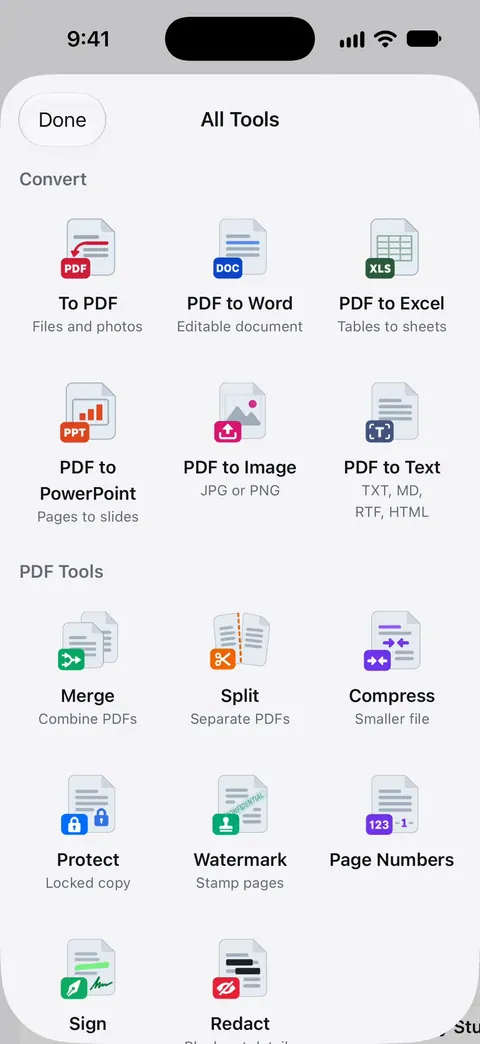
Tiny Scanner has a broad toolbox. Its App Store description lists batch scanning, modes for passports, IDs and driver’s licenses, a QR code reader, and camera tools that measure length and area, count identical objects and solve math problems. On PDFs it signs, adds text, images, shapes, dates, footers, page numbers and watermarks, merges and splits, and compresses. It recognizes text, converts PDFs to Word, JPG and Excel, and its AI can summarize an uploaded file and pull out key details.
For security it lists encrypted PDFs, an app lock and encrypted folders kept only on the device.
The bigger difference is the cloud. Tiny Scanner’s description lists cloud sync with free storage, and its website says Tiny Scanner Cloud syncs in real time across phones, tablets and the web, where you can also organize folders. The site offers the app on both iOS and Android, plus web tools to merge, compress and sign PDFs. If you switch between devices, or want your scans on a computer, that matters.
How the plans compare
Tiny Scanner sells subscriptions by the week, the month and the year, at several prices each on the US App Store. Its description says weekly and annual subscriptions are available. The page does not say what the free version leaves out, so check the plan screen before relying on a tool.
Scanner One has one free version with published limits and one Pro. Scanner One is free, with generous limits: scanning, clean PDFs and text search never stop.
- PDF tools and Office exports: 3 a week.
- Signing and markup: 3 documents a month.
- Clean Up, the smart eraser: 3 documents a month.
- Smart filing: 10 documents a month.
Pro comes monthly, yearly with a free week, or once for life. There is no weekly plan. Scanner One Pro Lifetime is a one-time purchase of $59.99 in the US.
Cloud or device
Tiny Scanner leans on its cloud for sync and web access. Scanner One keeps your papers on the phone by default. Documents stay on your iPhone unless you share them or turn on iCloud Sync. Scanner One needs no account and does no tracking. You can lock the app with Face ID.
Each has a cost. With Tiny Scanner you can reach your scans from a browser; with Scanner One you can’t. With Scanner One there is no account, and Scanner One’s privacy manifest declares no tracking. Our privacy label comparison puts many scanners side by side.
Pick Tiny Scanner if
- You want your scans synced to a web account or an Android phone.
- You use the camera tools: measuring, counting, solving math.
- You want web tools for PDFs on a computer too.
Pick Scanner One if
- You want your papers on your iPhone, with no account.
- You want every page read for free: Text recognition runs on every page for everyone, free or Pro.
- You want documents named and filed for you: Then it reads the text, names the document, tags it and puts it in the right folder.
- You’d rather pay once than by the week.
Where Scanner One helps, and where it doesn’t
Scanner One helps if you keep personal paperwork and want to find any of it again by a word inside. Search looks inside the text of every document and shows the matching line and page. Ask your documents anything. When does the lease end? What did I spend at the shop? The answer comes back with the page it came from. The PDF tools page lists what it can do to a file.
Where Tiny Scanner does more:
- Web and Android. Scanner One runs on iPhone and iPad. Scanner One has no web, Android or Mac version.
- Camera tools. Measuring, counting and math are not part of Scanner One.
- The free label and caps. On a free account, pages you share, print or export carry a small “Scanned with Scanner One” label at the bottom right. Pro removes it. Free PDF tools run 3 a week; see Free and Pro.
- Cloud AI. Cloud AI is off until you switch it on, and page images are a separate permission. Pro Max, the plan with cloud AI, costs $149.99 a year in the US.
If you only need to scan a page or two, Apple’s scanner in Notes or Files is free and enough: see how to scan documents on iPhone.
Questions and answers
How much does Tiny Scanner Premium cost?
The US App Store lists Premium Plan - Weekly at $4.99, $5.99 and $9.99, Premium Plan - Monthly at $4.99 and $6.99, Premium Plan - Yearly at $19.99 and $49.99, and Upgrade to Tiny Scanner Plus at $4.99. Its description says weekly and annual subscriptions are available.
Does Tiny Scanner sync to the cloud?
Yes. Its App Store description lists cloud sync with free storage, and its website says Tiny Scanner Cloud syncs across phones, tablets and the web. In Scanner One, Documents stay on your iPhone unless you share them or turn on iCloud Sync.
What does Tiny Scanner’s privacy label say?
On the US App Store it lists Usage Data as data used to track you; Purchases, Contact Info, Identifiers and Usage Data as linked to you; and User Content, Identifiers, Usage Data and Diagnostics as not linked to you. For Scanner One: Scanner One needs no account and does no tracking.
Can I pay once for Scanner One instead of weekly?
Yes. Scanner One Pro Lifetime is a one-time purchase of $59.99 in the US. Lifetime is one payment, yours forever.
Sources
What this page says about Scanner One was checked against the app on .
- Tiny Scanner - PDF Scanner App on the App Store — in-app purchases, subscription periods, features, privacy label, compatibility and version 8.16.8 of September 13, 2026; read 2026-11-13
- Tiny Scanner website — iOS and Android apps, web tools and Tiny Scanner Cloud sync; read 2026-11-13
- Scanner One on the App Store — the app’s own listing
Get Scanner One
Scanner One is free, with generous limits: scanning, clean PDFs and text search never stop.

Scanner OneScan, sign and ask anything
Scanner One is free, with generous limits: scanning, clean PDFs and text search never stop.