
Comparison
Scanner One vs Adobe Scan
Pick Adobe Scan if you already live in Acrobat, want your scans in Adobe Document Cloud, or use Android too. Its App Store page says a subscription raises text recognition from 5 to 100 pages and is needed to combine scans into one file. Pick Scanner One if you want every page read for free on the iPhone, documents kept on the device and no account. Scanner One’s free version caps PDF tools at 3 a week and labels shared pages; Pro is $4.99 a month or $59.99 once.

Scanner One is our app. The facts about Adobe Scan below come from its US App Store page and its Google Play listing, read on November 13, 2026. Adobe changes its plans often, so check the price screen in the app.
Side by side
Checked on November 13, 2026, on the US App Store.
| Adobe Scan | Scanner One | |
|---|---|---|
| Price model | Free download. In-app purchases listed include Adobe Scan Plus - Monthly at $4.99, Adobe Scan Plus - Yearly at $19.99, Adobe Scan Premium - Monthly at $9.99, and Adobe Scan Premium at $49.99 and $69.99 | Free download. Pro at $4.99 a month, $29.99 a year with a free week, or $59.99 once |
| Free limits | A subscription raises OCR from 5 to 100 pages and is needed to combine scans into one file, per the App Store description | Scanning, clean PDFs and text search never stop. PDF tools and Office exports: 3 a week. A small “Scanned with Scanner One” label on shared pages |
| Where scans go | Saved automatically to Adobe Document Cloud | Documents stay on your iPhone unless you share them or turn on iCloud Sync. |
| Privacy label | Tracking: Identifiers. Linked to you: Purchases, Contact Info, User Content, Search History, Identifiers, Usage Data, Diagnostics | No account, no tracking |
| Platforms | iPhone and iPad, Android, and Acrobat on the web | iPhone and iPad |
| Standout | Magic eraser and the Digitize tool for handwriting; one subscription across Scan, Reader and Acrobat on the web | Files each document by itself and answers questions with the page it came from |
Adobe Scan needs iOS 18.0 or later; version 26.11.09 came out on November 9, 2026. Scanner One needs iOS 17 or later.
What Adobe Scan does well
Adobe Scan is built to feed Adobe’s other apps. Its App Store description lists High-speed scan for stacks of pages, a Magic eraser that removes thumbs, shadows, stains and creases, and a new Digitize tool that turns handwritten notes and whiteboards into editable, searchable documents. It pulls contact details from business cards, exports to Word, Excel or PowerPoint, and can set a password on a scan before you send it.
The subscription is shared: the description says it works across the Scan and Reader mobile apps and Acrobat on the web. If you already pay for Acrobat, or your office runs on it, Adobe Scan slots in. It is also on Google Play, so the same account works on an Android phone.
The two catches in the free version
The App Store description names two things a subscription changes, and both matter for paperwork.
- Text recognition stops at 5 pages. The description says subscribing increases OCR capacity from 5 to 100 pages. By that description, a 12-page lease scanned on the free plan gets text recognition on only part of it.
- Combining scans is paid. “Combine scans into one file” is listed under in-app purchases. If you scan a tax form today and its second page tomorrow, putting them together needs a subscription.
Scanner One has neither limit. Text recognition runs on every page for everyone, free or Pro. A scan can have many pages, and you can reorder them. Its free limits sit on the tools you run afterwards:
- PDF tools (merge, split, compress and the rest) and the Word, Excel and CSV exports: 3 a week, from one shared allowance.
- Signing and markup: 3 documents a month.
- Clean Up, the smart eraser: 3 documents a month.
Pro removes every limit. Our guide to scanning many pages into one PDF shows Apple’s free way first.
Cloud first or device first
Adobe Scan’s description says scans are saved automatically to Adobe Document Cloud. That is handy if you want to open them on a computer at work. It also means your paperwork lives in Adobe’s cloud.
Scanner One starts from the other end. Documents stay on your iPhone unless you share them or turn on iCloud Sync. Scanner One needs no account and does no tracking. You can lock the app with Face ID. The privacy labels reflect the difference: Adobe Scan’s label lists Identifiers under Data Used to Track You and seven kinds of data linked to you, while Scanner One’s privacy manifest declares no tracking. The privacy page has the details.
Pick Adobe Scan if
- You use Acrobat Reader or Acrobat on the web, or your employer pays for Adobe.
- You want scans in a cloud you can open from any computer.
- You switch between iPhone and Android.
- You scan handwritten notes and want them turned into editable text with Digitize.
Pick Scanner One if
- You scan long documents and want every page searchable without paying.
- You want your papers on your iPhone, with no account to make.
- You want to sign, fill a form, redact or export to Word in the same app. Fill Form lets you type into the fields of a PDF form.
- You want your documents named and filed for you: Then it reads the text, names the document, tags it and puts it in the right folder.
More options are on Adobe Scan alternatives.
Where Scanner One helps, and where it doesn’t
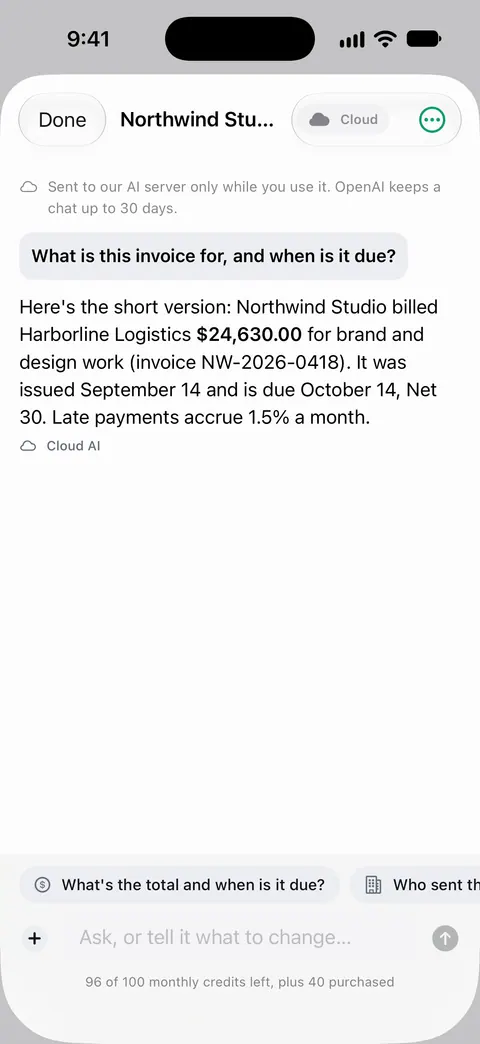
Scanner One helps when you want the text of every page, kept on the phone, without an account. Search looks inside the text of every document and shows the matching line and page. Ask your documents anything. When does the lease end? What did I spend at the shop? The answer comes back with the page it came from.
Where it is weaker than Adobe Scan:
- No Android, Mac or web. Scanner One runs on iPhone and iPad. Adobe Scan has Android, and its subscription covers Acrobat on the web.
- The free label. On a free account, pages you share, print or export carry a small “Scanned with Scanner One” label at the bottom right. Pro removes it. If you send scans often and stay free, that label will be on them.
- Caps on tools. Merging, compressing and exporting are capped on the free plan, even though scanning is not.
- Cloud AI costs extra. Cloud AI is off until you switch it on, and page images are a separate permission. Pro Max, the plan with cloud AI, costs $149.99 a year in the US.
For a single page you need today, Apple’s own scanner in Notes or Files is free: see how to scan documents on iPhone. The full split is on Free and Pro.
Questions and answers
How many pages does free Adobe Scan read with OCR?
Adobe Scan’s App Store description says a subscription increases OCR capacity from 5 to 100 pages. In Scanner One, Text recognition runs on every page for everyone, free or Pro.
Where does Adobe Scan save my scans?
Its App Store description says scans are automatically saved to Adobe Document Cloud. In Scanner One, Documents stay on your iPhone unless you share them or turn on iCloud Sync.
Can I sign a scan in Adobe Scan?
Adobe Scan’s description sends you to Acrobat Reader to comment, highlight, fill forms and sign. Scanner One does it in the same app: You can sign and annotate documents. Free accounts can sign and mark up 3 documents a month.
Does Adobe Scan track you?
Its App Store privacy label lists Identifiers under Data Used to Track You. For Scanner One: Scanner One needs no account and does no tracking. Scanner One’s privacy manifest declares no tracking.
Sources
What this page says about Scanner One was checked against the app on .
- Adobe Scan: PDF & Doc Scanner on the App Store — in-app purchases, the OCR page limit, combining scans, Document Cloud saving, privacy label, iOS 18 requirement and version 26.11.09 of November 9, 2026; read 2026-11-13
- Adobe Scan on Google Play — the Android version; read 2026-11-13
- Scanner One on the App Store — the app’s own listing
Get Scanner One
Scanner One is free, with generous limits: scanning, clean PDFs and text search never stop.

Scanner OneScan, sign and ask anything
Scanner One is free, with generous limits: scanning, clean PDFs and text search never stop.