
Guide
How to keep track of bills due without a spreadsheet
Make one list of every bill with its due date, then let your phone remind you: a repeating reminder a few days before each due date, and a reminder to read the statement for anything on autopay. The CFPB’s bill calendar does the same on paper, and notes you may be able to move a credit card’s due date to suit your paydays. Read each bill when it arrives: a credit card error must be disputed within 60 days.

Start with one list
A bill that was never written down is the easiest one to miss. So the first step is a list of every bill you pay, in one place.
- Go through your last 2 months of bank and card statements. Every regular payment is a bill: rent or mortgage, utilities, phone, internet, insurance, subscriptions, loans, credit cards.
- Add the bills that arrive on paper and the ones paid in cash or by check.
- For each bill, write down four things: who it is to, the usual amount, the due date, and how you pay it (autopay, online, check).
A list for a typical household might start like this:
| Bill | Usual amount | Due | How it is paid | Reminder |
|---|---|---|---|---|
| Rent | Fixed | 1st | Bank transfer | 3 days before, urgent |
| Electricity | Varies | 12th | Autopay | Read the statement on the 5th |
| Phone | Fixed | 18th | Card | 2 days before |
| Car insurance | Fixed, every 6 months | Renewal date | Card | 2 weeks before, to compare quotes |
| Credit card | Varies | 25th | Online | 5 days before |
The last column is the one that matters: it turns the list into something that taps you on the shoulder.
That list is your bill calendar. The CFPB’s version, part of its Your Money, Your Goals toolkit, is a printable page for exactly this: it helps you keep track of when your bills are due and avoid late fees.
Move due dates that fight your paydays
Once the list is on one page, you can see when too many bills fall before payday. The CFPB notes that for some bills, like credit cards, you may be able to adjust the due date by contacting the company. For others, like rent, you may be able to split a large monthly payment into two smaller ones. A short call can turn a stressful week into a calm one.
Put the list on your phone
Paper works if you look at it. A phone reminds you. In the Reminders app:
- Make a list called Bills.
- Add one reminder per bill, named with the payee and the usual amount, for example “Electric, about 90”.
- Tap the details button, set the Date a few days before the due date, then tap Repeat and choose how often, usually monthly.
- Use Early Reminder if you want a second alert for the bigger ones.
- For a bill that arrives on paper, add a scan of it to the reminder, so the account number and amount are there when you pay.
Apple notes that in iOS 18 and later, scheduled reminders also appear in the Calendar app, so your bills sit next to your plans. In iOS 26.2 and later, you can mark a reminder Urgent to get an alarm when it is due, which suits rent.
When you pay, tick the reminder. Because it repeats, next month’s appears by itself.
Autopay, with a check
Autopay takes the due date off your mind, which is why many people use it for fixed bills. It does not check the bill. So for each bill on autopay, keep one monthly reminder that says “Read the statement”.
That matters because the windows to fix mistakes are short. For a credit card billing error, the FTC says your letter must reach the card issuer within 60 days after the first bill with the error was sent to you. The FTC’s advice is to review your statements when you receive them. The bank statements guide has the rule for debit cards too.
Once a month, ten minutes
Pick a day, such as the first Sunday of the month:
- Open the Bills list and check that last month’s are all ticked.
- Open each statement that came in, and look for charges you don’t recognize.
- File the paper bills in this month’s folder, and shred last year’s when their time is up. The utility bills guide says how long.
- Update the list if a new bill started or an old one stopped.
Twice a year, add up the list. A full picture of what goes out each month is the start of any budget, and the budget review checklist lists the rest of what to gather.
When the money doesn’t stretch
If you can’t pay every bill this month, the CFPB’s advice is to contact the companies you owe, discuss your situation and ask about options. Its toolkit includes a tool to help you decide which bills to pay first and think through the impact of each choice. You can also dial 211 or 311 to find resources in your community.
Where Scanner One helps, and where it doesn’t
Scanner One does not pay bills, and it does not connect to your bank. Your bank’s bill pay and the companies’ own apps do that.
It helps with the bills that arrive as paper or PDFs, by reading the due date for you. Needs You gathers bills due, return windows and IDs about to expire on Home, from your own papers. So when you scan a bill, its due date can show up on Home without you typing it. The Needs You feature page shows how it looks.
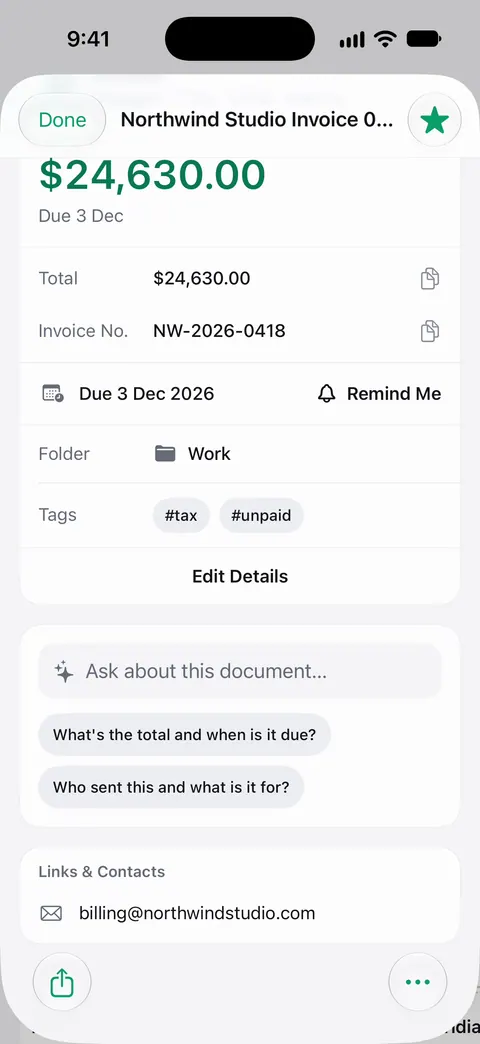
Point your camera at any piece of paper. Scanner One finds the edges, straightens the page, cleans it up and saves a real PDF. Then it reads the text, names the document, tags it and puts it in the right folder. The info card on each document shows the details found on it, including a due date.
With Siri and Shortcuts you can open, find, share and ask your documents by voice, and see what’s due. Ask your documents anything. When does the lease end? What did I spend at the shop? The answer comes back with the page it came from. On a free account you can ask 3 questions a day.
Documents stay on your iPhone unless you share them or turn on iCloud Sync. Scanner One needs no account and does no tracking.
If every bill you have is on autopay and arrives by email, a Reminders list may be all you need. The same approach also works for return windows.
Questions and answers
What is the easiest way to keep track of bills?
One list and one reminder per bill. Write down every bill, its usual amount and its due date, then add a repeating reminder a few days before each one. The CFPB’s bill calendar is the same idea on paper.
Can I change the due date of a bill?
Often, yes. The CFPB notes that for some bills, like credit cards, you may be able to change the due date by contacting the company, so payments land after payday.
Should I put every bill on autopay?
Autopay helps you avoid missing a payment, but it does not check the bill for you. If you use it, keep a monthly reminder to read each statement, so you can spot a wrong charge in time to dispute it.
What if I can’t pay all my bills this month?
Contact the companies you owe before the due date and ask about options. The CFPB has a free tool to help decide which bills to pay first, and you can dial 211 or 311 to find help in your community.
Sources
What this page says about Scanner One was checked against the app on .
- CFPB, Tools to help when you can’t pay your bills (archived blog post) — the bill calendar tool to track when bills are due and avoid late fees, moving a credit card due date, and the tool to prioritize bills; marked by the CFPB as archived content
- CFPB, Your Money, Your Goals toolkit — 43 tools and handouts as fillable PDFs, including tools to keep track of income and bills; read 2026-11-13
- Apple Support, Use Reminders on your iPhone, iPad, or iPod touch — dates, urgent reminders with an alarm in iOS 26.2, scheduled reminders shown in Calendar in iOS 18 and later; read 2026-11-13
- Apple Support, Add details in Reminders on iPhone — Repeat for recurring reminders, Early Reminder, and attaching a scanned document; read 2026-11-13
- FTC, Using Credit Cards and Disputing Charges — review statements when they arrive; a billing error letter must reach the issuer within 60 days after the first bill with the error was sent; dated May 2022
- Scanner One on the App Store — the app’s own listing
Get Scanner One
Scanner One is free, with generous limits: scanning, clean PDFs and text search never stop.

Scanner OneScan, sign and ask anything
Scanner One is free, with generous limits: scanning, clean PDFs and text search never stop.