
Guide
How to keep track of return windows
Find the last day to return the day you buy: it is on the receipt, the packing slip or the store’s website, and policies differ for sale items, special orders and online orders. Write that date on the receipt, then add a reminder with an alert a few days before. The FTC notes that many stores won’t take returns after a set time, like 30 or 90 days. Keep the receipt, the order email and the packaging until the window closes.

Why return windows slip by
There is no single return deadline. Each store, and often each kind of item, has its own. Wisconsin’s consumer protection agency puts it plainly: there are no laws in that state that regulate return or refund policies, so each business may set its own. The FTC’s own advice notes that many stores will not take returns or exchanges after a certain time, like 30 or 90 days.
So a 30-day shirt, a 14-day phone and a final-sale lamp can all come home in the same week, and the receipts look alike. The deadline is easy to miss because nobody writes it down.
Find the real deadline
The FTC says to look for return policies and deadlines on the receipt, the product packaging, the warranty, or the seller’s website. Wisconsin’s fact sheet adds the questions worth asking before you pay:
- Is there a time limit for returns?
- Will I get a cash refund, or only store credit or an exchange?
- If it’s store credit, does it expire?
- Are sale items, seconds or clearance items treated differently?
- Is there a special policy for deposits or special orders?
It also points out where policies differ: special orders such as furniture and auto parts often can’t be returned, or carry a restocking fee; online orders may have a different policy from the store, and may charge for return shipping; clearance items may be marked final sale.
If an employee promises an exception, Wisconsin’s advice is to get it in writing, with the date and the employee’s name.
Write it down the day you buy
The habit that works is short:
- At the till or the moment the box arrives, find the return window and work out the last day.
- Write the last day on the receipt in pen, or in the note of the order email.
- Add a reminder. Open Reminders, type “Return the lamp to the store by”, tap the details button and set the date a few days before the last day.
- Add an early reminder from the same details screen with Early Reminder, so you get a second nudge.
- Attach the receipt. In the reminder’s details you can add a photo or scan a document, so the receipt is with the reminder when it fires.
In iOS 26.2 and later, Apple says you can mark a reminder Urgent, and Reminders schedules an alarm when it is due, even when your iPhone is silenced or a Focus is on. That suits the last day of an expensive return.
One list for every open return
Make a Reminders list called “Returns”. Each purchase you might send back gets one reminder, with its last day. When you decide to keep something, tick it off; when you return it, tick it off after the refund shows up on your statement.
A quick look at the list each weekend keeps the open ones in view. It also catches refunds that never arrived.
What to keep until the window closes
- The receipt or order confirmation. The FTC’s advice for any problem with a purchase starts with gathering receipts and other documents. Make copies to give the business and keep the originals.
- The packaging, tags and accessories, if you might return the item. The FTC says to promptly return an undamaged item, with any tags and original packaging you have, for the best chance of a refund, exchange or store credit.
- Any chat, email or form where the seller agreed to something. For online chats and forms, the FTC suggests saving a copy or taking a picture of the screen before you exit, and noting the date.
Once the window has closed and you’re keeping the item, the receipt’s next job begins: proof of purchase for the warranty. The receipts guide and the warranty end dates guide pick up from there.
If you miss the window
Ask anyway. A calm request, with the receipt, sometimes works, and the FTC suggests asking for a manager if the first person can’t help. If the item is faulty, the return window is not the only route: the FTC notes that a written warranty may cover repairs, a replacement or a refund, and that you contact the seller first. Wisconsin’s fact sheet also mentions that some credit cards offer a return protection benefit, so check your card’s terms.
Where Scanner One helps, and where it doesn’t
Scanner One does not know a store’s return policy. The window is whatever the store says.
What it does is keep the receipt and the date together, and bring the date back before it passes. Needs You gathers bills due, return windows and IDs about to expire on Home, from your own papers. So a return window read from a receipt you scanned shows up on Home with your bills due and IDs about to expire. The Needs You feature page explains how it works.
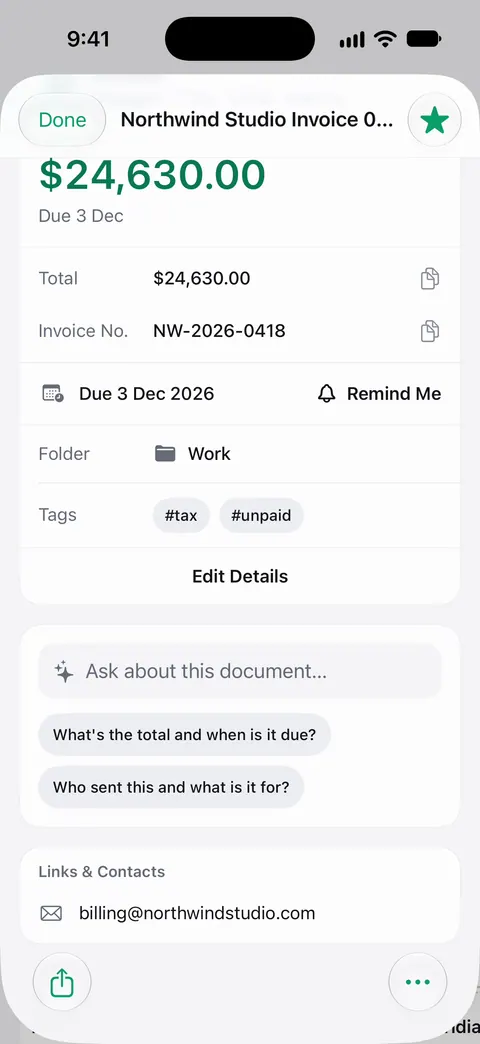
Point your camera at any piece of paper. Scanner One finds the edges, straightens the page, cleans it up and saves a real PDF. Scans come with Auto Clean, Color, Grayscale and Receipt filters. Then it reads the text, names the document, tags it and puts it in the right folder. The info card on a document shows the details found on it, with a due date, its folder and its tags.
With Siri and Shortcuts you can open, find, share and ask your documents by voice, and see what’s due. Search looks inside the text of every document and shows the matching line and page.
Documents stay on your iPhone unless you share them or turn on iCloud Sync. On a free account, smart filing covers 10 documents a month.
If you buy a few things a month, a Reminders list does the job well on its own. Needs You helps when the receipts pile up faster than you can type dates, and the bills due guide uses the same approach for payments.
Questions and answers
Do stores have to accept returns?
Not as a general rule. Wisconsin’s consumer protection agency, for example, says no law in that state regulates return policies, so each business sets its own. Rules vary by state, so your state’s consumer protection office can tell you what applies where you live. Whatever the store’s policy is, ask for it in writing.
Does the return window start on the day I buy or the day it arrives?
It depends on the seller. Some count from the purchase date, some from delivery. The policy on the receipt or the website says which, and it is worth checking before you write the date down.
What if I missed the return window?
Ask anyway, politely, and ask for a manager if the first answer is no. If the item is faulty, the warranty may still cover it even though the return window has closed.
Should I keep the box until the return window closes?
Yes, if you might return the item. The FTC’s advice is to promptly return an undamaged item, and to bring any tags and original packaging you have, for the best chance of a refund, exchange or store credit.
Sources
What this page says about Scanner One was checked against the app on .
- FTC, Solving Problems With a Business: Returns, Refunds, and Other Resolutions — look for return policies and deadlines on receipts, packaging, warranties or the seller’s website; many stores will not take returns after a certain time, like 30 or 90 days; dated September 2024
- Wisconsin DATCP, Return and Refund Policies (consumer fact sheet) — no Wisconsin law regulates return policies, so each business sets its own; ask for the policy in writing; different rules for sale items, special orders and online orders; read 2026-11-13
- Apple Support, Use Reminders on your iPhone, iPad, or iPod touch — set a date and time, urgent reminders with an alarm in iOS 26.2, and lists; read 2026-11-13
- Apple Support, Add details in Reminders on iPhone — Early Reminder, and adding a photo or a scanned document to a reminder; read 2026-11-13
- FTC, Warranties — when a return is no longer possible, a warranty may still cover a defect; dated July 2023
- Scanner One on the App Store — the app’s own listing
Get Scanner One
Scanner One is free, with generous limits: scanning, clean PDFs and text search never stop.

Scanner OneScan, sign and ask anything
Scanner One is free, with generous limits: scanning, clean PDFs and text search never stop.