
Tool
Add a watermark to a copy of your ID
Choose a photo or scan of your ID, type who the copy is for and the date (for example "Copy for Lakeside Apartments rental application only, November 13, 2026"), set the opacity and angle, and tap Save. The words are repeated across the whole picture and saved into a new JPG or PNG, made on your device. Nothing is uploaded or kept.

Watermark a copy of your ID
This tool runs in your browser, and its page is not allowed to open a single network connection, so nothing you add is sent anywhere. Nothing is saved: closing the tab forgets everything.
or drop it here. A photo or a scan saved as JPG, PNG or, in Safari, HEIC.
Say who the copy is for and why, with the date: for example "Copy for Lakeside Apartments rental application only, November 13, 2026".
Choose a picture of your ID to start.
How to use it
- Tap Choose a picture of your ID, or drop one onto the box. A photo or a scan saved as a picture both work.
- In Words to put across it, replace “[who]” with who the copy is for, and keep or change the date. Be specific: “Copy for Lakeside Apartments rental application only” says more than “Copy”.
- Set the Opacity. Around 30% marks the whole card while the details stay readable.
- Pick an Angle, a Text size and a Color. White shows best on dark cards; red stands out on busy ones.
- Check the preview, then tap Save the watermarked copy. Your browser saves it as a JPG (or a PNG if you chose it).
Check the saved copy before you send it: the name, photo, ID number and expiry date should all still be readable through the words.
What happens to your picture
Your browser decodes the picture on your device and draws it onto a canvas, then writes your words over it again and again in rows, at the angle and opacity you chose, with a thin outline so they show on light and dark parts alike. The canvas is then saved as a new JPG or PNG. The words are part of the pixels, not a layer on top, and because the file is made from pixels, the original photo’s details (where and when it was taken, the camera) are not carried into it.
The page is sent with a security rule that forbids it from opening any connection, so the picture of your ID could not leave even if the code tried. Closing the tab forgets it.
Why mark an ID copy at all
Landlords, banks, employers and rental desks often ask for a copy of a driver’s license or passport, and that copy then sits in an inbox or a folder you don’t control. The FTC lists what thieves do with personal information: open accounts, use your credit cards, claim your tax refund, even get medical care in your name. A copy marked for one purpose and one date is harder to reuse for anything else.
A watermark does not hide anything. If the office does not need some details, such as the ID number, cover them first with the redact image tool, or read how to redact a driver’s license or passport copy. On iPhone, Markup can do a simple version: open the photo, start Markup, tap the add button in the toolbar, tap Add Text, type the words, and use the tools to change the size and color. That gives one line of text, which is often enough. The steps for marking a copy with the iPhone’s own apps, and for a PDF, are in watermark a copy of your ID. If your ID has been misused, the FTC’s IdentityTheft.gov gives a recovery plan.
Where Scanner One helps, and where it doesn’t
This page marks a picture you already have. Scanner One starts from the card: ID cards and passports are scanned with both sides on one printable page. The PDF tools merge, split, compress, password-protect, add page numbers and watermarks, and extract text.
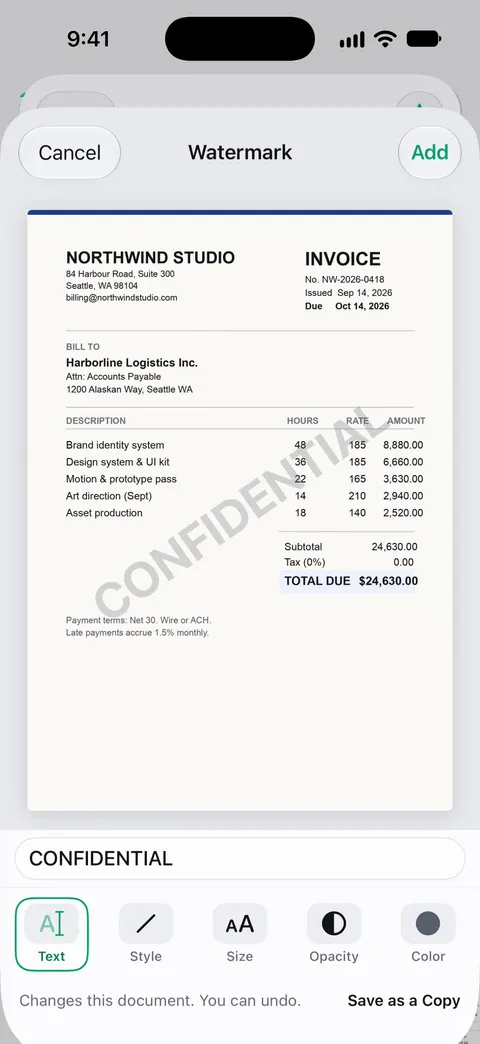
Free accounts can run the PDF tools and the Word, Excel and CSV exports 3 times a week, from one shared allowance. On a free account, pages you share, print or export carry a small “Scanned with Scanner One” label at the bottom right. Pro removes it. Redaction is permanent. Pro adds redaction, the smart eraser, edit text, auto-export and five alternate app icons.
Scanner One runs on iPhone and iPad only. To mark one ID picture on any device, this free page is enough.
Questions and answers
Is the picture of my ID uploaded?
No. This tool runs in your browser, and its page is not allowed to open a single network connection, so nothing you add is sent anywhere. Nothing is saved: closing the tab forgets everything.
What should the watermark say?
Who the copy is for, why, and the date: for example "Copy for Acme Bank account opening only, November 13, 2026". That way a copy that turns up somewhere else is plainly out of place, and it can’t be reused for another application without the mark showing.
Can a watermark be removed?
Not by deleting a layer: the words are part of the new picture’s pixels. Someone determined could still paint over them with photo editing, so a watermark discourages misuse rather than preventing it. Share ID copies only with people who really need them.
Will the office still accept a watermarked ID?
Most accept a copy that is clearly readable. Keep the opacity low enough that the name, photo, number and dates can still be read, and check the preview. If an office asks for an unmarked copy, ask why they need it.
Can I watermark a PDF scan of my ID?
This page works on pictures (JPG, PNG and, in Safari, HEIC). Save the scan as a picture first, or add a watermark to the PDF itself with a PDF tool.
Sources
What this page says about Scanner One was checked against the app on .
- FTC Consumer Advice, What To Know About Identity Theft — what identity thieves do with personal information, how to protect it, and reporting at IdentityTheft.gov; page dated September 2024, read 2026-11-13
- MDN Web Docs, HTMLCanvasElement: toBlob() — how the watermarked picture is saved as a new JPEG or PNG in memory; read 2026-11-13
- MDN Web Docs, Content-Security-Policy: connect-src — the rule this page is sent with ('none'), which stops a script from opening any connection; read 2026-11-13
- Apple iPhone User Guide, Add text, shapes, stickers, and more with Markup on iPhone — the built-in way: Markup’s Add Text with its font, size and color tools; undated guide page, read 2026-11-13
- Scanner One on the App Store — the app’s own listing: ID card scanning and the PDF tools, watermarks among them
Get Scanner One
Scanner One is free, with generous limits: scanning, clean PDFs and text search never stop.

Scanner OneScan, sign and ask anything
Scanner One is free, with generous limits: scanning, clean PDFs and text search never stop.