
Guide
What to black out on a driver’s license or passport copy
Hide everything the recipient doesn’t need. Ask what they’re checking: often it’s only your name, photo and expiry date. Details commonly covered are the document number, the machine-readable lines at the bottom of a passport, your signature, your address and any national ID number. Cover them so they’re really gone: put opaque paper over them before you scan, or use a redaction tool that removes the pixels. A black box or marker drawn on a PDF can often be removed.

This page is general information, not legal advice. What an organization may ask for and keep varies by country and state, and rules change. When in doubt, ask the organization what it needs and why, or check your government’s own guidance.
A copy of your driver’s license or passport is one of the most useful things a fraudster can get. Hiding the details nobody needs makes a leaked copy much less useful. This page is about which details to hide on an ID copy and how to hide them on an iPhone so they stay hidden. The general method for any PDF is in the guide to redacting a PDF properly.
Start with one question: what are they checking?
The Dutch government’s advice is a good rule anywhere: hide the details the organization doesn’t need, and what that is depends on who asked and why. Ask them, or read their instructions. Typical cases:
| Who asked | What they usually check | Often safe to hide |
|---|---|---|
| A landlord or letting agent | Your name and photo match the applicant, the ID is current | Document number, machine-readable lines, signature |
| A hotel or rental desk | Name, photo, expiry date | Address, signature, document number unless asked |
| An online marketplace or club | That you’re a real person of a certain age | Almost everything except name, photo and date of birth |
| An employer checking work eligibility | The document as listed on their official form | Usually nothing: follow their form |
| An airline, consulate or immigration office | The full document | Nothing: they need it as issued |
When an organization needs the full document, send it through their official channel, not a loose email.
The details people usually cover
- The document number. On a license it’s the license number; on a passport, the passport number near the top.
- The machine-readable lines. The two lines of letters, numbers and angle brackets along the bottom of a passport photo page repeat your name, number and date of birth in a form machines read. The Dutch guidance specifically warns to cover the ID number “including in the number line at the bottom.” The page on the MRZ on a passport explains what’s in it.
- Your signature. Rarely needed on a copy, and useful to forgers.
- Your home address, if the recipient already has it or doesn’t need it.
- Any national ID or tax number printed on the card.
- Barcodes on the back of a license. They usually encode the same details as the front.
Keep the copy useful: if you hide the photo and name too, the copy proves nothing, and they’ll ask again.
How to hide details so they stay hidden
U.S. courts, which deal with redaction every day, warn that common methods fail. The D.C. Circuit’s guidance lists white text and PDF commenting tools that “black-out, cover over or remove sections of text,” which “can still be removed by anyone.” It also warns that ink or semi-translucent tape on paper can show through on a scan.
So a black rectangle or marker stroke drawn on a PDF in Markup is not enough. Apple’s Markup is built so you can select and move what you drew, which is exactly the problem.
Best: cover the details before you scan
The surest method needs no software: the information never gets into the file.
- Cut small pieces of thick, opaque paper or card (not tape you can see through).
- Lay the ID flat and place the pieces over the details to hide.
- Scan or photograph it, with the pieces in place.
- Zoom in on the result and make sure nothing shows around the edges.
On a copy you already have
If you only have a scan or photo, you need a tool that replaces the pixels, not one that draws on top. Options:
- A redaction tool. It removes what’s under the box from the file.
- Our free redact image tool, which works on a picture in your browser.
- As a last resort, a screenshot. Open the photo, cover the details with Markup’s marker at full opacity, then take a screenshot of the screen. The screenshot contains only what you see. Crop it, and check the quality is still readable.
Check the copy before you send it
- Zoom in on every covered area. Look for edges of numbers peeking out.
- Search it. If the copy is a PDF with text, open it in Preview, tap the Search button and type part of the number you hid. No result is what you want.
- Check both sides of a license and every page of a passport copy.
- Add a watermark saying who it’s for and the date. The guide to watermarking an ID copy shows how.
Where Scanner One helps, and where it doesn’t
Covering details on paper before you scan works with any camera and costs nothing. For one copy, that is often the most reliable way.
Scanner One helps when you already have the scan, or you send ID copies often. ID cards and passports are scanned with both sides on one printable page. Redaction is permanent. You mark each detail to hide and pick a style.
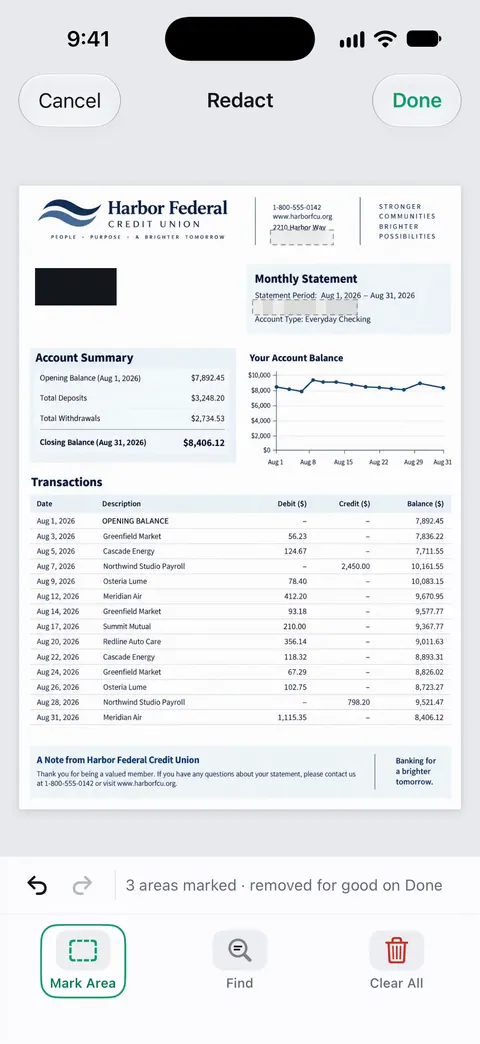
For an ID copy, solid black is the clearest choice: it leaves no doubt that something was removed on purpose. The redaction feature page shows the steps.
The limits, plainly:
- Redaction is part of Pro. Pro adds redaction, the smart eraser, edit text, auto-export and five alternate app icons.
- On a free account, pages you share, print or export carry a small “Scanned with Scanner One” label at the bottom right. Pro removes it.
- Scanner One doesn’t decide what to hide for you. The recipient’s needs do.
Questions and answers
Is it safe to send a copy of my driver’s license?
It carries real risk, because the copy can be stored, forwarded or leaked. Send one only to an organization with a clear reason to need it, hide what they don’t need, and mark the copy with who it’s for and the date.
Should I black out my passport number?
If the recipient only needs to see who you are, yes. Some, such as airlines, immigration or a hotel abroad, need the number, so check before you hide it. Remember that the number also appears in the machine-readable lines at the bottom of the page.
Does a black marker in Markup hide the details?
Not reliably. Marks drawn on a PDF sit on top of the page and can often be moved or deleted, revealing what’s underneath. Cover the details before scanning, or use a redaction tool that removes them.
Can a landlord ask for a copy of my ID?
Many do, as part of an application. Rules on what they may keep and how vary by state and country. Ask what they need it for, and send only that.
Is redaction free in Scanner One?
No, it’s part of Pro. Pro adds redaction, the smart eraser, edit text, auto-export and five alternate app icons. Redaction is permanent.
Sources
What this page says about Scanner One was checked against the app on .
- Government of the Netherlands, How do I prevent a copy of my ID being used for fraudulent activities? — cover your photo, signature and national identification number when not needed, make the BSN unreadable including in the number line at the bottom, and write the purpose and date on the copy; undated, read 2026-11-13
- Government of the Netherlands, How do I make a secure copy of my ID using the KopieID app? — black out details organizations do not need or are not allowed to process; what to hide depends on who asked and why; undated, read 2026-11-13
- U.S. Court of Appeals for the D.C. Circuit, Guidance on Redacting Personal Data Identifiers in Electronically Filed Documents — white text and commenting tools that black out text can be removed to reveal it; ink and semi-translucent tape can show through on a scan; identifiers shortened to last four digits or year of birth; undated PDF, read 2026-11-13
- Apple iPhone User Guide, Draw and handwrite with Markup on iPhone — the marker tool, opacity slider and lasso; marks can be selected and moved; undated, read 2026-11-13
- Apple iPhone User Guide, Open and view PDFs and images in Preview on iPhone — the Search button, used to check that hidden text can’t be found; undated, read 2026-11-13
- Scanner One on the App Store — the app’s own listing: permanent redaction, part of Pro; ID cards on one page
Get Scanner One
Scanner One is free, with generous limits: scanning, clean PDFs and text search never stop.

Scanner OneScan, sign and ask anything
Scanner One is free, with generous limits: scanning, clean PDFs and text search never stop.