
Comparison
Scanner One vs PDF Expert
They solve different problems. PDF Expert is Readdle’s PDF editor: reading, marking up, filling and signing are listed before its Premium section, and Premium adds text editing, conversion, merging, compression, AI and redaction, with one subscription for iPhone, iPad and Mac. Scanner One starts from paper: it scans, cleans, reads and files each page, then offers PDF tools. Pick PDF Expert for heavy editing or a Mac; pick Scanner One to turn paper into a searchable library. Scanner One’s free PDF tools run 3 a week.

Scanner One is our app. Everything said here about PDF Expert comes from its US App Store page and Readdle’s pricing page, read on November 13, 2026.
Different starting points
PDF Expert begins with a PDF that already exists: a contract in your email, a form from a website, a report from work. Its App Store description is about reading, marking up, filling, signing, editing and converting PDFs, and about scanned documents it says you can open scanned PDFs to fill out, sign, annotate and share.
Scanner One begins with paper. Point your camera at any piece of paper. Scanner One finds the edges, straightens the page, cleans it up and saves a real PDF. Then it reads the text, names the document, tags it and puts it in the right folder. PDF tools come after that, on the documents you have scanned or imported.
So the question is which end of the job you spend more time at. If it is editing PDFs others send you, PDF Expert is built for that. If it is turning letters, receipts and forms into files you can find later, Scanner One is.
Side by side
Checked on November 13, 2026, on the US App Store and pdfexpert.com.
| PDF Expert | Scanner One | |
|---|---|---|
| Price model | Free download. Listed: PDF Expert Premium $49.99, PDF Expert Mac & iOS $79.99, PDF Expert Basic $9.99, Premium Trial $9.99, Education $39.99. Lifetime marked Mac version only | Free download. Pro at $4.99 a month, $29.99 a year with a free week, or $59.99 once |
| Without paying | Read, highlight, mark up, fill and sign forms | Scanner One is free, with generous limits: scanning, clean PDFs and text search never stop. PDF tools: 3 a week. Signing and markup: 3 documents a month |
| Paid adds | Edit text, images and links; convert; merge, split, compress; PDF Copilot AI; a password lock for the app; redact | Pro removes every limit. Pro adds redaction, the smart eraser, edit text, auto-export and five alternate app icons. |
| Scanning paper | Opens scanned PDFs | Scanner One finds the edges of the page automatically and corrects the perspective. Scans come with Auto Clean, Color, Grayscale and Receipt filters. |
| Privacy label | Linked to you: Contact Info, Identifiers, Usage Data. Not linked: Identifiers, Diagnostics. No tracking section | No account, no tracking |
| Platforms | iPhone, iPad and Apple Vision; Mac under the same subscription | iPhone and iPad |
PDF Expert needs iOS 16.0 or later; version 7.26.4 came out on November 9, 2026. Scanner One needs iOS 17 or later.
What PDF Expert does well
As a PDF editor it is thorough. The description lists Day, Night and Sepia reading modes, Text to Speech, highlights, stamps and audio notes, and form filling that supports AcroForms and static XFA forms. Premium adds editing text, images and links directly in the PDF, converting to and from Word, Excel, PowerPoint and images, merging, splitting, compressing, a password lock for the app and redaction, plus PDF Copilot to summarize and answer questions with references. There are measuring tools for construction drawings.
One Premium subscription covers iPhone, iPad and Mac. If you edit PDFs at a desk as well as on the phone, that is a strong reason to choose it.
What Scanner One does instead
Scanner One spends its effort on the paper and the pile.
- Scanner One finds the edges of the page automatically and corrects the perspective. Book spreads are split into two pages and curved lines are flattened. ID cards and passports are scanned with both sides on one printable page.
- Text recognition runs on every page for everyone, free or Pro. Search looks inside the text of every document and shows the matching line and page.
- Fill Form lets you type into the fields of a PDF form. You can sign and annotate documents.
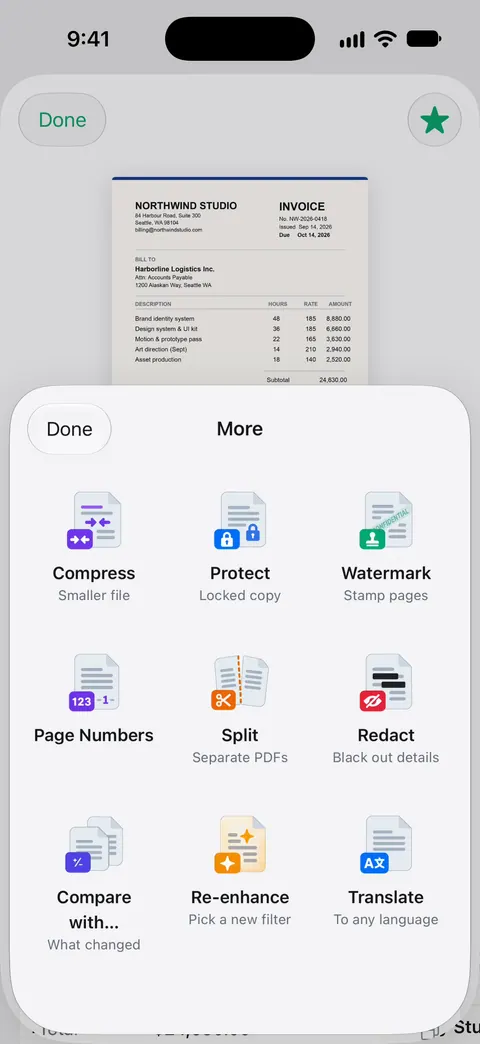
- The PDF tools merge, split, compress, password-protect, add page numbers and watermarks, and extract text. Scanner One exports to Word, keeping headings, lists and tables, and to Excel and CSV.
- Ask your documents anything. When does the lease end? What did I spend at the shop? The answer comes back with the page it came from.
For filling a form someone emailed you, our guide to filling a PDF form on iPhone starts with Apple’s free Markup and Preview.
Pick PDF Expert if
- You edit, convert and annotate PDFs others send you, often.
- You want the same app and subscription on a Mac.
- You work with XFA forms, construction drawings or audio notes.
Pick Scanner One if
- Most of your PDFs start as paper.
- You want every page searchable and filed without doing it by hand.
- You want to pay once on your iPhone: $59.99 once.
Readdle’s own scanner is compared on Scanner One vs Scanner Pro, and more editors are on the best PDF editors for iPhone.
Where Scanner One helps, and where it doesn’t
Scanner One helps when you scan: it straightens, cleans and reads every page, then files it. Documents stay on your iPhone unless you share them or turn on iCloud Sync. Scanner One needs no account and does no tracking.
Where PDF Expert is stronger:
- Editing depth. Its Premium editing covers text, images and links, and its form filling supports XFA forms. In Scanner One, editing text is a Pro feature; see editing text in a scanned document.
- Mac. Scanner One runs on iPhone and iPad. There is no Mac version of Scanner One.
- Free caps and the label. Scanner One’s free PDF tools run 3 a week, and On a free account, pages you share, print or export carry a small “Scanned with Scanner One” label at the bottom right. Pro removes it.
- Cloud AI. Cloud AI is off until you switch it on, and page images are a separate permission. Pro Max, the plan with cloud AI, costs $149.99 a year in the US.
Every limit is listed on Free and Pro.
Questions and answers
Can PDF Expert scan documents?
Its App Store description talks about opening scanned PDFs to fill out, sign, annotate and share. For scanning paper, Readdle makes a separate app, Scanner Pro. Scanner One does both: Point your camera at any piece of paper. Scanner One finds the edges, straightens the page, cleans it up and saves a real PDF.
Is PDF Expert free?
It is a free download. Its description lists reading, highlighting and markup, and filling and signing forms before the Premium section; editing text, converting, merging, compressing, AI and redaction are listed as Premium.
Does PDF Expert have a lifetime license on iPhone?
Its pricing page marks the Lifetime one-time payment as Mac version only, and the yearly Premium plan as covering iPhone, iPad and Mac. Scanner One’s lifetime option is bought in the iPhone app: Scanner One Pro Lifetime is a one-time purchase of $59.99 in the US.
Can I edit the text of a scanned PDF?
Both can, as a paid feature. PDF Expert lists editing PDF text under Premium. In Scanner One, Pro adds redaction, the smart eraser, edit text, auto-export and five alternate app icons.
Sources
What this page says about Scanner One was checked against the app on .
- PDF Expert: Editor & Reader on the App Store — in-app purchases, free and Premium features, scanned-PDF support, privacy label, compatibility and version 7.26.4 of November 9, 2026; read 2026-11-13
- PDF Expert pricing — yearly Premium for iPhone, iPad and Mac; Lifetime marked Mac version only; read 2026-11-13
- Scanner One on the App Store — the app’s own listing
Get Scanner One
Scanner One is free, with generous limits: scanning, clean PDFs and text search never stop.

Scanner OneScan, sign and ask anything
Scanner One is free, with generous limits: scanning, clean PDFs and text search never stop.