
Guide
Ask questions about a PDF
On an iPhone with Siri AI (beta), open the PDF and ask Siri about what’s on your screen. With the ChatGPT extension turned on, you can ask Siri to have ChatGPT summarize the open document, which sends it to ChatGPT. Accessibility Reader can summarize the text of what’s open. Scanner One’s Ask works on your own scans: Ask your documents anything. When does the lease end? What did I spend at the shop? The answer comes back with the page it came from. Whichever you use, open the page the answer came from and read the sentence yourself.

Ask Siri about the PDF on your screen
With Siri AI (beta), Siri can look at what’s on your screen and answer questions about it. Apple’s guide gives the example of asking “Which quarterly report grew faster?” with two documents selected in the Files app.
- Open the PDF in Files or Preview, or select one or two documents in Files.
- Activate Siri and ask your question, for example “When does this lease end?”
- Tap the Search button on the keyboard if needed.
- Swipe down on Siri’s answer to start a conversation and ask follow-up questions.
Apple says Siri AI is in beta on iOS 27 on Apple Intelligence iPhones (iPhone 15 Pro, 15 Pro Max, and iPhone 16 or later), with Siri and device language set to a supported language. It starts in English, French, Japanese, Korean, Portuguese and Spanish, is not initially available in the EU on iOS, and is not available for users under 13. Usage limits may apply.
Ask ChatGPT through Siri
If you’ve turned on the ChatGPT extension in Apple Intelligence, Siri can pass a question to ChatGPT. Apple’s own example: “Hey Siri, ask ChatGPT to summarize this document for me,” with a PDF of a home inspection report open in Files.
Know what that does. Apple says your request and attachments are sent to ChatGPT, along with limited data such as your time zone, country, device type, language and the feature you used. That is the document leaving your iPhone for another company’s servers. iPhone may ask you to confirm before it sends; you can turn off Confirm Requests in Settings, but for documents with personal details it’s worth leaving on. The guide on uploading documents to AI goes through what to keep out.
Summarize with Accessibility Reader
On an iPhone with Apple Intelligence, Accessibility Reader shows the text of what’s open in a clean view and can summarize it.
- Turn it on in Settings > Accessibility > Read & Speak > Accessibility Reader.
- Open the PDF, then open Accessibility Reader from Control Center or the Share button.
- Tap Summarize at the top of the content. Tap the summary again to hide it.
A summary is a good first look at a long document. It doesn’t answer a specific question, and it can leave out the line you needed.
Questions that work, and ones that don’t
AI is good at finding things that are printed in the document. It’s weaker at judgment and at anything the document doesn’t say.
Questions that tend to work:
- When does the lease start and end, and how much notice do I have to give?
- What is the total due, and by what date?
- What is the deductible on this policy?
- Which account number does this statement belong to?
- Who signed this, and on what date?
- What is the return window on this receipt?
Questions that tend not to:
- Is this a good contract? (A judgment the document can’t answer.)
- Can my landlord do this? (Legal advice, which depends on where you live.)
- What did I pay last year? (Only works if last year’s papers are in the same place.)
Check the answer before you rely on it
Generative AI can produce an answer that sounds certain and is wrong. NIST’s profile on generative AI calls this confabulation: “confidently stated but erroneous or false content”. It warns that the confident tone is what leads people to act on false information, and that summaries in specialist areas are especially at risk. Apple adds a similar line about ChatGPT: check important information for accuracy.
A few habits catch most mistakes:
- Ask where it found the answer. Then open that page and read the sentence.
- Check numbers twice. Amounts, dates and account numbers are where a misread scan or a confused answer does the most harm.
- Ask the same thing another way. “When can I cancel?” and “What is the notice period?” should agree.
- Look for what’s missing. If the answer mentions one fee, search the document for “fee” yourself.
For contracts and leases, the guide to getting the gist of a contract lists the parts to read in full.
Where Scanner One helps, and where it doesn’t
If you have Siri AI and only ask about a document now and then, the built-in way may be enough.
Scanner One is built around asking your own papers. Ask your documents anything. When does the lease end? What did I spend at the shop? The answer comes back with the page it came from. The page reference is the point: you can check every answer against the document.
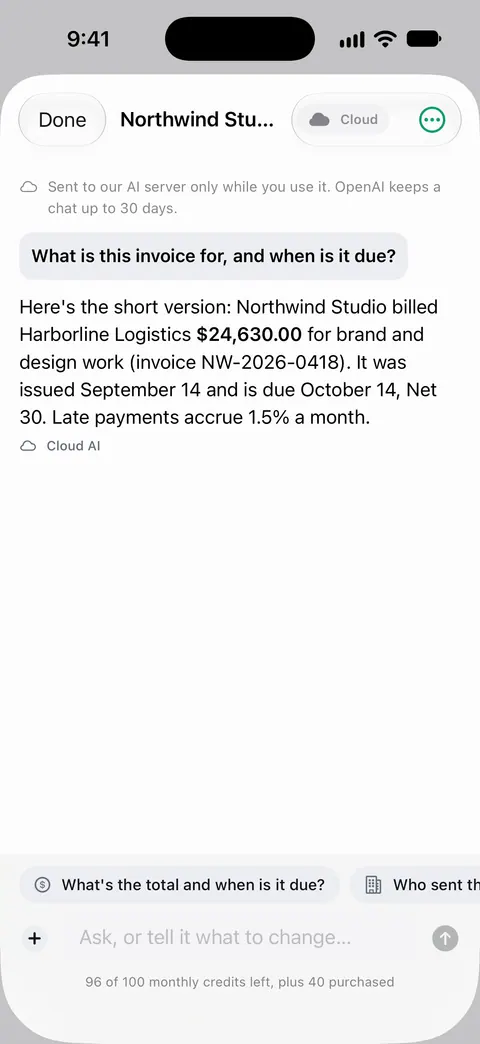
It can also answer with a table, such as the key dates and amounts in a document, or compare two documents side by side. Answers come from the text read on each page: Text recognition runs on every page for everyone, free or Pro.
What you should know before you use it:
- Free accounts can ask the on-device AI 3 questions a day. Pro removes every limit.
- Cloud AI is off until you switch it on, and page images are a separate permission. Pro Max, the plan with cloud AI, costs $149.99 a year in the US. Credits for cloud AI come in packs of 100 for $2.99, 400 for $9.99 and 1,000 for $21.99 in the US.
- It answers from what’s written. It doesn’t give legal, tax or medical advice, and a poor scan can still be misread.
The Ask feature page shows the rest, and on-device AI or cloud AI explains the privacy trade-off.
Questions and answers
Can I ask questions about a PDF without uploading it?
Yes, with AI that runs on your iPhone. Apple says many Apple Intelligence tasks run entirely on device, and harder ones may go to its Private Cloud Compute. Free accounts can ask the on-device AI 3 questions a day.
Why did the AI give a wrong answer about my document?
AI models can state false things confidently; NIST calls this confabulation. A poor scan adds misread text. Ask for the page or the sentence the answer came from, and read it.
What questions work best?
Specific ones with an answer printed in the document: a date, an amount, a name, a policy number, a deadline. Questions asking for a judgment, such as whether a deal is fair, get less reliable answers.
Is asking questions free in Scanner One?
Free accounts can ask the on-device AI 3 questions a day. Cloud AI is off until you switch it on, and page images are a separate permission. Pro Max, the plan with cloud AI, costs $149.99 a year in the US.
Sources
What this page says about Scanner One was checked against the app on .
- Apple iPhone User Guide, Siri AI: Learn about what’s on your iPhone screen — asking Siri about documents open on screen or selected in Files, and its availability; iOS 27 guide, undated, read 2026-11-13
- Apple iPhone User Guide, Use Siri to get answers from ChatGPT on iPhone — asking ChatGPT to summarize a document open in Files, what is sent to ChatGPT, and Confirm Requests; iOS 27 guide, undated, read 2026-11-13
- Apple iPhone User Guide, Read or listen to text in apps with Accessibility Reader on iPhone — Summarize in Accessibility Reader with Apple Intelligence; iOS 27 guide, undated, read 2026-11-13
- Apple iPhone User Guide, Apple Intelligence and privacy on iPhone — many Apple Intelligence tasks run on device, harder ones may use Private Cloud Compute; iOS 27 guide, undated, read 2026-11-13
- NIST AI 600-1, Artificial Intelligence Risk Management Framework: Generative Artificial Intelligence Profile — confabulation: confidently stated but false output, and why it matters for summaries; July 2024
- Scanner One on the App Store — the app’s own listing: ask your documents, with the page each answer came from
Get Scanner One
Scanner One is free, with generous limits: scanning, clean PDFs and text search never stop.

Scanner OneScan, sign and ask anything
Scanner One is free, with generous limits: scanning, clean PDFs and text search never stop.