
Guide
Get the gist of a long contract, then check what matters yourself
Let a summary point you to the right pages, not replace reading them. On iPhone, Accessibility Reader can summarize the text of an open document with Apple Intelligence, and some apps answer questions with the page each answer came from. Then read these parts yourself: the parties, the dates and term, every amount and fee, renewal and cancellation, penalties, and anything you must do by a deadline. For advice about your situation, ask a lawyer or a legal aid office.

This page is general information, not legal advice. Contract and tenancy rules differ by state and country, and change. For a decision that matters, read the full document and talk to a lawyer or a legal aid office.
What a summary is good for, and what it misses
A 30-page lease or a service agreement is hard to read on a phone. A summary helps you see the shape of it: what each section covers, roughly what you’re agreeing to, and where the money and dates are.
What a summary can’t promise is completeness or accuracy. NIST’s profile on generative AI describes “confabulation”: content that is confidently stated but false. It says the confident tone is exactly what leads people to act on false information, and that the risk matters most in consequential decisions. A contract you’ll sign is one. Apple’s guide makes the same point about ChatGPT in Writing Tools: check important information for accuracy.
There’s also what a summary leaves out on purpose. It condenses. The sentence it drops may be the automatic renewal, the early termination fee or the 60-day notice period.
Get a summary on iPhone
On an iPhone with Apple Intelligence:
- Accessibility Reader summarizes the text of what’s open. Turn it on in Settings > Accessibility > Read & Speak > Accessibility Reader, open the contract, open Accessibility Reader from Control Center or the Share button, and tap Summarize.
- Writing Tools has Summarize and Key Points for text you can select where you write. Paste the contract text into a note, select it, tap the Writing Tools button and choose one.
If the contract is a scan with no selectable text, its text has to be recognized first. See copying all the text out of a PDF.
Before you paste a contract into a chatbot, read is it safe to upload documents to AI. A lease has your name, address and often your bank details.
Ask pointed questions instead
A general summary is the weakest way to use AI on a contract. Specific questions, with the answer checked on the page, work better. Ask:
- Who are the parties, and are the names and addresses right?
- When does it start, when does it end, and what happens at the end?
- Does it renew automatically? How much notice stops the renewal?
- What does it cost in total, including every fee, deposit and charge?
- When can the price change, and by how much?
- How can I cancel early, and what does that cost?
- What happens if I pay late?
- What am I responsible for (repairs, insurance, maintenance)?
- What must I do by a deadline, and what happens if I don’t?
- How are disputes handled? Does it require arbitration?
Then open each answer’s page and read the clause in full. The guide to asking questions about a PDF covers the tools.
The parts to read yourself, line by line
Whatever the summary says, read these in the document itself:
- Names, addresses and dates at the top. Mistakes here cause trouble later.
- Term and renewal. Start date, end date, automatic renewal and the notice period.
- Money. Every amount, fee, deposit, interest rate and late charge, and when each is due.
- Ending the contract. Notice, early termination fees, and what you get back.
- Your obligations. What you promise to do, and by when.
- Penalties and liability. What you owe if something goes wrong.
- Changes. Whether the other side can change terms, and how they must tell you.
- Disputes. Arbitration clauses, class action waivers, and which state’s law applies.
- Attachments. Schedules, addenda and house rules the contract refers to are part of it. Ask for any you don’t have.
- Blank spaces. Nothing should be left blank when you sign.
For leases and renewals specifically, see what to check in a lease renewal. For anything you’re about to sign, what to check in a contract before you sign it has a fuller list.
When to get help
Get advice before you sign if the contract is large (a home, a business, a loan), if you’re giving up a right, or if a clause worries you and the other side won’t explain it. If you can’t afford a lawyer, the Legal Services Corporation’s Get Legal Help page finds the civil legal aid organization it funds for your address. Tenant unions, consumer protection offices and bar association referral services can also help.
Where Scanner One helps, and where it doesn’t
For one contract you read on a laptop, a careful read and a highlighter may be all you need.
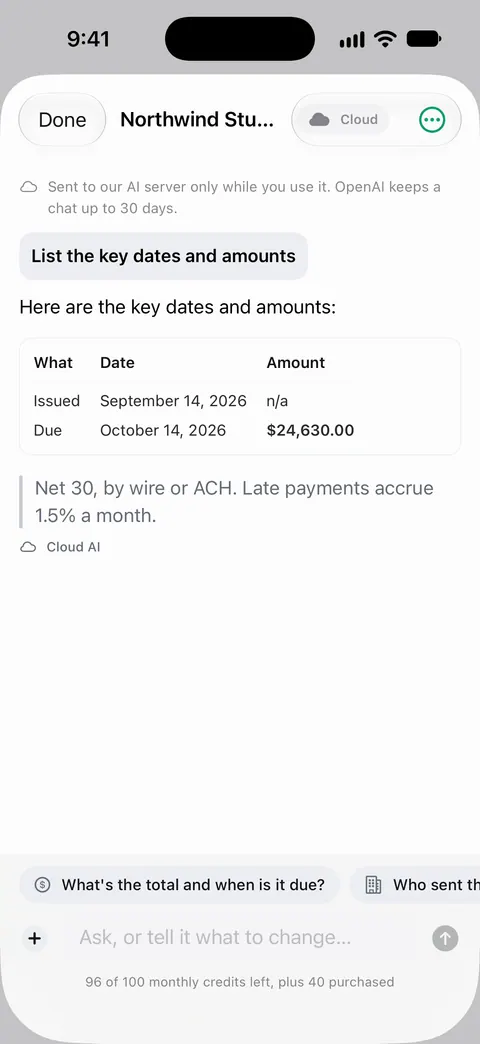
Scanner One helps you find your way around a contract you have on paper or as a PDF. Ask your documents anything. When does the lease end? What did I spend at the shop? The answer comes back with the page it came from. That page reference is what makes checking possible: you go straight to the clause.
Search looks inside the text of every document and shows the matching line and page. So you can search a long lease for “notice”, “fee” or “renew” and see every line that mentions it.
When a renewal arrives, What changed compares the new version of a lease or policy with the one you signed.
What it doesn’t do: it doesn’t tell you whether a term is fair, legal or negotiable, and it is not a lawyer. Free accounts can ask the on-device AI 3 questions a day. Cloud AI is off until you switch it on, and page images are a separate permission.
Questions and answers
Can I trust an AI summary of a contract?
Use it as a map, not a verdict. AI can state wrong things with confidence, and a summary leaves things out by design. Read the clauses about money, dates, renewal and cancellation in full, and get advice for anything you’re unsure about.
Is it safe to upload a contract to a chatbot?
A contract often carries names, addresses, account numbers and signatures. Uploading it hands a copy to that service. Remove what the AI doesn’t need, check the service’s settings, or use AI that runs on your iPhone.
Where can I get free help understanding a contract?
The Legal Services Corporation lists civil legal aid organizations it funds; search by your address on its Get Legal Help page. Many bar associations and tenant groups also run advice lines.
Can Scanner One tell me if a contract is fair?
No. Ask your documents anything. When does the lease end? What did I spend at the shop? The answer comes back with the page it came from. It answers from what the document says. Whether a term is fair or legal where you live is a question for a lawyer.
Sources
What this page says about Scanner One was checked against the app on .
- NIST AI 600-1, Artificial Intelligence Risk Management Framework: Generative Artificial Intelligence Profile — confabulation, and why confident but wrong output matters most in consequential decisions; July 2024
- Apple iPhone User Guide, Read or listen to text in apps with Accessibility Reader on iPhone — Summarize in Accessibility Reader with Apple Intelligence; iOS 27 guide, undated, read 2026-11-13
- Apple iPhone User Guide, Use Writing Tools to write, improve, and summarize content on iPhone — Summarize and Key Points, and Apple’s note that ChatGPT output should be checked for accuracy; iOS 27 guide, undated, read 2026-11-13
- Legal Services Corporation, Get legal help — finding an LSC-funded civil legal aid organization by address; read 2026-11-13
- Scanner One on the App Store — the app’s own listing: ask your documents, with the page each answer came from
Get Scanner One
Scanner One is free, with generous limits: scanning, clean PDFs and text search never stop.

Scanner OneScan, sign and ask anything
Scanner One is free, with generous limits: scanning, clean PDFs and text search never stop.