
Guide
On-device AI or cloud AI: what stays on your iPhone
On-device AI runs on your iPhone’s own chip, so the document is processed without leaving the phone. Cloud AI sends your request, and often the document, to a company’s servers, which can run bigger models. Apple Intelligence runs many tasks on device and sends harder ones to Private Cloud Compute, which Apple says doesn’t store them. To see those requests, go to Settings > Privacy & Security > Apple Intelligence Report. Translate has its own switch: On-Device Translation.

The difference in one table
“AI” on a phone means a model reading your words or your document and producing an answer. The question that matters for privacy is where that model runs.
| On-device AI | Apple’s Private Cloud Compute | A cloud chatbot or extension | |
|---|---|---|---|
| Where it runs | On your iPhone’s chip | On Apple silicon servers | On the provider’s servers |
| Does the document leave the phone? | No | Only the data relevant to the request, which Apple says isn’t stored | Yes, the request and attachments |
| Works without internet? | Yes | No | No |
| Kept afterwards? | On your phone only | Apple says not retained | Depends on the provider’s policy and your settings |
| Typical strength | Quick tasks, private papers | Harder Apple Intelligence requests | Big models, long or complex questions |
Neither is wrong. They suit different documents. A takeout menu can go anywhere; a tax return or a passport is better kept on the phone.
How Apple Intelligence decides
Apple describes the choice like this: when you make a request, Apple Intelligence checks whether it can be processed on device. In many cases the model runs entirely on your iPhone, so the task finishes without data leaving it. For more complex requests it can draw on Private Cloud Compute, which uses larger, server-based models.
Apple’s privacy claims for Private Cloud Compute are specific: only the data relevant to your request is processed, it is “not stored or made accessible to Apple”, results come back to your device and aren’t retained, and independent researchers can inspect the server software to check the promise.
Apple Intelligence runs on an iPhone 15 Pro, iPhone 15 Pro Max, or iPhone 16 or later, in supported languages and regions. Other iPhones don’t have Apple Intelligence, so these choices don’t come up on them.
See what your iPhone sent
You don’t have to take it on trust. iPhone keeps a log of Private Cloud Compute requests:
- Open Settings and tap Privacy & Security.
- Tap Apple Intelligence Report and choose a duration: the last 15 minutes (the default) or the last 7 days.
- Use the feature you’re curious about.
- Come back and tap Export Activity, choose where to save it, and tap Export.
- Open the file, Apple_Intelligence_Report.json, with a text reader.
An empty report means no request went to Private Cloud Compute in that time.
Translation: choose on-device
Translation is one place where you pick. Apple’s Translate settings:
- Open Settings, tap Apps, then Translate.
- Tap Languages and download the ones you use.
- Set On-Device Translation to Always.
With Automatic, Apple says translations are processed on the iPhone when the languages are downloaded, and otherwise may be processed on Apple servers. With Always, they are always processed on the iPhone, even without an internet connection.
Extensions and third-party apps
The ChatGPT extension is cloud AI from another company. Apple says your request and attachments, plus limited data such as your time zone, country, device type and language, are sent to ChatGPT. The same is true in spirit of any app that sends documents to a model online. What happens next is set by that provider’s policy.
To tell where an app’s AI runs:
- Read the app’s own words in its settings, privacy policy and App Store privacy details.
- Look for a switch. Apps that offer both often let you turn cloud processing on or off.
- Try Airplane Mode. If the feature still works with no connection, it ran on the iPhone.
- Watch for consent screens. An app asking permission to send pages or images is about to use the cloud.
When cloud AI is worth it
Bigger models do some things better: long documents, comparing several files, reasoning across tables, and writing. If the papers are low-risk, the cloud can be the right tool. For anything with ID numbers, health details or account numbers, start on the device, and if you do use the cloud, send only the pages you need. NIST’s profile on generative AI lists data leakage among the main risks, and confident wrong answers (it calls them confabulation) happen on both sides, so check answers against the page either way. The guide on uploading documents to AI covers what to remove first.
Where Scanner One helps, and where it doesn’t
Apple’s own on-device features, Live Text, Notes search and on-device Translate, already keep a lot on the phone, for free.
Scanner One draws the same line clearly for documents. Text recognition runs on the device, in 29 languages. Documents stay on your iPhone unless you share them or turn on iCloud Sync. Questions start on the device: Free accounts can ask the on-device AI 3 questions a day. Ask your documents anything. When does the lease end? What did I spend at the shop? The answer comes back with the page it came from.
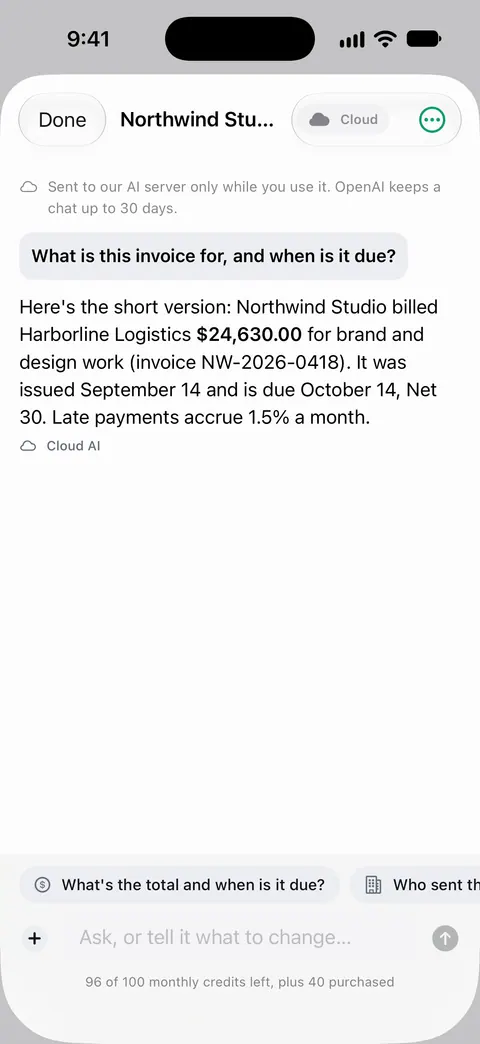
The cloud is a separate, paid choice that you make. Cloud AI is off until you switch it on, and page images are a separate permission. Pro Max, the plan with cloud AI, costs $149.99 a year in the US. Credits for cloud AI come in packs of 100 for $2.99, 400 for $9.99 and 1,000 for $21.99 in the US.
What it doesn’t change: once you turn cloud AI on, questions you send that way are answered off the phone, like any cloud AI. And on-device or not, an answer can be wrong, so open the page it came from. The privacy feature page and the Free and Pro page have the details.
Questions and answers
Is on-device AI as good as cloud AI?
For many document tasks, such as finding a date, an amount or a name, an on-device model is enough. Cloud models are larger and can do better with long documents, comparisons and harder questions. The trade is privacy and offline use against capacity.
How can I tell if an app’s AI runs on my iPhone?
Read what the app says in its settings and privacy details. A practical test: turn on Airplane Mode and try the feature. If it still works, it ran on your iPhone.
Does Apple see what I ask Apple Intelligence?
Apple says on-device tasks don’t leave the iPhone, and that data processed in Private Cloud Compute is not stored or made accessible to Apple. Requests sent to ChatGPT through the extension follow OpenAI’s handling instead.
Which AI does Scanner One use for questions?
Free accounts can ask the on-device AI 3 questions a day. Cloud AI is off until you switch it on, and page images are a separate permission. Pro Max, the plan with cloud AI, costs $149.99 a year in the US.
Sources
What this page says about Scanner One was checked against the app on .
- Apple iPhone User Guide, Apple Intelligence and privacy on iPhone — on-device models, Private Cloud Compute, and the Apple Intelligence Report steps; iOS 27 guide, undated, read 2026-11-13
- Apple iPhone User Guide, Change your Translate settings on iPhone — On-Device Translation: Automatic or Always, and offline use; iOS 27 guide, undated, read 2026-11-13
- Apple iPhone User Guide, Use Siri to get answers from ChatGPT on iPhone — what is sent to ChatGPT through the extension; iOS 27 guide, undated, read 2026-11-13
- NIST AI 600-1, Artificial Intelligence Risk Management Framework: Generative Artificial Intelligence Profile — data privacy and confabulation risks of generative AI; July 2024
- Scanner One on the App Store — the app’s own listing: on-device text recognition and the cloud AI switch
Get Scanner One
Scanner One is free, with generous limits: scanning, clean PDFs and text search never stop.

Scanner OneScan, sign and ask anything
Scanner One is free, with generous limits: scanning, clean PDFs and text search never stop.