
Guide
Pull dates, amounts and names out of a document
For one value, open the photo or scan, tap the Detect Text button and copy the text; quick actions let you call a number, open a link or convert a currency. To turn a date on a letter or flyer into a calendar event, point Visual Intelligence at it and tap Add to Calendar. For many documents, copy the key values into one table, or use an app that reads every page and lists the details it finds on each.

One value at a time with Live Text
Live Text reads the text in any photo, screenshot or scanned image. For a single number, it’s the fastest way.
- Open the photo or scan in Photos (or an image in Preview).
- Tap the Detect Text button.
- Touch and hold the value, drag the grab points around it, and tap Copy Text.
- Paste it where you need it.
Some values come with a shortcut. Apple says quick actions appear at the bottom of the screen depending on what’s in the picture: tap one to call a phone number, open a website, get directions or convert a currency. A bill from a foreign hotel can be converted without leaving the photo.
Dates into your calendar with Visual Intelligence
On an iPhone with Apple Intelligence (iPhone 15 Pro and later), Visual Intelligence turns a date it sees into an event.
- Activate Visual Intelligence: click and hold the Camera Control on models that have it, or use the Action button, the Lock Screen or Control Center if you’ve added it there.
- Point the camera at the letter, flyer or appointment card.
- Tap Add to Calendar, then Create Event.
Check the date, the time and the title before you save. A letter dated “4/3” means April 3 in the US and 4 March in most other countries.
What to pull from common papers
Most household papers have a handful of values worth keeping. Pulling these and no more keeps your table useful.
| Paper | Values to pull |
|---|---|
| Utility or phone bill | Amount due, due date, account number (last 4 digits), billing period |
| Pay stub | Pay date, gross pay, net pay, year-to-date totals |
| Receipt | Store, date, total, return window, what it was for |
| Lease | Start and end dates, rent, deposit, notice period |
| Insurance policy | Policy number, renewal date, premium, deductible |
| Medical bill | Date of service, provider, amount you owe, due date |
| Warranty | Purchase date, serial number, how long it lasts |
For account numbers, keep only the last 4 digits in a table you might share or sync. The full number stays in the document.
Put them in one table
A table is where separate values become useful: totals for a tax return, a list of bills due, a record of what you paid.
Set up a sheet in Numbers or any spreadsheet with these columns: Date, From, What, Amount, Due, Reference, File. Then:
- Write dates as year-month-day (2026-11-04). The National Archives recommends this international standard notation because it sorts in order.
- Type amounts as plain numbers, without currency signs, so the sheet can add them.
- One row per document. In File, put the document’s name so you can find the original.
- For many rows from one long document, such as a bank statement, converting the PDF to a spreadsheet is faster than copying. See turning a PDF into an Excel sheet.
Check what was read
Every text reader makes mistakes, and the cost is highest in numbers.
- Compare amounts digit by digit. 8 and 3, 1 and 7, 5 and 6 are common swaps.
- Watch decimal marks. “1.234,50” in a European invoice is one thousand two hundred thirty-four, not one point two.
- Total, not subtotal. Receipts and invoices have several totals. Copy the one you mean.
- Read the date format. Day-month or month-day changes the meaning of 03/04.
- Fading paper. Receipts printed on thermal paper fade. Scan them early, while the numbers are still sharp. The guide to scanning receipts has tips.
Where Scanner One helps, and where it doesn’t
For one total or one date, Live Text and Visual Intelligence are free and quick. Use them.
Scanner One helps when you have a pile and want the values without retyping them. Then it reads the text, names the document, tags it and puts it in the right folder. The details it finds are kept with each document, such as the pay date and net pay on a pay stub, or a due date on a bill.
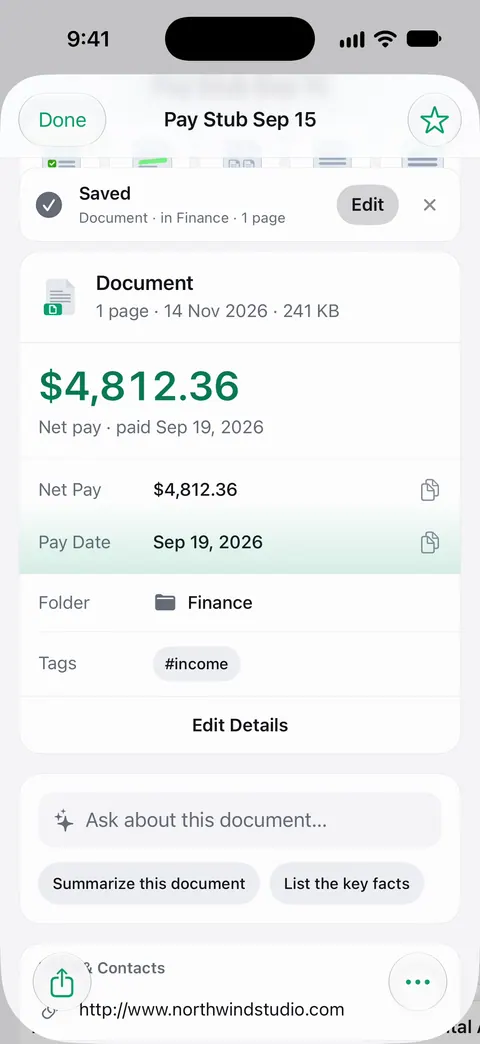
You can also ask for them. Ask your documents anything. When does the lease end? What did I spend at the shop? The answer comes back with the page it came from. Asked for the key dates and amounts, it can answer as a table, and AI Extract turns an invoice into clean text with a table of its line items. To move many rows into a spreadsheet: Scanner One exports to Word, keeping headings, lists and tables, and to Excel and CSV.
The limits, plainly:
- Free accounts get smart filing for 10 documents a month.
- Free accounts can ask the on-device AI 3 questions a day.
- Free accounts can run the PDF tools and the Word, Excel and CSV exports 3 times a week, from one shared allowance. Pro removes every limit.
- A value read wrong from a faded page is still wrong. Check amounts before you pay or file anything.
Needs You gathers bills due, return windows and IDs about to expire on Home, from your own papers. The guide to keeping track of bills due puts those due dates to work.
The smart filing feature page shows how documents are named and filed.
Questions and answers
Can iPhone add a date from a letter to my calendar?
On an iPhone with Apple Intelligence, yes: point Visual Intelligence at the page, tap Add to Calendar, then Create Event. Check the date, time and title before you save.
How do I get the total from a receipt without typing it?
Open the photo or scan, tap the Detect Text button, touch and hold the total, select it with the grab points and tap Copy Text. Then paste it where you need it, and compare it with the receipt.
Why are some numbers wrong after I copy them?
Text readers confuse similar shapes: 8 and 3, 1 and 7, 0 and O, and commas and periods in amounts. Faded thermal receipts make it worse. Check every digit of an amount or account number.
Does Scanner One find the details on each document?
Then it reads the text, names the document, tags it and puts it in the right folder. Free accounts get smart filing for 10 documents a month. Ask your documents anything. When does the lease end? What did I spend at the shop? The answer comes back with the page it came from.
Sources
What this page says about Scanner One was checked against the app on .
- Apple iPhone User Guide, Interact with content in a photo or video on iPhone — Live Text copying and quick actions for phone numbers, links and currencies; iOS 27 guide, undated, read 2026-11-13
- Apple iPhone User Guide, Learn about what’s around you with Visual Intelligence on iPhone — creating a calendar event from what the camera sees, and how to activate Visual Intelligence; iOS 27 guide, undated, read 2026-11-13
- US National Archives, Records Express: Best Practices for File Naming — international standard date notation (YYYY-MM-DD) for sorting; August 22, 2017, updated August 31, 2017
- Scanner One on the App Store — the app’s own listing: reading, naming and filing documents, and asking them questions
Get Scanner One
Scanner One is free, with generous limits: scanning, clean PDFs and text search never stop.

Scanner OneScan, sign and ask anything
Scanner One is free, with generous limits: scanning, clean PDFs and text search never stop.