
Glossary
What is thermal paper, and why do receipts fade?
Thermal paper is paper coated with chemicals that turn dark when heated, so a printer can make text with heat alone, no ink. Most store receipts use it. The image is fragile: the EPA notes that receipt paper can be damaged by sunlight, water, chemicals such as plasticizers, and friction, and calls it best suited to short-term printing. That is why a receipt you need for a return, a warranty or taxes should be scanned soon after you get it.

This page explains the paper and why it fades. For the steps to scan a receipt so it stays readable, see scan receipts on iPhone.
What thermal paper is
Most till receipts, many parking and lottery tickets, deli labels and some luggage tags are printed without ink. The paper itself does the work. The EPA’s report on thermal paper describes it as ordinary paper with a heat-sensitive coating on top, plus a base coat underneath that helps sharp printing. Some thermal papers also get a protective top coat and back coat, but the EPA notes that “thermal paper used for receipts typically lacks the top and back coats.”
How it prints
The heat-sensitive layer holds three main ingredients:
- A dye, usually a leuco dye, which is colorless at room temperature.
- A developer, a chemical that reacts with the dye. BPA was a common one; many papers now use alternatives.
- Often a sensitizer, which melts at a lower temperature and helps the two mix.
The printer’s thermal head pulses heat at tiny dots. Where it heats, the ingredients melt and react, and the dye changes shape into a dark color. No ink, no ribbon, which is why receipt printers are small, fast and cheap to run.
Why receipts fade
The image is a chemical reaction sitting near the surface, without a protective coat. The EPA lists what damages it: “prolonged exposure to sunlight, water, or chemicals (e.g., solvents, plasticizers) and to friction.” It also notes that rolls exposed to heat can turn black, and concludes that receipt printing “is best suited for short-term printing needs more so than longer term data storage.” Some thermal printing lasts years, but that is not something to count on.
In daily life, that means:
- Heat from a car dashboard turns the whole receipt gray or black.
- Light in a sunny window slowly bleaches the print.
- Plastic sleeves, wallet pockets and some sticky tapes contain plasticizers that pull the image off.
- Friction in a wallet or a pocket rubs the surface.
Why it matters for your papers
The receipts that fade are often the ones you need later: proof of purchase for a warranty claim, a return after the holidays, a business expense or a medical cost you might deduct. The IRS says the requirements for paper records “also apply to electronic records”, so a clear scan made while the receipt is readable keeps it usable long after the paper has gone blank. How long to keep each kind is covered in how long to keep receipts.
How to capture a receipt before it fades
With the iPhone’s own scanner, from Apple’s steps:
- Open Notes, open a note, tap the Attachment button and choose Scan Documents. Or, in Files, tap the More button and choose Scan Documents.
- Lay the receipt flat on a dark surface in even light. Long receipts can be scanned in sections.
- On iOS 26, Apple says you can choose flash or an image filter before you scan; a high-contrast filter can make faint print darker.
- Tap the Shutter button if it doesn’t capture by itself, adjust the corners, then tap Keep Scan and Done.
If a receipt is already faint, try more light from the side and a higher-contrast filter. Scan faded or old documents has more tricks.
Confusions people have
- Thermal vs regular paper. Receipts from an ink or laser printer, such as many invoices, don’t fade this way.
- BPA-free means fade-proof. It doesn’t. BPA-free paper swaps the developer, but it is still a heat-sensitive coating, open to the same heat, light, chemicals and rubbing.
- Photocopying vs scanning. A photocopy on regular paper lasts longer than the original, but a scan is easier to find again and to send.
Where Scanner One helps, and where it doesn’t
For a few receipts a year, Notes is enough: scan, keep, done.
Scanner One helps when receipts pile up. Scans come with Auto Clean, Color, Grayscale and Receipt filters. The Receipt filter turns gray thermal print into crisp black on white, as the screenshot shows. Then it reads the text, names the document, tags it and puts it in the right folder.
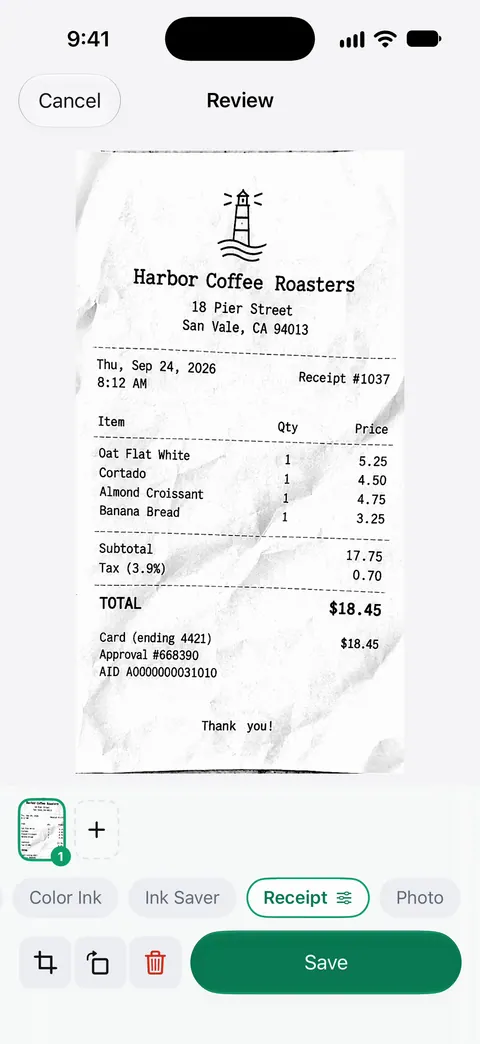
What it can’t do: bring back print that has completely faded, or make a store accept a scan in place of the original. Free accounts get smart filing for 10 documents a month. On a free account, pages you share, print or export carry a small “Scanned with Scanner One” label at the bottom right. Pro removes it.
Questions and answers
How can I tell if a receipt is thermal paper?
Thermal receipts are thin, slightly glossy on the printed side, and have no ink you can smudge. Many people test by scratching the shiny side quickly with a fingernail: the heat of friction leaves a dark mark on thermal paper.
Can a faded receipt be restored?
Sometimes partly. Scanning in good light with high contrast, or a black and white or receipt filter, can bring back faint print. Once the image has fully gone, there is nothing left to recover, so scan early.
Do I need to keep the paper receipt after scanning it?
For taxes, the IRS says the requirements for paper records also apply to electronic ones, so a clear, complete scan is a record in its own right. Stores set their own return rules, and some still ask for the original.
Is it safe to handle receipts?
The EPA notes that BPA used in some thermal paper can transfer to skin, and that people who handle receipts all day, such as cashiers, may face greater exposure. For occasional handling, washing your hands is a simple precaution.
Sources
What this page says about Scanner One was checked against the app on .
- U.S. EPA, Bisphenol A Alternatives in Thermal Paper, Final Report (August 2015) — chapter 3: thermal paper layers; leuco dye, developer and sensitizer; the print head’s heat triggers the color; receipt paper usually lacks protective top and back coats; damage from sunlight, water, solvents, plasticizers and friction; best for short-term needs, some printing estimated to last 5 to 12 years; BPA can transfer to skin; read 2026-11-13
- U.S. EPA, Partnership to Evaluate Alternatives to Bisphenol A in Thermal Paper — BPA as a developer in receipts; workers who handle receipts often may face greater exposure; 19 alternatives assessed; updated 2026-01-08, read 2026-11-13
- IRS, What kind of records should I keep — all requirements that apply to hard copy records also apply to electronic records; updated 2026-08-03, read 2026-11-13
- Apple Support, Scan documents on your iPhone or iPad (article 108963) — Scan Documents in Notes and Files, Keep Scan, filters on iOS 26; published 2026-02-13, read 2026-11-13
- Scanner One on the App Store — the app’s own listing: scan filters including Receipt
Get Scanner One
Scanner One is free, with generous limits: scanning, clean PDFs and text search never stop.

Scanner OneScan, sign and ask anything
Scanner One is free, with generous limits: scanning, clean PDFs and text search never stop.