
Guide
Scan faded receipts and old documents so you can read them
Scan in color or grayscale first, never straight to black and white, which can erase faint strokes. Use bright, even daylight from the side, and fill the frame. Then darken the text: try the scanner’s grayscale filter, or take a photo and in Photos lower Exposure and raise Contrast until the words stand out. For a receipt that’s nearly gone, scan it today and keep the matching bank or card statement as backup proof.

This page is about getting faint writing back: receipts that have faded to gray, pencil that has rubbed thin, old letters on yellowed paper. For receipts that are still fresh, scanning a receipt on iPhone is the everyday routine. For why receipts fade at all, see what thermal paper is.
First: capture everything, then darken
The biggest mistake with faded paper is choosing a black-and-white filter at the start. A black-and-white filter sorts each dot into ink or paper. Ink that has faded lighter than its cutoff is sorted as paper and vanishes from the scan.
So work in two steps:
- Capture the page in color or grayscale, so every faint stroke is in the file.
- Darken the text afterward, where you can see what you’re doing and undo it.
The National Archives makes the same point for records it keeps: digitize in color when color carries information needed to read the record. Yellowed paper and brown ink are exactly that.
Light the page for faint text
- Bright, even daylight from a window is best. Faint text needs light; a dim room adds grain that swallows thin lines.
- Light from the side, not from above you, so your shadow doesn’t sit on the page.
- Flash off for thermal paper and glossy stock. The flash flattens contrast and adds a hot spot. On matte, faded typewriter paper it can help: try one capture with and one without.
- A low, raking light for indented writing. When pencil is almost gone, the groove the pencil pressed into the paper often remains. A lamp held low to one side casts tiny shadows in those grooves and makes the words readable.
Capture it sharp and close
- Put the page on a dark, plain surface and flatten it gently. Old paper tears, so don’t force a fold.
- Open the scanner in Notes, Files or Preview. Before capturing, tap Filters and choose color or grayscale.
- Fill the frame with the page. A small receipt should take up most of the screen, close enough for detail but not so close the camera loses focus.
- Hold still and let it capture, or capture manually and drag the corners.
- Look at the thumbnail at full zoom before you move on.
Bring the text back
In the scanner
In Notes, tap the page’s thumbnail after capture and try the other filters. In Preview, Apple’s guide says you can tap the thumbnails to adjust the coloring of a scan. A grayscale version with the paper turned whiter is often enough for a receipt.
In Photos, for stubborn pages
For the hardest cases, take a regular photo with the Camera app and edit it, because Photos gives you finer control:
- Open the photo in Photos, tap the edit button, then tap Adjust.
- Lower Exposure a little, or lower Brilliance, to darken faint strokes.
- Raise Contrast and Black Point until the text separates from the paper.
- Lower Highlights if the paper glares.
- Tap the photo to compare with the original, then tap Done. Photos keeps the original, so you can always go back.
Then turn the edited photo into a PDF: see photos to PDF on iPhone, or use our free photos to PDF tool, which runs in your browser.
When a receipt is almost blank
- Scan it anyway. A gray ghost is still evidence of the store, date and total.
- Back it up with a statement. The IRS says account statements can prove a payment was made. It also notes that proof of payment alone doesn’t show what the expense was, so keep whatever shows what you bought: an order email, an invoice, a note you write on the scan.
Old letters, records and family papers
- Keep the color scan as the archive copy, and make a darkened copy for reading. If you ever need to show a record to an agency or a relative, the untouched scan is the honest one.
- Scan at full resolution and don’t compress the archive copy. You can always make a smaller copy to email.
- Handle with clean, dry hands, and support fragile pages from underneath.
- Name files with dates and people, not “Scan 14”. Scanning family records for genealogy has a naming system.
Stop the next receipt from fading
Scan receipts the day you get them, while the print is dark. Keep paper ones you must hold on to flat, cool and away from sunlight and heat, such as a car dashboard. A routine like the receipts guide takes a minute a day.
Where Scanner One helps, and where it doesn’t
Scans come with Auto Clean, Color, Grayscale and Receipt filters. Try Receipt or Grayscale on slips like these. The B&W filter has a strength slider, shown in the screenshot, so when you do want a crisp black-and-white copy you can set how much faint ink it keeps.
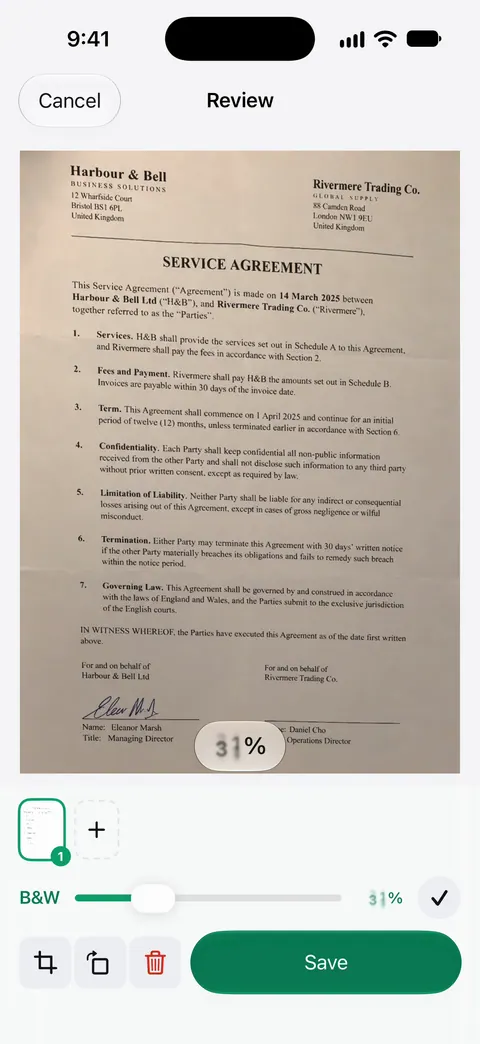
Text recognition runs on every page for everyone, free or Pro. Search looks inside the text of every document and shows the matching line and page. So once a faint receipt is readable, you can find it later by the store’s name. Clean Up, the smart eraser, can remove a stain or coffee ring from a scan: Free accounts can use Clean Up, the smart eraser, on 3 documents a month.
What it doesn’t do: no app can invent ink that isn’t there. If the paper is blank to the camera from every angle, the scan will be too. For old family documents, keep the original.
When the built-in way is enough: a grayscale scan in Notes, or a photo edited in Photos, rescues most faded pages. See Auto Clean and the filters for what each filter does.
Questions and answers
Can you recover a completely faded receipt?
Sometimes a little. Scan it in grayscale and push contrast hard, and look at it under light from a low angle. If nothing shows, ask the store for a copy from your card or order number, and keep your bank or card statement as proof of payment.
Should I heat a faded receipt to bring the text back?
No. Thermal paper prints with heat, so heating it tends to darken the whole slip and hide what’s left. Scan it as it is.
Why does black and white make my old letter worse?
A black-and-white filter decides for every dot whether it’s ink or paper. Faint ink lighter than its cutoff turns white and disappears. Grayscale keeps every shade, so you can darken it gently.
Should I keep the original after scanning an old document?
For family records, letters and anything legal or official, yes: a scan is a copy, and the original may matter later. For an everyday receipt, a clear scan plus your statement usually does the job; check the rules for your taxes or expense policy.
Sources
What this page says about Scanner One was checked against the app on .
- iPhone User Guide (iOS 27), Scan text and documents in Notes — Flash and Filters before capture; adjust after capture; read 2026-11-13
- iPhone User Guide (iOS 27), Scan text and documents in Preview — tap the thumbnails to crop, rotate or adjust the coloring of a scan; read 2026-11-13
- iPhone User Guide (iOS 27), Edit photos and videos — Adjust light and color with settings such as Exposure, Brilliance and Highlights; compare to the original; read 2026-11-13
- IRS, Publication 583 (12/2024), Starting a Business and Keeping Records — account statements can prove payment; proof of payment alone does not establish a deduction; revised December 2024
- National Archives Records Express, Digitizing Records: Requirements for Paper and Photographs — 300 pixels per inch minimum for textual records and color where it is needed to read the record; posted 2023-06-07
- Scanner One on the App Store — the app’s own listing
Get Scanner One
Scanner One is free, with generous limits: scanning, clean PDFs and text search never stop.

Scanner OneScan, sign and ask anything
Scanner One is free, with generous limits: scanning, clean PDFs and text search never stop.