
Glossary
Electronic signature vs digital signature
An electronic signature is any electronic sound, symbol or process a person adopts with the intent to sign, such as a drawn signature on a PDF, a typed name or a clicked "I agree". A digital signature is a specific technology: a cryptographic seal, tied to a certificate, that proves who signed and shows whether the file changed afterwards. Every digital signature is a kind of electronic signature, but most electronic signatures are not digital signatures.

This page is general information, not legal advice. Signature rules depend on the country, the state and the type of document, and they change. Check with the person or office asking for your signature, or a lawyer, when it matters.
This page explains the two terms and how they differ. Whether a signature holds up in law is its own question, covered in are electronic signatures legally binding. For the steps to sign on your phone, see sign a PDF on iPhone.
Electronic signature: a legal idea
“Electronic signature” is a broad term defined by law. The US ESIGN Act (15 U.S.C. § 7006) defines it as “an electronic sound, symbol, or process, attached to or logically associated with a contract or other record” and “executed or adopted by a person with the intent to sign the record.”
That covers a lot:
- your signature drawn with a finger and placed on a PDF,
- a picture of your handwritten signature pasted into a document,
- your name typed at the bottom of an email or a form,
- a box ticked or a button tapped that says “I agree”,
- a recorded “yes” on a phone line.
The key part is intent. What makes it a signature is that you meant it as one, not the technology used.
Digital signature: a technical idea
A digital signature is a specific kind of electronic signature built with cryptography. NIST’s Digital Signature Standard (FIPS 186-5) says digital signatures are used to detect unauthorized changes to data and to authenticate the identity of the signer.
How it works, simply:
- The signer has a pair of keys: a private key only they hold, and a public key anyone can use. A certificate, issued by a trusted organization, ties the public key to a named person or company.
- Signing computes a fingerprint of the exact file and seals it with the private key.
- Anyone opening the file uses the public key to check the seal. If even one character of the file changed after signing, the check fails.
So a digital signature answers two questions a drawn signature can’t: who really signed, and has the document been altered since.
The difference at a glance
| Electronic signature | Digital signature | |
|---|---|---|
| What it is | Any electronic mark or action adopted with intent to sign | A cryptographic seal tied to a certificate |
| Looks like | A drawn or typed name, a checkbox | Often nothing visible, or a stamp plus a signature panel |
| Proves who signed | Only through surrounding evidence (email, audit trail) | Through the certificate |
| Shows later changes | No | Yes, the check fails if the file changed |
| Needs a certificate | No | Yes |
| Typical use | Leases, forms, permission slips, everyday contracts | Government and tax filings, some EU and court processes, regulated industries |
Why it matters when you sign papers
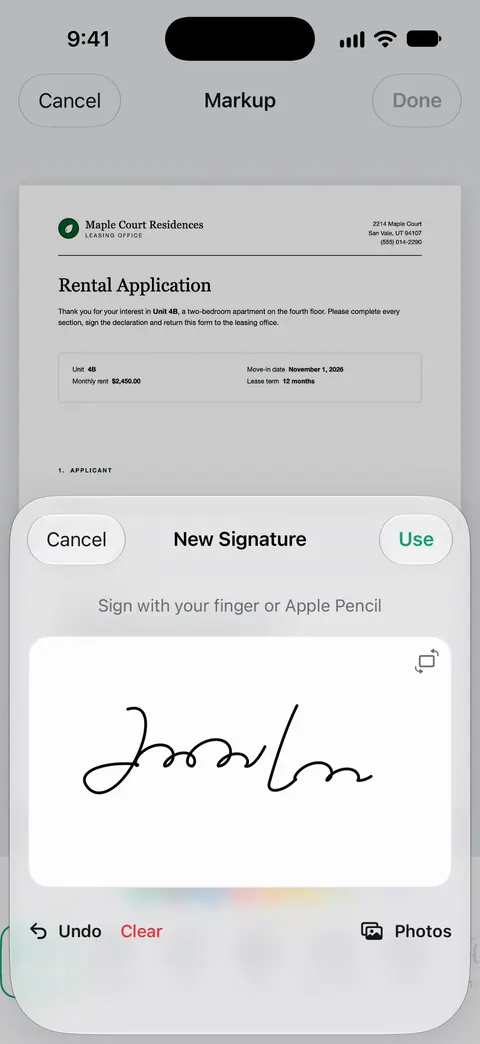
Most people asking you to sign a PDF want an electronic signature: your signature on the line, sent back. That is what iPhone’s Markup does. Apple’s steps: open the document, tap the Markup button, tap Add Signature, sign with your finger, tap Done, then drag the signature into place.
When someone asks for a “digital signature”, ask whether they mean a certificate-based one. In the EU, the eIDAS rules have three levels: simple, advanced and qualified. The European Commission says only qualified signatures are explicitly recognized as having the same legal effect as a handwritten signature everywhere in the EU, and those need a qualified certificate and device. A drawn signature can’t meet that.
Confusions people have
- “Digital” in everyday speech. Many people say digital signature when they mean any signature made on a screen. Check which one is meant.
- A scanned signature. A photo of your signature pasted on a page is an electronic signature, not a digital one. See scan a signature.
- Security. A drawn signature is easy to copy from one PDF to another. If proof matters, keep the email or message that came with it.
- Platforms. E-signature services often add an audit trail and their own certificate seal over your drawn signature. That seal is a digital signature by the service, not by you.
Where Scanner One helps, and where it doesn’t
For a single signature now and then, Markup in Files, Mail or Preview is enough, and free.
Scanner One handles the everyday electronic signature, alongside scanning the paper in the first place. You can sign and annotate documents. You draw your signature, place it on the page and share the PDF.
What it doesn’t do: it does not create certificate-based digital signatures, qualified EU signatures, or an audit trail. For those, use the service the requester names. Free accounts can sign and mark up 3 documents a month. On a free account, pages you share, print or export carry a small “Scanned with Scanner One” label at the bottom right. Pro removes it.
Questions and answers
Is a drawn signature on a PDF an electronic signature?
Yes. A signature drawn with your finger and placed on a PDF is an electronic symbol adopted with the intent to sign, which is how US federal law defines an electronic signature. It is not a digital signature, because it carries no certificate or cryptographic seal.
Do I need a digital signature or is an electronic one enough?
For most everyday papers, such as leases, permission slips and work forms, an electronic signature is what is asked for. Some government, court, tax and EU processes ask for a certificate-based or qualified signature. Check what the recipient requires.
How can I tell if a PDF has a digital signature?
Open it in a desktop PDF reader that checks signatures. A digitally signed file shows a signature panel or banner with the signer’s certificate and whether the document changed since signing. A drawn signature shows no such panel.
Can Scanner One add a certificate-based digital signature?
You can sign and annotate documents. That is a drawn electronic signature. If a form asks for a certificate-based digital signature, use the signing service or software the form names.
Sources
What this page says about Scanner One was checked against the app on .
- 15 U.S. Code § 7006, Definitions (ESIGN Act), via Cornell LII — the federal definition of electronic signature: an electronic sound, symbol or process attached to or logically associated with a record and executed or adopted with the intent to sign; read 2026-11-13
- NIST, FIPS 186-5 Digital Signature Standard — digital signatures detect unauthorized modifications to data and authenticate the identity of the signatory; published 2023-02-03, read 2026-11-13
- NIST CSRC Glossary, digital signature — definitions: origin authentication, data integrity and signatory non-repudiation; private key signs, public key verifies (SP 800-63-4); read 2026-11-13
- European Commission, What is eSignature — simple, advanced and qualified electronic signatures under eIDAS; only qualified ones explicitly have the legal effect of handwritten signatures across the EU; read 2026-11-13
- Apple iPhone User Guide, Fill out forms, sign documents, and create signatures on iPhone — Add Signature in Markup, signing with your finger, saved signatures; undated guide page for iOS 26 and 27, read 2026-11-13
- Scanner One on the App Store — the app’s own listing: sign and annotate documents
Get Scanner One
Scanner One is free, with generous limits: scanning, clean PDFs and text search never stop.

Scanner OneScan, sign and ask anything
Scanner One is free, with generous limits: scanning, clean PDFs and text search never stop.