
Guide
Scan receipts for taxes and expense reports
Scan each receipt within a few days, before thermal paper fades, with Notes, Files or Preview. Save it as a PDF in a folder for the tax year, named with the date, vendor, amount and category. The IRS says supporting documents should show the payee, the amount paid, proof of payment and the date, and that the rules for paper records also apply to electronic ones. This is general information, not tax advice: check IRS.gov or a tax professional.

This page is general information, not tax or legal advice. Tax rules change and depend on your situation: check the IRS pages linked here, or ask a tax professional.
What a receipt needs to show
A receipt is a “supporting document”: it backs up a number on your return or your expense report. The IRS says that for purchases and expenses, supporting documents should identify:
- The payee: who you paid.
- The amount paid.
- Proof of payment.
- The date incurred.
The IRS also notes that a combination of documents may be needed to cover all of these. A restaurant receipt might show the vendor, date and total, while your card statement shows how you paid. For business expenses, write the business purpose somewhere you’ll keep with the receipt, such as in the file name or on the scan itself.
What the IRS says about electronic copies
On its recordkeeping page, the IRS says: all requirements that apply to hard copy books and records also apply to electronic records. Publication 583 goes further for businesses that replace paper with an electronic storage system:
- The system must be able to index, store, preserve, retrieve and reproduce the records in a legible format.
- The original paper records may be destroyed provided the electronic storage system has been tested to show it meets IRS requirements. The details are in Revenue Procedure 97-22, linked from Publication 583.
- The IRS may test your electronic storage system.
What that means in practice: a clear, legible scan, kept where you can find it again and produce it if asked. Whether to throw away the paper is a separate decision; our guide on throwing away originals after scanning covers it, with the official links.
Set up a simple system
The best system is one you’ll keep up in March as well as January.
Folders by tax year
In the Files app, make one folder per tax year, such as “Taxes 2026”, in iCloud Drive or On My iPhone. Inside, a few category folders that match how you or your preparer report expenses, for example:
- Office and supplies
- Travel and vehicle
- Meals
- Medical
- Charitable donations
- Home office or rent
To make a folder, open the location, tap the More button, then New Folder.
Names that sort and search
Rename each scan as you save it (touch and hold, Rename), in one pattern:
2026-03-14 City Office Supply 86.40 supplies
Date first sorts the folder by date; vendor and amount let you match it to your bank statement; the last word is the category. Add a tag (touch and hold, Tags) if one receipt belongs to a client or a project. More patterns in naming scanned documents.
A weekly 10 minutes
- Empty your wallet, bag and car of receipts once a week.
- Scan them in one session with Files (open the right folder, tap the More button, then Scan Documents), one receipt per scan.
- Rename each one as you save it.
- Keep or discard the paper according to your own decision above.
Scanning weekly matters for thermal receipts, which fade with heat and light. Don’t highlight or tape over thermal print before scanning: a California State University staff guide warns that highlighters destroy it. Tips for getting faint receipts readable are in scanning receipts on iPhone.
Expense reports at work
Employers set their own rules for expense reports: which receipts they need, in what format, and how soon. Check your company’s policy. In general:
- Scan each receipt on the day, while you remember the purpose and who was there.
- Keep one PDF per receipt, named the same way, so you can attach exactly what the report asks for.
- Keep your own copy after you submit, in a folder for that trip or month.
If a report is due tomorrow and the receipts are still in your bag, see the expense report situation guide.
At tax time
- Check the year’s folder against your bank and card statements. A missing receipt is easier to find in February than during an audit.
- Give your preparer the folder. In Files, touch and hold the year’s folder and tap Compress to make one ZIP file, or share an iCloud Drive folder with them.
- Keep the folder after you file, for as long as the records may be needed: see how long to keep tax records. The full list of papers for a return is in documents you need to file your taxes, and freelancers have their own list.
Where Scanner One helps, and where it doesn’t
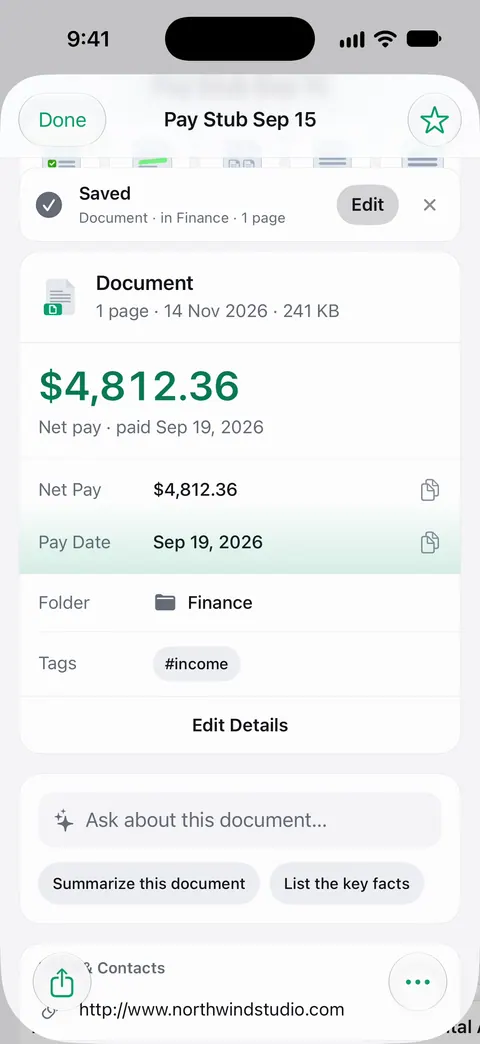
The weekly scan is where an app saves the most typing. Scans come with Auto Clean, Color, Grayscale and Receipt filters. The Receipt filter is made for faint till print. You scan each receipt and save it. Then it reads the text, names the document, tags it and puts it in the right folder. So each receipt arrives named and filed. Search looks inside the text of every document and shows the matching line and page. Ask your documents anything. When does the lease end? What did I spend at the shop? The answer comes back with the page it came from.
Your preparer may want a spreadsheet. Scanner One exports to Word, keeping headings, lists and tables, and to Excel and CSV.
Packs: say what you’re applying for, like a visa, a lease or your taxes, and see which papers you have and what’s missing. Taxes are one of the things a Pack can be for.
The limits that apply: Free accounts get smart filing for 10 documents a month. Free accounts can run the PDF tools and the Word, Excel and CSV exports 3 times a week, from one shared allowance. On a free account, pages you share, print or export carry a small “Scanned with Scanner One” label at the bottom right. Pro removes it. Documents stay on your iPhone unless you share them or turn on iCloud Sync.
What it doesn’t do: it isn’t tax software or an accounting system, and it doesn’t decide what’s deductible or whether your records meet IRS standards. When the built-in way is enough: a handful of receipts a year fit well in a Files folder named by year.
Questions and answers
Does the IRS accept scanned receipts?
The IRS says that all requirements that apply to hard copy records also apply to electronic records, and Publication 583 describes the standards for electronic storage. Read those pages, or ask a tax professional about your situation.
What should a receipt show for taxes?
According to the IRS, supporting documents for purchases and expenses should identify the payee, the amount paid, proof of payment and the date. Sometimes you need more than one document to show all of that.
Can I throw away paper receipts after scanning them?
Publication 583 says original paper records may be destroyed provided your electronic storage system has been tested to meet IRS requirements (Revenue Procedure 97-22). If you’re unsure, keep the originals or ask a tax professional.
How long should I keep receipts for taxes?
Generally, as long as they may be needed for the return they support, until the period of limitations for that return ends. Publication 583 lists the periods; our guide on tax records summarizes them.
Sources
What this page says about Scanner One was checked against the app on .
- IRS, What kind of records should I keep — supporting documents should identify the payee, amount paid, proof of payment and date; electronic records have the same requirements; page last reviewed or updated 2026-08-03
- IRS, Publication 583: Starting a Business and Keeping Records — electronic storage systems, when originals may be destroyed, Revenue Procedure 97-22, and how long to keep records; revised December 2024
- California State University, San Bernardino, Preparing Documents for Scanning: Tips and Techniques — highlighters and tape ruin thermal receipts; keep them away from sunlight and heat; no date shown
- iPhone User Guide (iOS 27), Organize files and folders in Files — folders, renaming, tags and compressing a folder; read 2026-11-13
- Scanner One on the App Store — the app’s own listing
Get Scanner One
Scanner One is free, with generous limits: scanning, clean PDFs and text search never stop.

Scanner OneScan, sign and ask anything
Scanner One is free, with generous limits: scanning, clean PDFs and text search never stop.