
Guide
Keep a copy of a vaccination record on your phone
Scan the paper record or card flat, in color, with Scan Documents in Notes or Files, including both sides, and save it in a Health folder with the person’s name and the date. If you don’t have the paper, ask the doctor’s office or your state’s immunization information system: the CDC doesn’t hold vaccination records. Where your provider supports it, the Health app can download your vaccination records too. Keep the original, since schools and travel may ask for an official copy.

This page is about one record: proof of the vaccines you or your children have had, kept on your phone so it’s there when a school, camp, employer or trip asks for it. For a fuller system for every medical paper, see keeping medical records on iPhone.
This is general information, not medical advice. Which vaccines and which kind of proof a school, employer or country requires depends on where you are and changes over time. Check with them and your state or national health authority.
Scan the paper record you have
Vaccination records come as yellow cards, clinic printouts, booklets from another country, or a state form filled in by the doctor. Scan each one the same way.
- Lay it flat on a dark, plain surface in good daylight. Cards from a wallet are often bent; press them flat under a book for a few minutes.
- Open Notes, create a note titled with the person’s name (“Maya, vaccination record”), tap the Attachment button and then Scan Documents. In Files, tap the More button and then Scan Documents.
- Keep the flash off if the card is laminated or glossy. A white glare spot over a date makes the copy useless.
- Scan the front, then the back, as two pages of one document, even if the back looks almost empty. Later doses, stamps and lot numbers often end up there.
- Scan every page of a booklet or a multi-page printout.
- Tap the Done button. In Files, choose a folder such as Health and tap Save.
Check every date is readable
Zoom in. Handwritten dates and clinic stamps are the details people get asked about, and they’re the ones a bad scan loses. Look for:
- The person’s full name and date of birth.
- Each vaccine name, dose number and date.
- The clinic name, stamp or signature.
If anything is unclear, scan that side again with the card tilted slightly away from the light.
Keep color
A color scan keeps stamps, colored ink and handwritten notes distinct from the printed form. Black and white can make a faint stamp vanish.
If you don’t have the paper
Many adults have no idea where their childhood record went. The CDC is clear that it doesn’t hold vaccination records. It points you to:
- The provider who gave the shots: a pediatrician, clinic or pharmacy.
- Your state’s immunization information system (IIS), the registry that stores records. The CDC’s contacts page lists each state’s IIS. Try the state you live in now, and the state where you or your child got the most recent shots.
- Your local or state health department’s immunization program.
Other places worth checking: a parent’s files, school or college health records, and military records if you served. When the official copy arrives as a PDF or printout, save or scan it into the same place as your other records.
Use the Health app if your provider supports it
Apple’s Health app can hold your vaccinations alongside allergies, medications and labs, downloaded from healthcare organizations that support it (not in all countries or regions).
- Open Health, tap Summary, then tap your picture or initials.
- Tap Health Records, then Get Started (or Add Account if you’ve set one up before).
- Find your clinic or hospital, tap it, then tap Connect Account and sign in with your patient portal details.
New records then arrive automatically. Apple also notes you can download some records with a QR code or link from a provider or health authority. If your provider isn’t listed, a scan is still your copy.
When you’re asked for proof
- School enrollment. Schools usually ask for immunization records with the other enrollment papers. Some states require their own form completed by a provider, so a scan of an old card may not be enough. See the school enrollment documents checklist and forms for a child starting school.
- Travel. Some countries ask for proof of specific vaccines. Carry the original where it’s required, and keep the scan as a backup. The international travel documents checklist covers what to pack.
- Work, college or camp. Read the request: some accept a copy, others want an official record from the provider or the state registry.
Keep it private
A vaccination record carries a name, date of birth and health details. Keep it in a folder or note you’d be comfortable with others not seeing, and lock the app that holds it if others use your phone: see locking documents with Face ID. Share it only with whoever asked, and only the pages they need. Keep the paper original in your home files.
Where Scanner One helps, and where it doesn’t
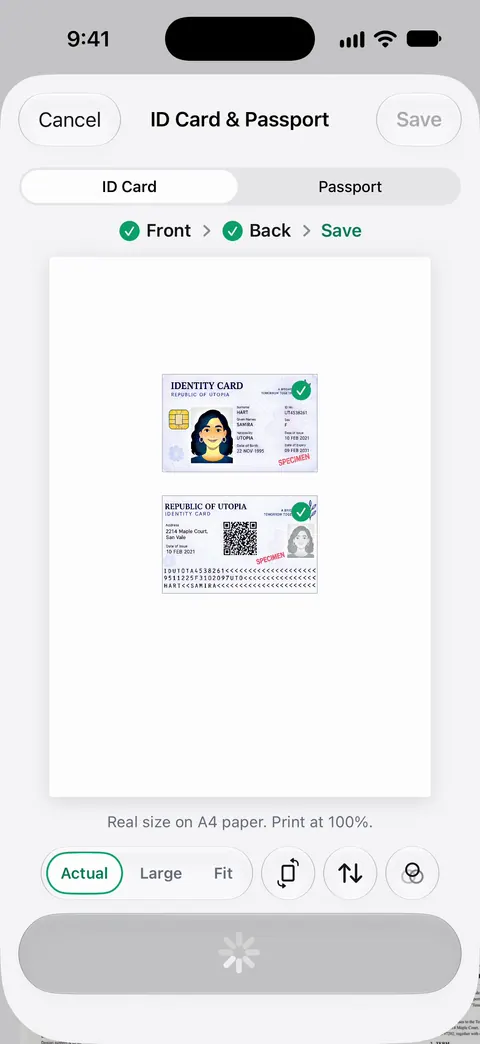
Scanner One finds the edges of the page automatically and corrects the perspective. That helps with small, bent cards held at a slight angle. ID cards and passports are scanned with both sides on one printable page. That two-sided layout also suits a wallet-size vaccination card.
Search looks inside the text of every document and shows the matching line and page. So searching a vaccine name or a child’s name finds the record without remembering where you saved it. Documents stay on your iPhone unless you share them or turn on iCloud Sync. You can lock the app with Face ID.
What it doesn’t do: it doesn’t connect to your doctor, your state registry or the Health app, and a scan is not an official record. If you send the copy from a free account, On a free account, pages you share, print or export carry a small “Scanned with Scanner One” label at the bottom right. Pro removes it.
When the built-in way is enough: Notes or Files with Scan Documents keeps a good copy, and the Health app is the better home for records your provider can send directly. More in Guides.
Questions and answers
Where can I get a copy of my vaccination record?
Start with the doctor’s office or clinic that gave the shots, then your state’s immunization information system (IIS) or health department. The CDC says it does not have vaccination record information and points people to their state’s IIS.
Will a school accept a photo or scan of my child’s immunization record?
Some schools accept a copy for enrollment; others want a specific state form or a record signed by a provider. Check with the school or district and your state health department before the first day.
Can I put my vaccination record in the iPhone Health app?
If your provider supports Health Records, the Health app can download your vaccinations along with other records. A provider can also give you a QR code or link for some records. It isn’t available in every country or region.
Should I scan the back of a vaccination card?
Yes. Cards often list later doses, lot numbers or a clinic stamp on the back. Scan both sides into the same PDF.
Sources
What this page says about Scanner One was checked against the app on .
- CDC, Contacts for IIS Immunization Records — CDC doesn’t hold vaccination records; contact the state immunization information system, your provider or the health department; updated 2026-11-10
- iPhone User Guide (iOS 27), Download health records — Health Records downloads vaccinations and more from supporting organizations, or from a provider’s QR code or link; not in all countries; read 2026-11-13
- Apple Support, Scan documents on your iPhone or iPad (article 108963) — Scan Documents in Notes and Files; page dated 2026-02-13
- iPhone User Guide (iOS 27), Search through your notes — Notes search covers text in scanned documents; read 2026-11-13
- Scanner One on the App Store — the app’s own listing
Get Scanner One
Scanner One is free, with generous limits: scanning, clean PDFs and text search never stop.

Scanner OneScan, sign and ask anything
Scanner One is free, with generous limits: scanning, clean PDFs and text search never stop.