
Guide
Scan a check: deposit it, keep a record, or send a voided one
To deposit a check, use your bank’s app: a scanner app or a PDF can’t deposit anything. To keep a record of a check, scan the front and back with Scan Documents in Notes, Files or Preview before you deposit or mail it. For a voided check that HR or a payroll service asks for, write VOID in large letters across a blank check without covering the numbers along the bottom, scan it, and send it through their secure upload.

People search “scan a check” for three different jobs. This page sorts them out, because the right tool is different for each.
| What you want | Use | Why |
|---|---|---|
| Put the money in your account | Your bank’s app | Only the bank can accept a deposit |
| Keep a copy of a check you wrote or received | A document scanner (Notes, Files, Preview) | A PDF is a lasting record you control |
| Give HR or payroll your account details | A scanned voided check, or your bank’s direct deposit form | They need the routing and account numbers |
Depositing a check: use your bank’s app
Mobile deposit happens in your bank’s app, not in a scanner. The app opens its own camera, asks for the amount, and takes a photo of the front and the back. J.P. Morgan’s steps are typical: choose Deposit checks and the account, enter the amount, photograph the front, endorse the check, photograph the back, then confirm.
Banks set their own rules for the endorsement (some want specific words under your signature), deposit limits and cut-off times. Follow what your bank’s app shows on screen.
After a mobile deposit, keep the paper check for a while. The FDIC suggests tracking the checks you deposit, for example by writing the deposit date on the check, holding onto it until the check has cleared and the money is in your account, and then destroying it, preferably with a good shredder.
Keeping a PDF record of a check
A scan is useful when you want proof of a payment you made or received: a rent check, a deposit refund from a landlord, a settlement or a check you’re mailing to a government office.
- Put the check on a dark, plain surface. Checks are light paper, and a dark table gives a clear edge.
- Start a scan. In Notes, tap the Attachments button in a note, then Scan Documents. In Files, tap the More button, then Scan Documents. In Preview (iOS 26 and later), tap Scan Documents.
- Capture the front. If you’ve already endorsed it, flip it and capture the back too: the signature is part of the record.
- Tap the Done button, and in Files choose a folder and tap Save.
- Name it with the date, the payer or payee and the amount, such as “2026-11-04 check 1043 to Oak Property, rent”.
Use the color or grayscale filter rather than a harsh black-and-white one. Checks have patterned backgrounds, and a strong black-and-white filter can turn the pattern into speckles that hide the amount.
Records you share with someone else
If you send a check copy as proof of payment, the other person rarely needs your full account number. The routing number and account number are printed along the bottom of every check (the IRS shows where on a sample check). Hide the account number before sending, using real redaction, not a black box drawn on top. Redacting a PDF properly explains the difference.
How long to keep these records depends on what they prove. How long to keep bank statements covers the usual timelines.
A voided check for direct deposit
New employers and payroll services often ask for “a voided check” to set up direct deposit. They want the bank’s routing number and your account number, printed in a way they can trust, on a check that can’t be cashed.
- Take a blank check from your checkbook. Don’t sign it.
- In blue or black ink, write VOID in large letters across the front. Keep the letters above the line of numbers at the bottom, so the routing and account numbers stay readable.
- Scan the front only, using the steps above. A voided check doesn’t need its back.
- Zoom in and check that every digit of the routing and account numbers is clear.
- Name it “Voided check for direct deposit, [Employer]” and send it the way they ask.
Here, don’t hide the account number: it is the whole point. That is also why it deserves a safe route. Use the employer’s secure portal if there is one. If it must go by email, lock the PDF: in Preview, tap the Actions menu next to the file name, tap Lock, type the same password twice and tap Done, then share the password by phone. Sending documents securely has more options.
No paper checks?
Many people never had a checkbook. Most banks offer a direct deposit form or account letter in their app or on their website showing the same numbers. The IRS notes that most banks also list their routing number on their website. Ask your employer whether a bank form is accepted. The rest of the first-week paperwork is in the new job paperwork checklist, and the papers to keep from your first job says what to file afterwards.
Where Scanner One helps, and where it doesn’t
It does not deposit checks: that is your bank’s job.
For the record and the voided check: Scanner One finds the edges of the page automatically and corrects the perspective. Scans come with Auto Clean, Color, Grayscale and Receipt filters. Grayscale keeps a check’s patterned background calm.
For copies you share: Redaction is permanent. That is how you hide an account number for good. Pro adds redaction, the smart eraser, edit text, auto-export and five alternate app icons. So redaction needs Pro.
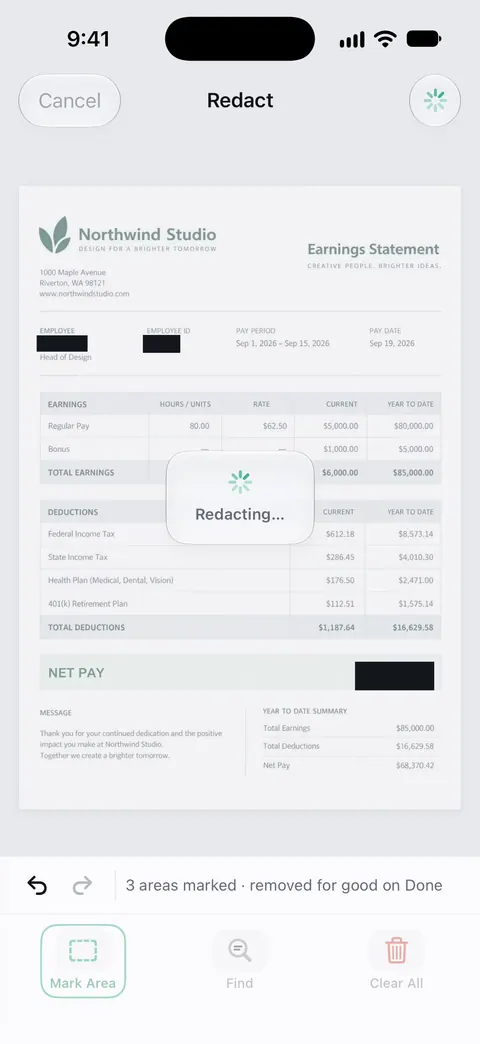
The PDF tools merge, split, compress, password-protect, add page numbers and watermarks, and extract text. A password is one of them, and Free accounts can run the PDF tools and the Word, Excel and CSV exports 3 times a week, from one shared allowance. On a free account, pages you share, print or export carry a small “Scanned with Scanner One” label at the bottom right. Pro removes it. Documents stay on your iPhone unless you share them or turn on iCloud Sync.
When the built-in way is enough: a voided check or a one-off record scans perfectly well in Notes, Files or Preview. Scanner One earns its place when you keep many payment records and want to find them by payee or amount later, or need to hide account numbers before sharing.
Questions and answers
Can I deposit a check by scanning it to PDF?
No. Deposits go through your bank’s own app, which photographs the check in its deposit screen. A PDF from a scanner app is only a record. Ask your bank if you’re not sure which app or limit applies.
How do I make a voided check PDF for direct deposit?
Write VOID in large letters across the front of a blank check in ink, leaving the numbers along the bottom readable. Scan it with Scan Documents in Notes, Files or Preview and send the PDF through your employer’s secure upload.
What if I don’t have paper checks?
Many banks let you download a direct deposit form or letter from their app or website showing your routing and account numbers. Ask your employer whether they accept it instead of a voided check.
Should I keep a scan of a check after I deposit it?
The FDIC suggests holding the paper check until it has cleared and the money is in your account, then shredding it. A scan can be your record afterwards, or the deposit record in your bank app may be enough.
Is it safe to email a voided check?
A voided check shows your routing and account numbers. Send it only to the payroll team or service that asked, preferably through their secure portal, or as a password-locked PDF.
Sources
What this page says about Scanner One was checked against the app on .
- FDIC Consumer News, Banking at the speed of technology — track deposited checks, hold the check until it clears, then shred it; issue of October 2019
- J.P. Morgan, Mobile check deposits (how-to page) — an example of a bank app’s deposit steps: front photo, endorse, back photo, confirm; read 2026-11-13
- IRS, Get your refund faster: tell IRS to direct deposit your refund — what the routing number and account number are, with a sample check; last updated 2026-05-18
- Apple Support, Scan documents on your iPhone or iPad (article 108963) — Notes and Files scanning steps and filters on iOS 26; page dated 2026-02-13
- iPhone User Guide (iOS 27), Lock PDFs in Preview — locking a PDF with a password; read 2026-11-13
- Scanner One on the App Store — the app’s own listing
Get Scanner One
Scanner One is free, with generous limits: scanning, clean PDFs and text search never stop.

Scanner OneScan, sign and ask anything
Scanner One is free, with generous limits: scanning, clean PDFs and text search never stop.