
Situation
A medical bill you do not understand: what to gather
Don’t pay it or ignore it yet. Call the billing office and ask for an itemized bill. Then gather your insurer’s explanation of benefits (EOB) for the same visit, any estimate you were given, and your own payment records. Compare them line by line for duplicate charges, services you didn’t get and claims your insurer hasn’t processed. If something is wrong, dispute it in writing with copies, ask about financial assistance, and keep notes of every call.

The first steps, today
A confusing medical bill is stressful, and the instinct is either to pay it to make it go away or to put it in a drawer. Do neither for now. These steps come from the CFPB’s advice:
- Make sure it is yours, and not already paid. Check the name, the date of service and the provider. Bills do get sent to the wrong person, or arrive after you have paid.
- Note the due date. Write it down so the dispute doesn’t run past it unnoticed.
- Call the billing office. Ask for an itemized bill, and ask whether they will hold the account while you review it. Write down who you spoke to and when.
- Look for your insurer’s statement for the same visit, the explanation of benefits.
The papers to gather
Put these together before you compare anything:
- The itemized bill. Each service on its own line, with dates and codes, not a single total.
- The explanation of benefits (EOB) from your insurer for the same date of service.
- Your insurance card and plan documents, for what is covered, your deductible and your copays.
- A good faith estimate, if you were uninsured or paid yourself and were given one before the care.
- Any referral or prior approval letters.
- Your own records of payment: receipts, card statements, bank records.
- Notes from every call: date, name, what was said.
Read the bill against the EOB
Lay the itemized bill and the EOB side by side, line by line. Look for:
- Duplicate charges: the same service or test billed twice.
- Services you didn’t receive, such as a test that was cancelled.
- A claim your insurer never received or hasn’t processed. If the EOB doesn’t exist yet, the bill may be ahead of the insurance.
- A different “you owe” amount on the bill and on the EOB.
- Out-of-network charges you shouldn’t face. The No Surprises Act protects most insured people from surprise out-of-network bills for emergency care, and for some non-emergency care at an in-network hospital or surgery center. Ground ambulance rides are not covered by it.
- A bill far above your good faith estimate, if you were uninsured or self-pay. You may be able to dispute it.
Dispute it in writing
A phone call starts the conversation. A letter makes it a record.
- Write to the billing office. Say which charges you dispute and why, and include copies of your documents, never the originals. Keep a copy of what you send.
- Appeal to your insurer if the problem is a claim they denied or paid wrongly. Ask for an internal appeal, and if that fails, an external review.
- Call the No Surprises help desk at 1-800-985-3059 if you think surprise billing rules were broken. It is open 7 days a week, with language help.
- Keep going until you have an answer in writing.
If you owe it but can’t pay it
Even a correct bill can be more than you can manage. You have options:
- Ask about financial assistance. Nonprofit hospitals must have financial assistance or charity care programs, and some states require more. Ask before you pay.
- Negotiate. Ask whether they will accept a lower amount you can afford.
- Ask for an interest-free payment plan from the provider.
- Be careful about putting it on a credit card. It can carry high interest, and you lose room to negotiate.
- Special programs: people in Medicare’s QMB program shouldn’t be billed for Medicare-covered costs, and veterans may qualify for VA hardship help.
If it goes to collections
You can dispute a medical bill with a debt collector and with the credit reporting companies. If you have trouble with either, you can complain to the CFPB online or at 855-411-2372, and to your state attorney general or insurance department.
Keep the file afterwards
When it is settled, keep the itemized bill, the EOB, your letters and the final answer together. Our guides on how long to keep medical bills and keeping medical records on your iPhone help you decide what to keep.
This page is general information, not medical, legal or financial advice. Rules differ by plan and by state, and they change: check the CFPB and CMS pages linked here, or ask your state’s insurance department.
Where Scanner One helps, and where it doesn’t
The work here is reading and writing letters, and no app can dispute a bill for you. Scanner One helps with the paper around it.
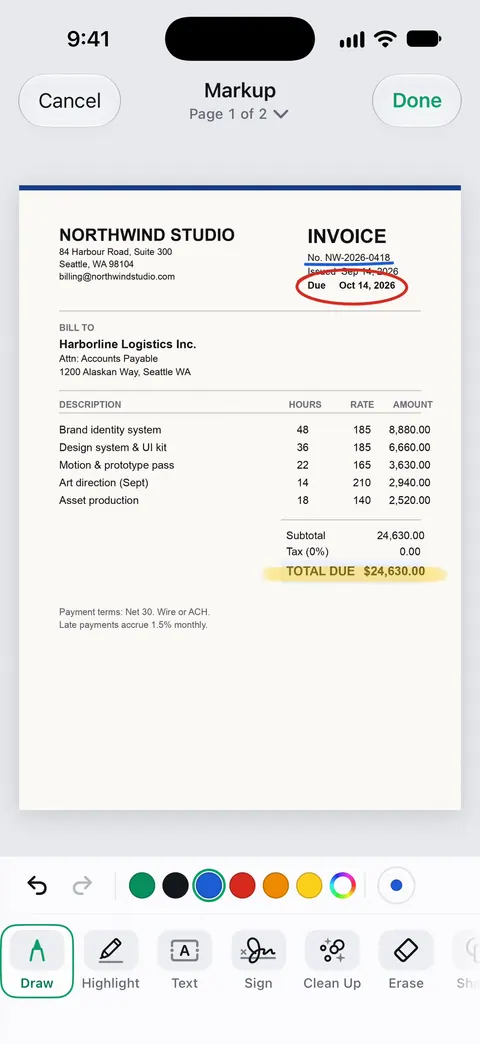
Point your camera at any piece of paper. Scanner One finds the edges, straightens the page, cleans it up and saves a real PDF. Scan the bill and the EOB and they sit side by side in one folder. You can sign and annotate documents. You can circle the lines you dispute before you send a copy.
Search looks inside the text of every document and shows the matching line and page. Ask your documents anything. When does the lease end? What did I spend at the shop? The answer comes back with the page it came from. Free accounts can ask the on-device AI 3 questions a day. Treat any answer as a pointer to the right line, then read the line yourself; our guide to pulling dates and amounts out of documents explains how to check.
Free accounts can sign and mark up 3 documents a month. On a free account, pages you share, print or export carry a small “Scanned with Scanner One” label at the bottom right. Pro removes it. Documents stay on your iPhone unless you share them or turn on iCloud Sync.
To send your copies, our guide to scanning and emailing a document covers the built-in way as well.
Questions and answers
How do I get an itemized medical bill?
Call the billing office on the number printed on the bill and ask for an itemized statement for that date of service. Ask them to send it in writing or to your patient portal. The CFPB suggests checking each line to see whether you received each service.
What is an explanation of benefits?
It is the statement your health insurer sends after a claim, showing what the provider charged, what the plan paid and what you may owe. It is not a bill, but it is the document to compare your bill with.
Do I have to pay a medical bill while I dispute it?
The CFPB notes that a dispute can take a while, and in the meantime the bill may still be owed and could pick up late fees or interest. Tell the billing office you are disputing it and ask whether they will pause it while they review.
What is the No Surprises Act?
A federal law, in force since 2022, that protects most insured people from surprise out-of-network bills for emergency care and some care at in-network hospitals. If you are uninsured or paying yourself, providers generally have to give you a good faith estimate. The help desk is 1-800-985-3059.
Who can help me with a medical bill dispute?
Your insurer, through an internal appeal and then an external review; the No Surprises help desk at 1-800-985-3059; your state’s insurance department or attorney general; and the CFPB, for problems with debt collectors or credit reports, at 855-411-2372.
Sources
What this page says about Scanner One was checked against the app on .
- CFPB, What should I do if I can’t pay a medical bill? — make sure you owe it, ask for an itemized bill, compare with the explanation of benefits, appeals, financial assistance at nonprofit hospitals, payment plans, disputes with collectors and credit bureaus, complaints; last reviewed 2026-10-28
- CMS, Medical bill rights (No Surprises Act) — protection from surprise out-of-network bills for emergency care and some care at in-network facilities, good faith estimates for uninsured or self-pay patients, disputes when a bill is far above the estimate, and the help desk number; last modified 2026-10-05
- Scanner One on the App Store — the app’s own listing: scanning, markup, search, ask your documents
Get Scanner One
Scanner One is free, with generous limits: scanning, clean PDFs and text search never stop.

Scanner OneScan, sign and ask anything
Scanner One is free, with generous limits: scanning, clean PDFs and text search never stop.