
Situation
Your visa appointment is next week: getting the papers in order
Open the official checklist for your exact visa from the embassy, consulate or visa center that booked your appointment, and save it. Check your passport’s validity, your application confirmation page and appointment letter, and the photo rules. Then make sure every supporting paper is current, in the language they ask for, and in their order. Make copies, keep the originals ready, and read what you may bring into the building.

Today: confirm the basics
Do these first, because they decide everything else:
- Find the official checklist for your exact visa and the place you apply. Use the embassy, consulate, visa center or government website, not a forum or an agency’s summary. Save it as a PDF or print it.
- Read your appointment confirmation. Date, time, address, and what it says to bring.
- Check your passport. Each country sets its own rule. For example: the UK wants a passport valid for your whole stay; for a Schengen visa it should be valid at least 3 months after you leave the Schengen area; Canada’s checklist asks for a passport valid at least 6 months from your travel date. Count blank pages too.
- Check your application. For a U.S. visa, the U.S. Embassy in London says to bring a printed copy of your DS-160 confirmation page, and its number must match the one in your appointment account. The form has to be signed and submitted at least 2 business days before your appointment.
Our checklists for the Schengen visa, the UK visitor visa, the US visitor visa and the Canada visitor visa list what each usually asks for, with links to the official pages.
The papers most visa checklists ask for
The exact list is the official one. Most visitor visa lists cover the same ground:
| What it proves | Typical documents |
|---|---|
| Who you are | Passport, old passports, national ID |
| The application | Application form or confirmation page, appointment letter |
| Your photo | Photos to the exact size and background rules |
| Why you are going | Invitation letter, itinerary, hotel or event bookings, a conference registration |
| That you can pay | Bank statements, pay stubs, a letter from whoever is paying |
| That you will return | An employer letter, a lease or deed, family ties, a return ticket |
| Health cover | Travel medical insurance, which a Schengen visa requires |
| Translations | Certified translations of documents not in the accepted language |
For a Schengen visa, the European Commission lists the application form, a photo, the passport, travel medical insurance that covers emergency care, hospitalization and repatriation, and documents on the purpose of the stay, your means, your accommodation and your intention to return. The consulate may ask for more.
This week, day by day
Day 1. Print or save the checklist. Mark what you have and what you don’t.
Day 2. Request what you need from others: an employer letter, a reference, an invitation, bank statements. Ask for them on letterhead, signed and dated.
Day 3. Order certified translations if any document isn’t in the accepted language. The UK, for one, asks for certified translations of documents not in English or Welsh.
Day 4. Get photos taken to the exact specification for that country.
Day 5. Make copies. Put everything in the order of the checklist, in a folder, originals and copies together.
The day before. Re-read the appointment letter. Plan your route, aim to arrive early, and check the security rules. The U.S. Embassy in London, for example, has airport-style screening and does not allow laptops or bags larger than cabin baggage, with no storage for them.
If you upload documents
Some applications are mostly online. Canada’s, for example, gives you a personalized document checklist in its portal and says you will need a scanner or a camera. Its biometrics appointment comes after you apply, once you get the instruction letter.
For uploads:
- Scan, don’t photograph at an angle. Straight, flat pages with all four edges visible.
- One PDF per item on the checklist, named after the item, such as “Bank statements Aug to Oct”.
- All pages of a statement, not only the first.
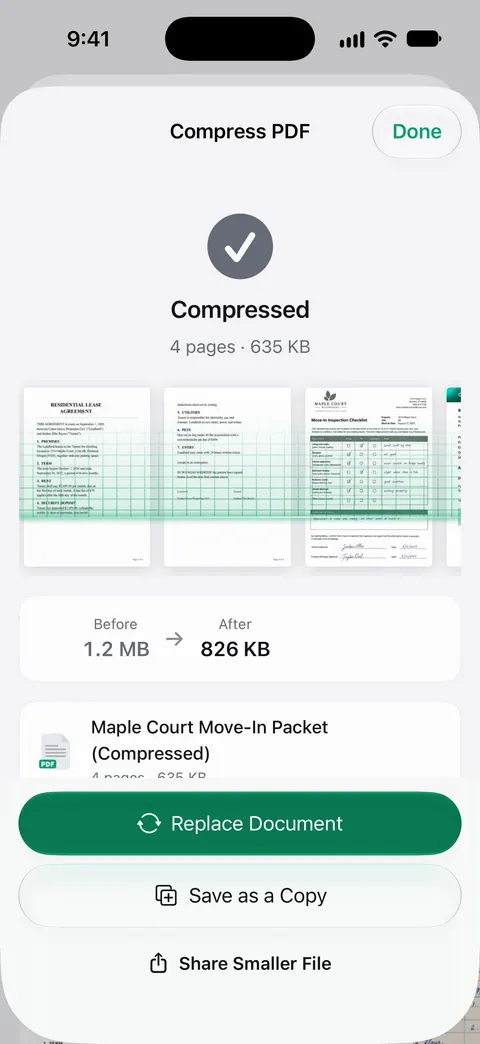
- Check the size limit. If a file is too big, our guide to making a PDF smaller helps.
The guide to scanning a passport covers the photo page, which most portals want.
Mistakes that cost appointments
- An application confirmation that doesn’t match the booking.
- A form that wasn’t signed or submitted in time.
- A passport that is too close to expiry, or out of blank pages.
- Statements or letters that are out of date.
- Documents not translated, or translated without certification.
- Photos that don’t meet the rules.
- Bringing items the building doesn’t allow.
Fees
We don’t repeat visa fees here, because they change and depend on the visa and your nationality. The official page for your visa shows the current fee, how to pay it and when.
This page is general information, not immigration or legal advice. Requirements differ by country, by visa and by the consulate or visa center, and they change. The official checklist for your application is the one that counts.
Where Scanner One helps, and where it doesn’t
It can’t tell you what your consulate wants: the official checklist does. It helps you turn a pile of paper into clean files fast.
ID cards and passports are scanned with both sides on one printable page. Point your camera at any piece of paper. Scanner One finds the edges, straightens the page, cleans it up and saves a real PDF. The PDF tools merge, split, compress, password-protect, add page numbers and watermarks, and extract text. Free accounts can run the PDF tools and the Word, Excel and CSV exports 3 times a week, from one shared allowance.
Text recognition runs on the device, in 29 languages. Search looks inside the text of every document and shows the matching line and page.
On a free account, pages you share, print or export carry a small “Scanned with Scanner One” label at the bottom right. Pro removes it. If you upload documents to a visa portal from a free account, they will carry that label. If that worries you, scan them with the Notes or Files scanner, which add nothing.
Packs: say what you’re applying for, like a visa, a lease or your taxes, and see which papers you have and what’s missing. Pro checks each paper in a Pack against what’s asked.
Questions and answers
What documents do I need for a visa appointment?
The exact list depends on the country, the visa type and where you apply, so use the official checklist from the embassy, consulate or visa center. Most lists include your passport, the application confirmation, a photo to their specification, and proof of the trip’s purpose, your money, where you will stay and your ties to home.
Do I bring originals or copies?
Follow your checklist. Many ask you to bring originals and copies, or to upload copies and bring originals. For a UK visitor visa, you provide supporting documents at the visa application centre, and you get your passport back the same day while they may keep other documents.
Do my documents need to be translated?
Often. The UK, for example, asks for a certified translation of any document not in English or Welsh. Check what your destination asks for, and leave time: a certified translation can take a few days.
How much is the visa fee?
Fees change and differ by visa and nationality, so we don’t repeat them here. The official page for your visa shows the current fee and how to pay it.
What happens if my DS-160 number doesn’t match my appointment?
At the U.S. Embassy in London, the DS-160 number on your printed confirmation page must match the one in your appointment account, and the form must be signed and submitted at least 2 business days before. If it doesn’t, you may be refused entry and have to reschedule.
Sources
What this page says about Scanner One was checked against the app on .
- U.S. Embassy and Consulates in the United Kingdom, Nonimmigrant visas: the interview — airport-style security and no laptops or large bags, a printed DS-160 confirmation page whose number must match the appointment, submitting the DS-160 at least 2 business days before, fingerprints and the interview; modified 2025-04-15
- GOV.UK, Apply for a Standard Visitor visa — a passport valid for the whole stay, the details and documents to provide, the visa application centre appointment for fingerprints and photo, certified translations for documents not in English or Welsh; read 2026-11-13
- European Commission, Applying for a Schengen visa — where and when to apply, passport validity, travel medical insurance, supporting documents and fingerprints; dated 2025-12-02
- Government of Canada (IRCC), Apply for a visitor visa — online application with a personalized document checklist, a scanner or camera to upload documents, and the biometrics appointment after the instruction letter; page date 2026-11-05
- Scanner One on the App Store — the app’s own listing: ID cards and passports on one page, merge and compress
Get Scanner One
Scanner One is free, with generous limits: scanning, clean PDFs and text search never stop.

Scanner OneScan, sign and ask anything
Scanner One is free, with generous limits: scanning, clean PDFs and text search never stop.