
Template
Travel consent letter for a child: a template to copy
A travel consent letter is signed by the parent or parents who are not traveling. It names the child, the adult traveling with them, the destination and dates, and gives the signing parent’s contact details. USA.gov suggests the sentence 'I acknowledge that my child is traveling outside the country with [adult] with my permission', in English and preferably notarized. If the child travels alone or with someone else, both parents sign. Copy the template below, fill it in, sign the original and carry it.

This page is the letter itself, ready to copy. For the full set of papers a child needs at a border (passport, birth certificate, custody order), see documents to travel with a child.
This is general information, not legal advice. Each country sets its own entry and exit rules for children, and they change. The destination’s embassy or consulate has the final word, and custody questions belong with a family lawyer. Sources were read on 13 November 2026.
When you need a consent letter
USA.gov says a child traveling alone or with only one parent or legal guardian may need a letter of consent. In practice, write one when:
- One parent travels with the child. The parent staying home signs.
- The child travels with grandparents, a relative, a friend or a group. Both parents sign.
- The child flies alone. Both parents sign, and the airline may also want its own form.
No country check is skipped because you have the letter, and no officer has to accept it. It answers the question “does the other parent know?” before anyone asks.
What must be in it, and why
USA.gov suggests the core sentence: “I acknowledge that my child is traveling outside the country with [the name of the adult] with my permission.” Canada’s recommended letter adds the details an officer needs to check it:
- The child’s full name, as written in their passport, and date of birth.
- Each signing parent’s name and contact details, so an officer can call to confirm.
- The accompanying adult’s full name, address, contact details and relationship to the child.
- The destination, how long the trip lasts, and the exact travel dates.
Add passport numbers for the child and the adult, and attach a copy of the signing parent’s passport or ID so the signature can be compared.
The template
Copy the text below into a document, replace each part in square brackets, and delete the lines that don’t apply.
Consent for a child to travel abroad
Date: [Date]
I, [Full name of parent or guardian signing], living at [Full home address], phone [Phone number with country code], email [Email address], am the [mother / father / legal guardian] of:
[Child’s full name as in passport], born on [Child’s date of birth] in [City and country of birth], passport number [Child’s passport number], issued by [Issuing country].
I acknowledge that my child is traveling outside the country with [Full name of accompanying adult], [Relationship to the child], passport number [Adult’s passport number], with my permission.
Trip: from [City and country of departure] to [Destination country or countries], leaving on [Departure date] and returning on [Return date], traveling by [Airline and flight numbers, or car, bus, ship].
While away, my child will stay at [Address abroad], phone [Phone number abroad].
You may contact me at any time to confirm this consent, at [Phone number] or [Email address].
Signature: [Signature of parent or guardian]
Printed name: [Full name of parent or guardian]
Attached: a copy of my [passport or driver’s license], number [Document number].
If both parents sign (the child travels alone or with someone else), change the first line to “We, [Full name of first parent] and [Full name of second parent], are the parents of”, write “our child” and “our permission”, and give each parent’s address, phone and signature.
If you have sole custody, add: “I have sole custody of [Child’s full name] under the attached order of [Court name], dated [Date of order].” Carry a copy of that order.
A filled example
I, Maria Lopez, living at 14 Elm Street, Austin, TX 78701, phone +1 512 555 0142, am the mother of Sofia Lopez, born on 3 May 2016 in Austin, USA, passport number [Passport number]. I acknowledge that my child is traveling outside the country with David Lopez, her father, with my permission. Trip: from Austin, USA to Madrid, Spain, leaving 20 December 2026 and returning 4 January 2027.
Sign it, notarize it, carry the original
- Print it and sign in ink. The signed paper is what you carry. If the other parent lives far away, they can fill in the PDF, print it where they are, sign and notarize it there, and send you the original by courier; the guide to signing a PDF on iPhone helps with the paperwork around it.
- Have it notarized if you can. US rules don’t require it, but USA.gov prefers a notarized letter, CBP’s visitor guide says to have one notarized “if possible”, and Canada strongly recommends a notary. Some countries insist on it; ask the embassy. Sign in front of the notary, not before.
- Write it in English, as USA.gov prefers, and ask the embassy whether the destination wants a translation too.
- Carry the signed original in your hand luggage, with the child’s passport. Canada notes that officials may not accept photocopies or digital versions.
- Keep a scan on your phone in case the paper goes missing. How to scan a passport covers the ID copies.
Write a new letter for each trip, and check the child’s own passport papers in the child passport checklist well before you go.
Where Scanner One helps, and where it doesn’t
Scanner One doesn’t write the letter, notarize it, or tell you what a country requires. Any word processor or the Notes app is enough to type it.
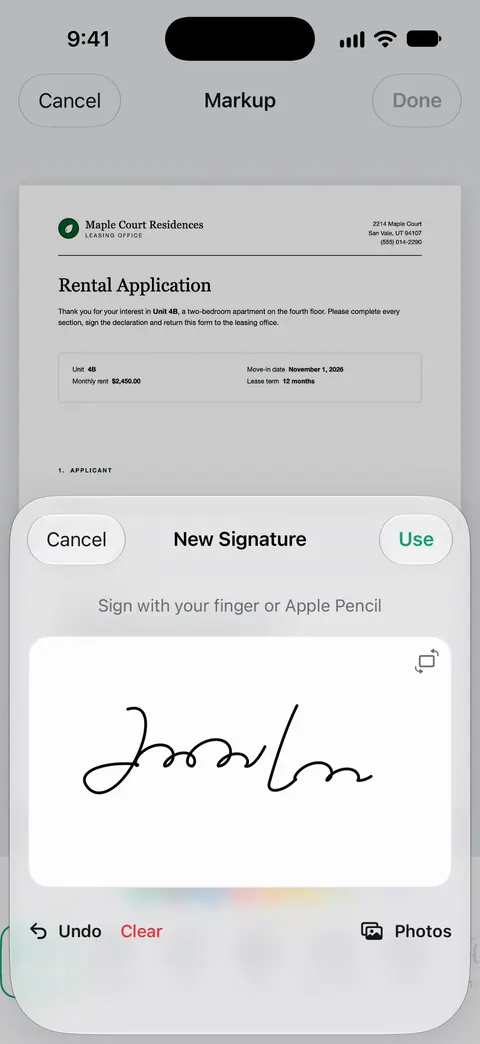
Where it helps is the paperwork around it. If you receive the letter as a PDF form, Fill Form lets you type into the fields of a PDF form. You can sign and annotate documents. You can then scan the signed and notarized original, together with both passports, into one PDF to keep on your phone: A scan can have many pages, and you can reorder them. ID cards and passports are scanned with both sides on one printable page.
The limits, plainly:
- Free accounts can sign and mark up 3 documents a month. Pro removes every limit.
- On a free account, pages you share, print or export carry a small “Scanned with Scanner One” label at the bottom right. Pro removes it.
- A scan is a backup. At the border, bring the signed paper.
More templates for everyday paperwork are in templates.
Questions and answers
Does a child travel consent letter have to be notarized?
US rules don’t require it, but USA.gov prefers a notarized letter and CBP’s visitor guide says to have one notarized if possible. Canada strongly recommends a notary. Some destination countries require it, so check with their embassy.
Who signs the consent letter?
The parent who is not traveling. If the child travels alone, with grandparents, a school group or a friend, both parents sign. A parent with sole custody usually signs alone and carries the custody order.
Can I use a scanned or emailed copy of the letter?
Bring the signed original. Canada warns that border officials may not accept photocopies or digital versions. Keep a scan on your phone as a backup in case the paper is lost.
Do I need a new letter for every trip?
Yes. The letter names specific dates and a destination, so write a fresh one for each trip, especially if you cross the same border often.
Sources
What this page says about Scanner One was checked against the app on .
- USA.gov, International travel documents for children — when a consent letter may be needed, who signs, English and notarized preferred, and the suggested sentence; last updated 2026-04-09
- U.S. Customs and Border Protection, Welcome to the United States: a guide for international visitors (PDF) — notarized permission letters for minors traveling without both parents, and the suggested wording; undated PDF, read 2026-11-13
- Government of Canada, Recommended consent letter for children travelling abroad — what the letter should contain, who signs, a notary strongly recommended, originals preferred over copies; modified 2026-09-02
- Scanner One on the App Store — the app’s own listing: signing, Fill Form, scanning
Get Scanner One
Scanner One is free, with generous limits: scanning, clean PDFs and text search never stop.

Scanner OneScan, sign and ask anything
Scanner One is free, with generous limits: scanning, clean PDFs and text search never stop.