
Template
A simple expense report template, receipts included
An expense report lists one row per expense with the date, merchant, business purpose, category, payment method and amount, then totals them, subtracts any advance and shows what you are owed. Attach a readable receipt for each line, numbered to match. IRS Publication 463 says good evidence shows the amount, date, place and essential character of each expense, and that accounting within 60 days counts as a reasonable time under an employer’s accountable plan. Copy the template below.

This is a template to copy and reuse each month or trip. If the report is due tomorrow and you have a pile of receipts, start with expense report due tomorrow, then come back here to set up next time.
What a reimbursable expense needs to show
IRS Publication 463 says documentary evidence is ordinarily adequate if it shows the amount, date, place and essential character of the expense. A hotel receipt should show the hotel’s name and location, the dates of the stay, and separate amounts for lodging, meals and calls. A restaurant receipt should show the name and location, the number of people served, and the date and amount.
Under an employer’s accountable plan, the publication lists three rules: the expense has a business connection, you adequately account for it within a reasonable period, and you return any excess. Accounting within 60 days after paying counts as a reasonable period, and returning excess money within 120 days. Your company may set shorter deadlines.
This is general information, not tax advice. Your employer’s expense policy comes first, and IRS rules change: check the current Publication 463 or ask a tax professional.
The template
Set this up once in Excel, Numbers or Google Sheets. The top block, then the table, then the summary.
Header block (one line each):
Expense report
Name: [Your full name]
Employee ID or department: [ID or department]
Report period: [First date] to [Last date]
Purpose or trip: [For example, “Client visit, Chicago”]
Manager or approver: [Name]
The table. For a CSV file, copy this header line into a plain text file and save it as expenses.csv; for a spreadsheet, type the headings into one row.
Receipt no.,Date,Merchant,City,Business purpose,Category,Payment method,Amount,Currency,Client or project,Notes
| Receipt no. | Date | Merchant | Business purpose | Category | Payment | Amount |
|---|---|---|---|---|---|---|
| 1 | 2026-11-03 | [Airline] | Flight to client meeting | Airfare | Company card | [Amount] |
| 2 | 2026-11-03 | [Taxi company] | Airport to hotel | Ground transport | Personal card | [Amount] |
| 3 | 2026-11-04 | [Hotel] | 2 nights for client visit | Lodging | Personal card | [Amount] |
| 4 | 2026-11-04 | [Restaurant] | Dinner with client, 3 people | Meals | Personal card | [Amount] |
Summary block, under the table:
Total expenses: [Sum of the Amount column]
Paid with company card: [Sum of company card lines]
Advance received: [Amount, or 0]
Amount owed to me: [Total, minus company card lines, minus advance]
I confirm these expenses were incurred for business and are supported by the attached receipts.
Employee signature: [Signature] Date: [Date]
Approved by: [Approver’s name and signature] Date: [Date]
Use one category list and keep it the same every month: airfare, lodging, meals, ground transport, mileage, parking, supplies, other. If you drive your own car, add a mileage line per trip with the date, from, to, purpose and miles, and use the rate your employer sets.
Attach the receipts
- Number each receipt to match its row. Write the number on the paper, or put it in the file name (“03-hotel.pdf”).
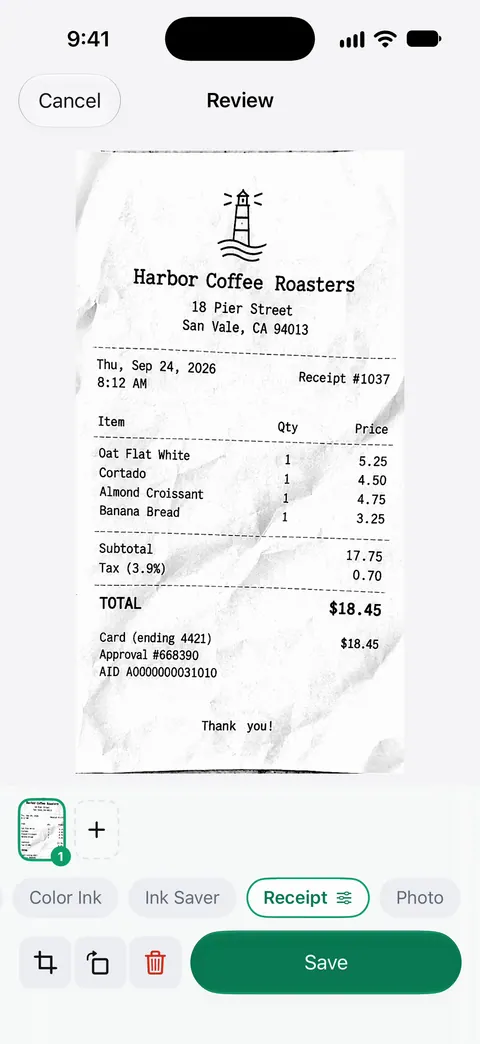
- Scan them flat and sharp. Thermal receipts fade; scan receipts on iPhone covers light and contrast. In Notes, tap the camera button, then Scan Documents.
- Put them in row order in one PDF, after the report itself. Merge PDFs on iPhone shows how with the Files app, or use our free merge PDF tool, which runs in your browser.
- Note missing receipts in the Notes column (“receipt lost, card statement attached”) instead of leaving a gap.
- Keep the originals until the money arrives, and longer if you deduct anything yourself.
For a business of your own, the same sheet becomes your expense log; organize receipts for a small business shows how to file it by month.
Mistakes that get reports sent back
- A business purpose of “meeting” with no who or why.
- A credit card slip instead of the itemized receipt.
- Receipts out of order, or one blurry photo of five receipts together.
- Personal items on the same hotel bill with no note.
- Totals that don’t match the receipts because of a currency conversion: write the rate you used.
Where Scanner One helps, and where it doesn’t
Scanner One doesn’t fill in your company’s report, submit it, or know your policy. A spreadsheet app does the template part for free, and Notes can scan the receipts.
It helps with the receipts. Scans come with Auto Clean, Color, Grayscale and Receipt filters. A scan can have many pages, and you can reorder them. Ask your documents anything. When does the lease end? What did I spend at the shop? The answer comes back with the page it came from. That can pull a date or an amount off a crumpled receipt.
When the receipts already sit in a PDF with a table of amounts, Scanner One exports to Word, keeping headings, lists and tables, and to Excel and CSV.
The limits, plainly:
- Free accounts can run the PDF tools and the Word, Excel and CSV exports 3 times a week, from one shared allowance. Free accounts can ask the on-device AI 3 questions a day. Pro removes every limit.
- On a free account, pages you share, print or export carry a small “Scanned with Scanner One” label at the bottom right. Pro removes it. Some finance teams don’t mind; check before you send.
- Exported numbers come from the paper. Check every amount against the receipt.
More templates are in templates.
Questions and answers
What should an expense report include?
Your name, the report period, and one line per expense with the date, merchant, business purpose, category, payment method and amount. Then a total, any advance you received, the balance owed, your signature and space for an approver. Attach the receipts, numbered to match the lines.
Do I need a receipt for every expense?
Your employer’s policy decides. For tax purposes, IRS Publication 463 lists some exceptions, including expenses other than lodging below a set amount, but many companies ask for every receipt anyway. Keep them all.
How soon do I have to submit an expense report?
Check your company policy. Under an accountable plan, IRS Publication 463 treats accounting for expenses within 60 days after they were paid as a reasonable period, and returning any excess reimbursement within 120 days.
Can I submit photos of receipts instead of the paper ones?
Most employers accept clear scans or photos, and many prefer one PDF. Check your policy, and keep the paper until the report is paid.
Sources
What this page says about Scanner One was checked against the app on .
- IRS, Publication 463 (2025), Travel, gift, and car expenses — documentary evidence showing amount, date, place and essential character; hotel and restaurant receipt details; accountable plans and the 60-day and 120-day reasonable period; for 2025 returns, read 2026-11-13
- Scanner One on the App Store — the app’s own listing: Receipt filter, Excel and CSV export, merge
Get Scanner One
Scanner One is free, with generous limits: scanning, clean PDFs and text search never stop.

Scanner OneScan, sign and ask anything
Scanner One is free, with generous limits: scanning, clean PDFs and text search never stop.