
Tool
Merge PDFs into one file
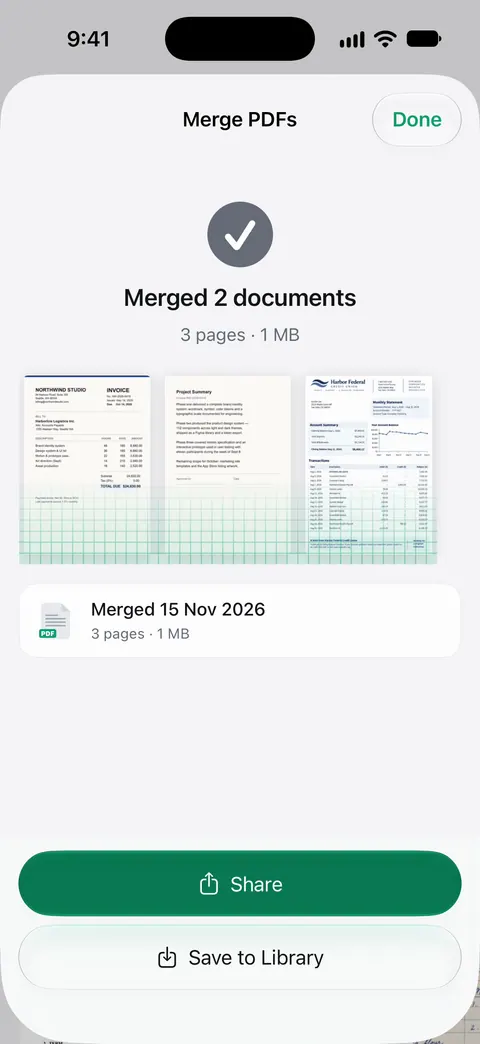
Choose two or more PDFs, put them in order with the arrows, and tap Merge the PDFs. Every page of every file is copied, in that order, into one new PDF that your browser saves as a download. The files are opened by this page on your own device: nothing is uploaded, and nothing is kept when you close the tab. Password-protected PDFs can’t be opened here.

Merge PDFs into one
This tool runs in your browser, and its page is not allowed to open a single network connection, so nothing you add is sent anywhere. Nothing is saved: closing the tab forgets everything.
or drop them here. Two or more PDFs; you can add more at any time.
No PDFs yet.
How to use it
- Tap Choose PDFs, or drop files onto the box. You can add more at any time, including the same file twice.
- Put the files in order with the arrows. The first file’s pages come first. The page count of each file is shown next to its name.
- Remove a file you added by mistake with the cross.
- Name the new file, then tap Merge the PDFs. Your browser saves it like any other download.
Every page of every file goes in. If you only need some pages from a file, take them out first with the split PDF tool, then merge the pieces.
What happens to your files
Your browser reads each file into memory on your device. A PDF library on this page, pdf-lib, opens it and copies its pages one by one into a new, empty PDF, exactly as they are: text stays text, scanned pages stay pictures, and nothing is compressed or redrawn. The new file is then handed to your browser as a download.
The page is sent with a security rule that forbids it from opening any connection, so your files could not leave even if the code tried. When you close the tab, they are gone from the page.
What it can’t do
- Password-protected PDFs can’t be opened. Remove the password first in an app where you know it.
- Bookmarks (the outline in a PDF’s sidebar) are not carried over, and form fields may stop being fillable in some apps. Fill and save forms before you merge.
- Digital signatures no longer validate once a file is changed. Merge first, then sign the merged file.
- Size: the merged file is about the size of the parts added together. If it is too big to email or upload, make the PDF smaller.
On an iPhone with iOS 26 or later you may not need a website at all: in Preview, open the first PDF, show the thumbnails, touch and hold one, and tap Insert from File. The full steps, and the other built-in ways, are in how to merge PDFs on iPhone.
Where Scanner One helps, and where it doesn’t
This page joins PDFs you already have. Scanner One works from the paper and keeps the result: A scan can have many pages, and you can reorder them. The PDF tools merge, split, compress, password-protect, add page numbers and watermarks, and extract text. Scanner One makes searchable PDFs.
Free accounts can run the PDF tools and the Word, Excel and CSV exports 3 times a week, from one shared allowance. On a free account, pages you share, print or export carry a small “Scanned with Scanner One” label at the bottom right. Pro removes it. Scanner One is free, with generous limits: scanning, clean PDFs and text search never stop.
Scanner One runs on iPhone and iPad only. To join a few PDFs once, on any computer or phone, this free page is enough.
Questions and answers
Are my PDFs uploaded to a server?
No. This tool runs in your browser, and its page is not allowed to open a single network connection, so nothing you add is sent anywhere. Nothing is saved: closing the tab forgets everything.
Can I merge PDFs on my iPhone with this?
Yes. Open this page in Safari, tap Choose PDFs and pick the files from the Files app. The merged PDF is offered as a download, which Safari saves to Downloads in Files. On iOS 26 and later, Preview can also insert one PDF into another without any website.
Why won’t one of my PDFs open?
It is most likely password-protected or locked against changes, which this page can’t open. Open it in an app where you know the password, save a copy without the password, then add that copy. A file that only looks like a PDF, or is damaged, is refused too.
Is there a limit on how many files or pages?
There is no set limit. Everything happens in your device’s memory, so very large files (more than about 150 MB together) make the page slow, and an older phone may give up. Merge in two steps if that happens.
Will the merged PDF keep fillable fields and bookmarks?
Not always. The pages, text and pictures are copied as they are, but bookmarks are not, and form fields may stop being fillable in some apps. A digital signature in one of the files no longer checks out after any change to the file, merging included.
Sources
What this page says about Scanner One was checked against the app on .
- pdf-lib, Create and modify PDF documents in any JavaScript environment — the open-source library this page uses to read the PDFs and copy their pages (copyPages) into one new file, in the browser; this site bundles version 1.17.1; read 2026-11-13
- MDN Web Docs, Content-Security-Policy: connect-src — the rule this page is sent with ('none'), which stops a script from opening any connection; read 2026-11-13
- Apple iPhone User Guide, Add, delete, rotate, move, or crop PDF pages in Preview on iPhone — the built-in way on iPhone: touch and hold a thumbnail, then Insert from File; undated guide page, read 2026-11-13
- Scanner One on the App Store — the app’s own listing: the PDF tools, Merge among them
Get Scanner One
Scanner One is free, with generous limits: scanning, clean PDFs and text search never stop.

Scanner OneScan, sign and ask anything
Scanner One is free, with generous limits: scanning, clean PDFs and text search never stop.