
Tool
Will my file upload? Check its size, pages and format
Choose the file and type the upload limit in MB, or pick one. The page shows the exact size in bytes, KB and MB, counted both ways (1 MB as 1,000,000 bytes and as 1,048,576), what kind of file it really is, and for a PDF how many pages it has. It tells you if the file fits, is too big, or is borderline, and how much smaller it needs to be. The file is never uploaded.

Will my file upload?
This tool runs in your browser, and its page is not allowed to open a single network connection, so nothing you add is sent anywhere. Nothing is saved: closing the tab forgets everything.
or drop it here. Any file: a PDF, a photo, a Word file.
No file yet.
To make a PDF smaller, see how to make a PDF smaller. A scan saved in color or at a high resolution is usually the reason it is big.
Many forms that take a picture also take a PDF. Our free photos to PDF tool can make one with "Smaller file" chosen, or send a screenshot of the picture, which is usually much smaller than the photo.
If the place you are uploading to accepts PDF, saving the file as a PDF and then making the PDF smaller usually works. Splitting it into two uploads is the other way.
How to use it
- Tap Choose a file, or drop it onto the box. Any kind of file works.
- Type the limit the form or email gives, in MB, or pick Gmail attachment or iCloud Mail message from the list.
- Read the result: the exact size, what the file is, for a PDF the number of pages and about how much each page weighs, and whether it fits.
- If it is too big, the page says how much smaller it needs to be (for example “about 72% of its size”) and links the guide that fits the kind of file.
What it checks
- The exact size. In bytes, then in KB and MB counting by 1,000, and in KiB and MiB counting by 1,024. NIST defines the first as the megabyte and the second as the mebibyte, and notes that the word “megabyte” is used both ways in practice.
- Fits, too big or borderline. The file is compared with your limit both ways. “Fits” means it fits however the site counts; “borderline” means it fits only if the site counts the bigger megabyte.
- What the file really is. The page reads the file’s first bytes, which say its true format whatever its name. A file named .pdf that is really a HEIC photo, or a .jpg that is a PDF, is pointed out, because some upload forms check.
- Pages, for a PDF. The page count, and the size per page. Very large per-page sizes usually mean color scans at a high resolution. An encrypted PDF is noted too.
Limits it knows, and the ones it doesn’t
The two presets come from the providers’ own pages: personal Gmail accounts take attachments up to 25 MB (bigger ones become a Google Drive link), and iCloud Mail takes messages up to 20 MB, or up to 5 GB with Mail Drop. The iCloud limit is for the whole message, so leave some room.
Forms on government, school, job and bank sites set their own limits, often printed next to the upload button. Type that number in. The page can’t know a limit you don’t give it, and it doesn’t check the content of your file, only its size, format and pages.
If a PDF is too big, see how to make a PDF smaller and how to get a PDF under a size limit. If the form takes several files, our free split PDF tool breaks a long PDF into parts. Before you send, uploading a scanned document to a website covers the rest.
Where Scanner One helps, and where it doesn’t
This page tells you whether a file fits. Scanner One can make a scanned PDF smaller on your iPhone: The PDF tools merge, split, compress, password-protect, add page numbers and watermarks, and extract text.
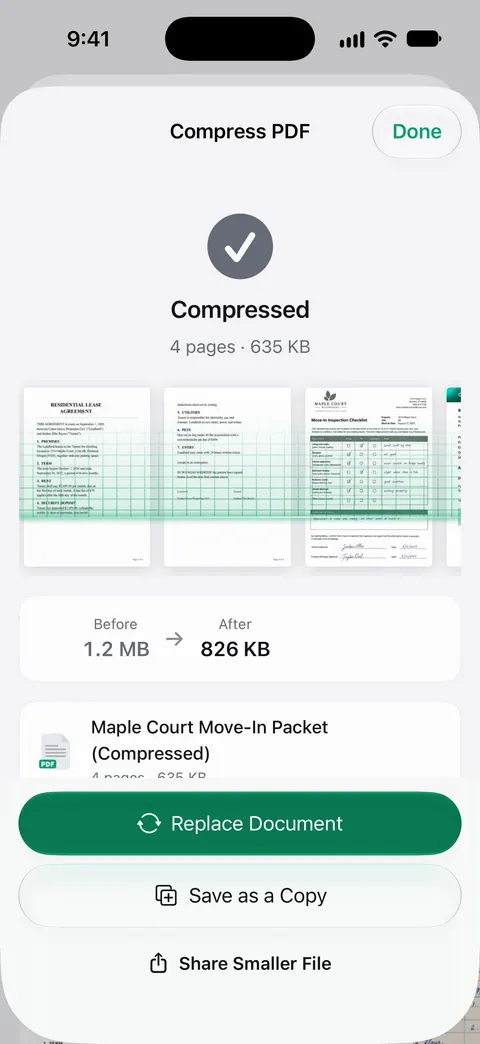
Free accounts can run the PDF tools and the Word, Excel and CSV exports 3 times a week, from one shared allowance. On a free account, pages you share, print or export carry a small “Scanned with Scanner One” label at the bottom right. Pro removes it. Pro removes every limit.
It doesn’t upload anything for you, and it can’t change a website’s limit. For a quick size check on any device, this free page is enough. Scanner One runs on iPhone and iPad.
Questions and answers
Is my file uploaded to check it?
No. This tool runs in your browser, and its page is not allowed to open a single network connection, so nothing you add is sent anywhere. Nothing is saved: closing the tab forgets everything.
Why does my computer show a different size than the website?
There are two ways to count a megabyte: 1,000,000 bytes, or 1,048,576 bytes. NIST notes that makers use the word inconsistently. A 25.5 MB file by one count is 24.3 MB by the other, so a file can look under a limit on your computer and still be refused.
What does 'borderline' mean?
The file fits if the site counts 1,048,576 bytes to the megabyte and doesn’t fit if it counts 1,000,000. Sites rarely say which, so the safe move is to make the file a little smaller.
How do I make a PDF smaller?
Scan in black and white or grayscale instead of color, at a normal resolution, and compress the PDF. Our guides on making a PDF smaller and getting a PDF under a size limit walk through it on iPhone.
Sources
What this page says about Scanner One was checked against the app on .
- MDN Web Docs, Blob: size property — the browser gives a file’s size in bytes, which this page reads without opening the file; read 2026-11-13
- NIST, Prefixes for binary multiples — 1 MB is 1,000,000 bytes and 1 MiB is 1,048,576 bytes; makers use megabyte inconsistently; undated, read 2026-11-13
- Google Gmail Help, Add attachments to Gmail — personal Gmail accounts: 25 MB; larger attachments become a Google Drive link; undated, read 2026-11-13
- Apple Support, iCloud Mail storage and message limits (article 102198) — messages up to 20 MB, up to 5 GB with Mail Drop turned on; published 17 March 2025
- Scanner One on the App Store — the app’s own listing
Get Scanner One
Scanner One is free, with generous limits: scanning, clean PDFs and text search never stop.

Scanner OneScan, sign and ask anything
Scanner One is free, with generous limits: scanning, clean PDFs and text search never stop.