
Checklist
What to bring to a new doctor’s appointment
For a first visit with a new doctor, bring your insurance card and a photo ID, a list of every medicine you take (with doses, vitamins and supplements), your allergies, your health history (past illnesses, surgeries, vaccinations and family history), the names of your other doctors, and any recent test results or records. Add a written list of questions. Ask the office when you book what else to bring and whether forms can be filled in ahead. Uninsured? Ask for a good faith estimate of the cost.

This page is the checklist for a first visit with a new doctor: what to carry in, and what to send ahead. Moving your full file from the old practice is a bigger job, covered in transferring your records to a new doctor. The advice here comes from CMS’s From Coverage to Care roadmap, HealthIT.gov and CMS’s medical bill rights page, read on 13 November 2026.
This is general information, not medical or legal advice. Every practice has its own forms and rules. Ask the office what it needs, and talk with your doctor about your own health.
When you book
CMS’s roadmap suggests you:
- Say you’re a new patient.
- Give the name of your health plan and ask whether they take it.
- Say why you want the appointment and which doctor you’d like to see.
- Ask what to bring, and whether you can fill in the new patient forms before the day.
The cards
- Your health insurance card, front and back. CMS lists it first. How to scan a health insurance card gives you a copy on your phone.
- A photo ID, such as a driver’s license, if the office asks for one.
- Medicare or Medicaid card, if you have one, alongside any other insurance.
- Your pharmacy’s name and address.
Your medicines
- A list of every medicine you take: name, dose and how often.
- Vitamins, supplements and over-the-counter medicines too.
- Allergies, especially to medicines, and what happened.
Your health history
CMS suggests knowing:
- Past serious illnesses and injuries, and when they happened.
- Surgeries and hospital stays.
- Vaccinations. How to scan a vaccination record keeps one with you.
- Family health history: conditions your parents, brothers and sisters have had.
Records from other doctors
- Recent test results, imaging reports and specialist letters.
- The names and phone numbers of your other doctors, so the new office can request more.
- Your last doctor’s contact details, for the records request.
HealthIT.gov says HIPAA lets you get a copy of your health record from your doctors, on paper or electronically, even if you owe them money, and share it with anyone you choose, including a new provider.
Questions and help
- A written list of questions and things you want to discuss, with the most important first. CMS suggests taking notes during the visit.
- Someone to come with you, if it helps.
- Your advance directive or health care proxy form, if you have one and want it on file.
If you’re uninsured or paying yourself
- Ask for a good faith estimate of the cost. CMS says providers usually must give one if you ask or if you book at least 3 business days ahead. If the bill comes in well above the estimate, you can dispute it.
After the visit
CMS’s roadmap continues after the appointment:
- Follow the instructions and fill any prescriptions.
- Book a follow-up, if you need one.
- Check your Explanation of Benefits from your plan, to make sure it’s right.
- Keep the visit summary with the rest of your records. Keep medical records on iPhone shows a few ways.
Mistakes that waste the first visit
- Arriving without the insurance card, so the office can’t check coverage.
- A medicine list that leaves out supplements or doses.
- Not asking for old records until the day of the visit.
- Leaving the most important question for the last minute.
More lists are on the checklists hub.
Where Scanner One helps, and where it doesn’t
Scanner One doesn’t book appointments, fill in the office’s portal or request records for you. Bring the cards themselves too: the office decides what it accepts.
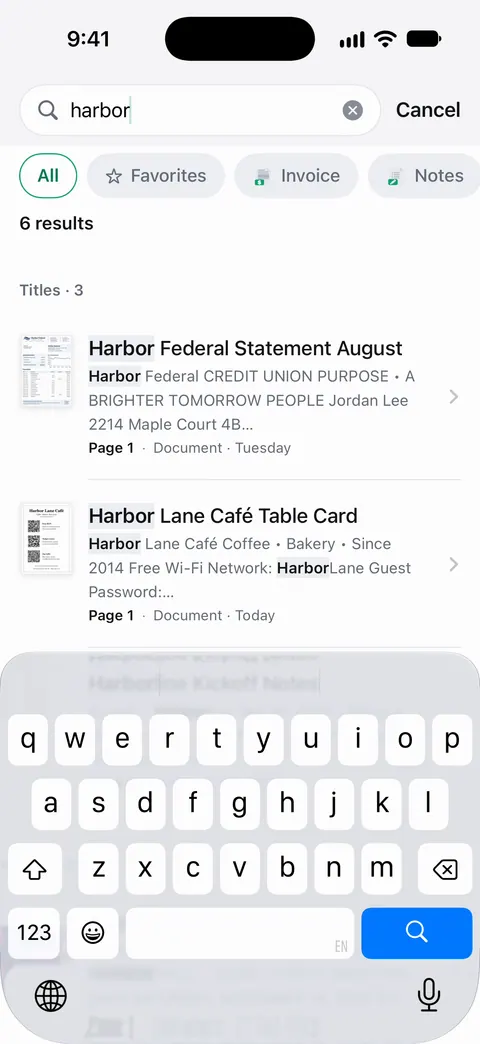
It’s useful for carrying your papers on your phone. ID cards and passports are scanned with both sides on one printable page. So both sides of an insurance card fit on one page. A scan can have many pages, and you can reorder them. So a stack of test results becomes one document to hand over. Search looks inside the text of every document and shows the matching line and page. So a word like “allergy” finds the page. Documents stay on your iPhone unless you share them or turn on iCloud Sync. You can lock the app with Face ID.
On a free account, pages you share, print or export carry a small “Scanned with Scanner One” label at the bottom right. Pro removes it.
Questions and answers
What paperwork do I need for a new patient appointment?
Your insurance card, a photo ID and the office’s new patient forms, if you got them ahead. Bring a medicine list, your allergies and health history, and any records from your last doctor. CMS suggests asking what to bring when you book.
How do I get my records sent to my new doctor?
Ask your old doctor’s office for a copy or to send them on. HealthIT.gov says HIPAA gives you the right to get your health record, on paper or electronically, even if you have unpaid bills, and to share it with another provider.
Should I bring my pill bottles to a new doctor?
A complete written list works, with each medicine’s name, dose and how often you take it, plus vitamins and supplements. Some people bring the bottles to be sure nothing is missed. CMS’s checklist asks for a list of every medicine you take.
I don’t have insurance. What should I ask for?
A good faith estimate. CMS says providers usually must give uninsured or self-pay patients an estimate if you ask, or if you schedule at least 3 business days ahead, and you can dispute a bill that is at least a set amount above it.
Sources
What this page says about Scanner One was checked against the app on .
- CMS From Coverage to Care, View your path to better health (Publication 11822) — making an appointment (say you’re a new patient, check they take your plan, ask what to bring) and being prepared (insurance card, health history, allergies, vaccinations, medicine list, questions, bringing someone); revised April 2023
- HealthIT.gov, Get it, check it, use it: your health record — your HIPAA right to see and get a copy of your record, electronic or paper, even with unpaid bills, sharing it with another provider; last updated 2026-01-20
- CMS, Medical bill rights — good faith estimates for uninsured or self-pay patients who ask or book 3 business days ahead, surprise billing protections; last modified 2026-10-05
- Scanner One on the App Store — the app’s own listing
Get Scanner One
Scanner One is free, with generous limits: scanning, clean PDFs and text search never stop.

Scanner OneScan, sign and ask anything
Scanner One is free, with generous limits: scanning, clean PDFs and text search never stop.