
Situation
Seeing a new doctor: getting your records there
Ask the new doctor’s office what they need and how they want it. Then request your records from the old office: through its patient portal if it has one, or with its records release form, naming the new doctor as the recipient. Under HIPAA you have a right to your records, and a provider can take up to 30 days, with one extension. Meanwhile, bring copies of recent results, your medication list and your insurance card to the first visit.

This page is about one moment: you’re seeing a new doctor and your history is somewhere else. For keeping your own medical papers organized day to day, see keeping medical records on iPhone.
This page is general information, not medical or legal advice. Privacy rules and state laws change, and offices have their own forms. HealthIT.gov and your providers have the current details.
First: ask the new office what it needs
Call or check the new practice’s patient portal before you request anything. Ask:
- Which records they want (often the last few years, recent labs and imaging, and a vaccination history, not every page you ever had)
- How they want them: through a shared health system, a secure upload, the portal, or on paper
- Whether they have a new patient packet to fill in before the visit
HealthIT.gov suggests asking a new provider which format they prefer. A tidy request gets you what you need faster than “send everything”.
Request your records from the old office
You have a legal right to them. HealthIT.gov puts it simply: under the HIPAA Privacy Rule you can see and get a copy of your health record from most doctors, clinics, hospitals, pharmacies and labs, even if you haven’t paid your bills.
Through the patient portal
Many portals let you download records or request them directly. Look for a section called Health Records, Medical Records, Documents or Requests. If you can download visit notes, test results and a summary yourself, you may be able to send them to the new office the same day.
With a release form
If there’s no portal, or what you need isn’t in it, contact the old office’s records department (sometimes called health information management). Expect a records release form. There’s no single standard form, but most ask for:
- Your name, date of birth and contact details
- The provider and the dates of care
- Which records to release
- Who should receive them (the new doctor’s name, address and fax or secure address)
- The purpose, such as “continuing care”
- An expiration date and your signature
If the form comes as a PDF, you can fill it in and sign it on your phone; our guide to filling a PDF form on iPhone shows how.
Timing and cost
- A provider can take up to 30 days, and one more 30-day extension if they explain why. Some state laws are shorter. Asking for a specific date can help.
- Electronic copies through a portal, app or email are likely free.
- A provider may charge a reasonable fee that covers only the cost of copies and mailing.
- Sending paper records to someone else needs an authorization form and can cost more; HIPAA sets no deadline for that kind of transfer.
Bring your own copies to the first visit
Even when a transfer is underway, records often arrive after your appointment. Bring:
- A current medication list with doses, including vitamins and supplements
- Recent lab results and imaging reports (the reports, not the scans themselves, unless asked)
- Your vaccination record; see scanning a vaccination record
- A list of past surgeries, conditions and allergies, with rough dates
- Your insurance card and photo ID, front and back; see scanning a health insurance card
- Specialist letters or discharge summaries from the last few years
Our new patient appointment checklist has the full list.
Paper records you already have can be scanned on iPhone with Notes or Files: in Notes, tap the Attachment button, then Scan Documents, and keep adding pages.
Pull records into the Health app
If your old or new provider supports it, the Health app can download your records:
- Open Health and tap Summary, then tap your picture or initials.
- Tap Health Records, then Get Started (or Add Account for another provider).
- Find your organization, tap it, then tap Connect Account and sign in with your patient portal details.
New records then download as they become available. Apple notes that not every organization or country supports this, and that Health data is encrypted when your iPhone is locked.
Sending records yourself
If you send records to the new office yourself, use the method they give you: their portal, a secure upload or their fax. Avoid ordinary email for medical files if there’s a safer route. Our guide to sending documents securely explains the options.
Next time
Download a copy of each visit summary and result as you go, and keep them in one folder. Moving doctors next time is then a matter of sharing a folder, not waiting a month.
Where Scanner One helps, and where it doesn’t
Scanner One can’t request records from a provider, and it doesn’t connect to patient portals or the Health app. It helps with the paper you carry.
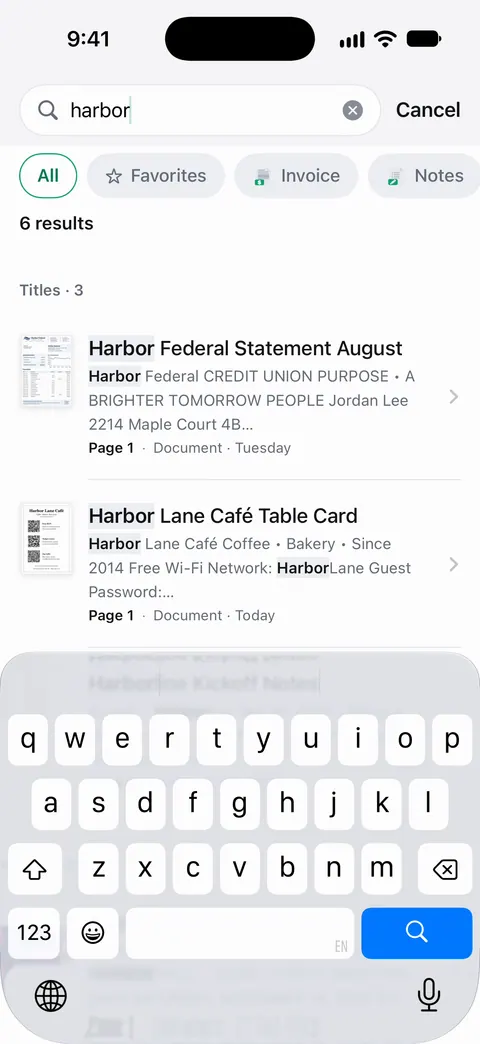
A scan can have many pages, and you can reorder them. Search looks inside the text of every document and shows the matching line and page. So finding the lab result with a word like “cholesterol” in it takes one search.
Fill Form lets you type into the fields of a PDF form. That covers a release form or new patient packet sent as a fillable PDF. Documents stay on your iPhone unless you share them or turn on iCloud Sync. You can lock the app with Face ID.
Free accounts can sign and mark up 3 documents a month. On a free account, pages you share, print or export carry a small “Scanned with Scanner One” label at the bottom right. Pro removes it. For a one-time stack of papers, the Notes scanner and the Health app may be all you need.
Questions and answers
How long does it take to transfer medical records?
Under HIPAA, a provider can take up to 30 days to give you your record, and up to 30 more if they explain the delay and give you a new date. Some states set shorter deadlines. Records sent through a portal are often much faster.
Do I have to pay for my medical records?
Electronic copies through a portal, app or email are likely free, according to HealthIT.gov. A provider may charge a reasonable fee that covers only the cost of making and sending copies. Sending paper records to someone else on your behalf can cost more.
Can my old doctor refuse because I owe them money?
No. HealthIT.gov says you are entitled to your record even if you haven’t paid your health care bills.
Should I bring paper records to my first appointment?
Bring copies of the things that matter right away: your medication list, recent lab results and imaging reports, your vaccination record and your insurance card. Keep your own copies; don’t hand over your only set.
Can my records go into the Health app on iPhone?
If your provider supports it, yes. In Health, tap Summary, tap your picture, then Health Records, and connect your patient portal account. New records then download automatically. Not all providers or countries support it.
Sources
What this page says about Scanner One was checked against the app on .
- HealthIT.gov (ONC), How to get your health record — the HIPAA right to see and get a copy of your record, even with unpaid bills; electronic, paper or other media; sharing it with a new doctor; last updated 2026-01-20
- HealthIT.gov (ONC), Get it: how to request your record — patient portals, the records department, release forms, reasonable cost-based fees, up to 30 days plus one 30-day extension, authorization forms for sending to others; last updated 2026-01-14
- Apple iPhone User Guide, Download health records on iPhone — connecting a provider’s patient portal to the Health app, what downloads, encryption when iPhone is locked; iOS 27 guide, undated, read 2026-11-13
- Scanner One on the App Store — the app’s own listing, for the closing section
Get Scanner One
Scanner One is free, with generous limits: scanning, clean PDFs and text search never stop.

Scanner OneScan, sign and ask anything
Scanner One is free, with generous limits: scanning, clean PDFs and text search never stop.