
Comparison
Scanner One vs Genius Scan
Pick Genius Scan if you want a free scanner with no document limit and no watermark, or you also use Android: its makers say the free Basic plan has neither, and Ultra costs $39.99 a year for OCR, cloud export and sync. Pick Scanner One if you want text recognition and search free on every page, plus automatic filing and answers from your own papers. Its free version caps the PDF tools at 3 a week and labels shared pages; Pro is $29.99 a year or $59.99 once.

Scanner One is our app. Everything said here about Genius Scan comes from its US App Store page, its Google Play listing and The Grizzly Labs’ pricing page, all read on November 13, 2026. Prices change, so check the store before you buy.
Side by side
Checked on November 13, 2026, on the US App Store and each maker’s own site.
| Genius Scan | Scanner One | |
|---|---|---|
| Price model | Free download. In-app purchases listed: Genius Scan Ultra at $4.99, $39.99 and $49.99, Genius Scan Plus at $1.99 and $11.99. The maker’s site lists Ultra at $39.99 a year. | Free download. Pro at $4.99 a month, $29.99 a year with a free week, or $59.99 once |
| Free version | No document limit and no watermark, per the pricing page | Scanning, clean PDFs and text search never stop. PDF tools and Office exports: 3 a week. Signing and markup: 3 documents a month. Shared pages carry a small “Scanned with Scanner One” label |
| Text recognition (OCR) | Premium plan feature, with searchable PDFs and business cards | 29 languages, on the device, free and Pro |
| Privacy label | Linked to you: Contact Info, User Content. Not linked: Usage Data, Diagnostics. No tracking section | No account, no tracking |
| Platforms | iPhone and iPad, Android, and web access to Genius Cloud | iPhone and iPad |
| Standout | Free and unlimited basic scanning; long list of cloud export targets | Files each document by itself, and answers questions with the page it came from |
Genius Scan needs iOS 17.0 or later, and its current version, 8.16.1, came out on November 6, 2026. Scanner One needs iOS 17 or later.
What Genius Scan does well
Genius Scan’s free plan is generous in a way few scanners are. The Grizzly Labs’ pricing page says Basic has no limit on the number of documents and produces full-resolution scans without a watermark. If all you want is a clean multipage PDF of a letter, a lease or a stack of receipts, and you will send it by email, the free version does that and adds nothing to the page.
It also reaches beyond the iPhone. Genius Scan is on Google Play from the same developer, and the Ultra plan includes Genius Cloud, which syncs between devices and gives web access to your documents from a computer. If your household or office mixes iPhone and Android, that matters more than any single feature.
The App Store description lists on-device document processing, tags and content search for everyone. In the premium plan it adds Face ID locking, PDF passwords, background auto-export and a long set of export targets: Box, Dropbox, Evernote, Expensify, Google Drive, iCloud Drive, OneDrive, OneNote, FTP, SugarSync and WebDAV. Version 8.14 added finding, opening and sharing documents through Siri, Spotlight and the Shortcuts app. Its privacy label shows no “Data Used to Track You” section.
What you pay for in each
In Genius Scan, the paid line is drawn around reading the text. The App Store description marks text extraction, searchable PDF creation and business card scanning with a “+”, and says those are part of a premium plan. The pricing page lists OCR, export to all major cloud providers, unlimited cloud backups, sync and web access under Ultra, at $39.99 a year. The App Store also lists a $4.99 Ultra purchase and a $49.99 one; the page does not say which period each covers, so check the price screen in the app.
Scanner One draws the line the other way. Scanner One is free, with generous limits: scanning, clean PDFs and text search never stop. Text recognition runs on every page for everyone, free or Pro. What the free version limits is the work you do on a document afterwards:
- PDF tools and the Word, Excel and CSV exports: 3 a week, from one shared allowance.
- Signing and markup: 3 documents a month.
- Smart filing: 10 documents a month.
- Questions to the on-device AI: 3 questions a day.
Pro removes every limit. Pro comes monthly, yearly with a free week, or once for life. The lifetime option, $59.99 once, is one payment.
Finding a document later
This is where the two apps differ most for everyday use. Genius Scan’s description lists tags and “metadata and content search” for everyone, while text extraction and searchable PDFs carry the premium mark.
In Scanner One, every page is read when you save it, on the iPhone. Search looks inside the text of every document and shows the matching line and page. Then it reads the text, names the document, tags it and puts it in the right folder. So a free account can type “warranty” or a landlord’s name and land on the right page of the right document.
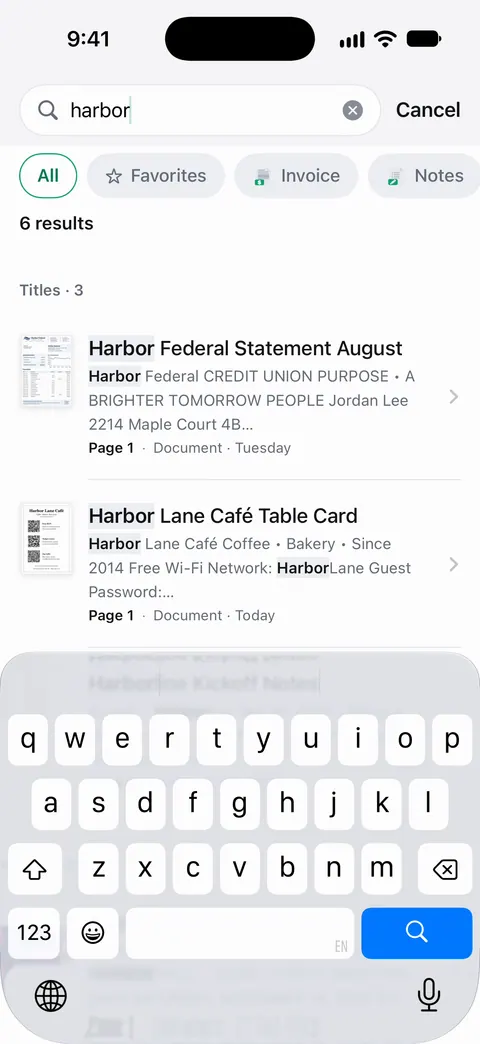
If you want to see how that works without either app, our guide to making a scanned PDF searchable covers Apple’s own options first.
Pick Genius Scan if
- You want unlimited free scanning with no mark on the page, and you don’t need the text read.
- You use Android too, or you want to reach your scans from a computer’s browser.
- You export to a specific service such as Expensify, FTP or WebDAV, and don’t mind paying for it.
Pick Scanner One if
- You want every page readable and searchable without paying.
- You want documents named, tagged and filed for you, and to ask them questions. Ask your documents anything. When does the lease end? What did I spend at the shop? The answer comes back with the page it came from.
- You need Word, Excel and CSV exports, form filling or redaction (a Pro feature) in the same app. Scanner One exports to Word, keeping headings, lists and tables, and to Excel and CSV.
- You would rather pay once: one payment, yours forever.
For more options, see Genius Scan alternatives and the comparisons hub.
Where Scanner One helps, and where it doesn’t
Scanner One helps when the point of scanning is finding things again. Text recognition, search and clean PDFs are free and unlimited, documents are filed for you, and Documents stay on your iPhone unless you share them or turn on iCloud Sync. Scanner One needs no account and does no tracking.
Where it does less than Genius Scan:
- The watermark. On a free account, pages you share, print or export carry a small “Scanned with Scanner One” label at the bottom right. Pro removes it. Genius Scan’s free plan adds none. If you send many scans and won’t pay, that alone may decide it.
- Caps. The free PDF tools, exports, signing and filing have weekly or monthly limits; Genius Scan’s Basic plan has no document limit.
- Platforms. Scanner One runs on iPhone and iPad. There is no Android, Mac or web version, and no cloud you can open from a computer.
- Cloud AI. Cloud AI is off until you switch it on, and page images are a separate permission. It is a separate paid plan: Pro Max, the plan with cloud AI, costs $149.99 a year in the US.
And if you scan a page a month, Apple’s Notes app is enough for both: see scanning with the Notes app. The full list of free and paid features is on Free and Pro.
Questions and answers
Is Genius Scan really free?
Its makers say yes: The Grizzly Labs' pricing page says the free Basic plan has no limit on the number of documents you scan and adds no watermark. Text recognition, searchable PDFs, business cards and most cloud exports are marked as premium features on its App Store page.
Does Genius Scan put a watermark on scans?
Not on the free plan, according to its pricing page, which says Basic produces full-resolution documents without any watermark. Scanner One’s free version does add one: On a free account, pages you share, print or export carry a small "Scanned with Scanner One" label at the bottom right. Pro removes it.
Which one makes searchable PDFs for free?
Scanner One. Text recognition runs on every page for everyone, free or Pro. Scanner One makes searchable PDFs. In Genius Scan, searchable PDF creation is listed among the premium-plan features.
Does Genius Scan work on Android?
Yes. Genius Scan is on Google Play from the same developer, and its Genius Cloud adds web access from a computer. Scanner One does not: Scanner One runs on iPhone and iPad.
Sources
What this page says about Scanner One was checked against the app on .
- Scanner App: Genius Scan on the App Store — in-app purchases, privacy label, compatibility, the description’s premium [+] features and version 8.16.1 of November 6, 2026; read 2026-11-13
- The Grizzly Labs, Genius Scan pricing — Basic free with no document limit or watermark, Ultra at $39.99 a year, web access through Genius Cloud; page shows no date, read 2026-11-13
- Genius Scan on Google Play — the Android version; read 2026-11-13
- Scanner One on the App Store — the app’s own listing
Get Scanner One
Scanner One is free, with generous limits: scanning, clean PDFs and text search never stop.

Scanner OneScan, sign and ask anything
Scanner One is free, with generous limits: scanning, clean PDFs and text search never stop.