
Comparison
Scanner One vs TurboScan
Pick TurboScan if you want a simple, fast scanner you pay for once and an App Store privacy label that reads Data Not Collected: TurboScan Premium is a $14.99 in-app purchase, or TurboScan Pro is a $12.99 paid app. It also runs on older iPhones and on Android. Pick Scanner One if you want every page read and searchable, documents filed for you, Office exports and answers from your papers. Scanner One is free with caps such as 3 a week for PDF tools; Pro Lifetime is $59.99 once.

Scanner One is our app. Everything said here about TurboScan comes from its two US App Store pages and its support site, read on November 13, 2026.
Side by side
Checked on November 13, 2026, on the US App Store.
| TurboScan | Scanner One | |
|---|---|---|
| Price model | Free download with one purchase listed: TurboScan Premium at $14.99. Or TurboScan Pro, a separate paid app at $12.99 | Free download. Pro at $4.99 a month, $29.99 a year with a free week, or $59.99 once |
| Free version | Not spelled out on the App Store page | Scanning, clean PDFs and text search never stop. PDF tools and exports: 3 a week. A small “Scanned with Scanner One” label on shared pages |
| Privacy label | Data Not Collected | No account, no tracking |
| Text | Description lists naming, folders and “smart search” | Text recognition runs on the device, in 29 languages. Scanner One makes searchable PDFs. |
| Platforms | iPhone, iPad, iPod touch, Mac (Apple M1 or later) and Apple Vision; Android | iPhone and iPad |
| Oldest system | iOS 13.0 | iOS 17 or later |
| Standout | SureScan for sharp pages; several receipts or cards on one PDF page | Files each document by itself and answers with the page it came from |
TurboScan’s current version, 3.4.2, came out on November 4, 2026.
What TurboScan does well
TurboScan does one job and keeps it simple. Its App Store description lists automatic edge detection and perspective correction, shadow removal and a contrast setting for black text on white, plus color and photo modes. SureScan, its own mode, takes three pictures of the same page for a sharper scan, which its maker says helps most in low light.
The everyday touches are thoughtful. “Email to myself” sends a document in one tap. You can arrange several receipts or cards on a single PDF page for printing. It has a Face ID, Touch ID and passcode lock, saves pages to Photos, uploads or backs up to iCloud Drive, and works with AirDrop and AirPrint. Faxes go through a separate Turbo Fax app.
Its privacy label is short. The label for both TurboScan and TurboScan Pro reads Data Not Collected, and the description says all scanning happens on your iPhone.
It also reaches further back than most apps: it needs only iOS 13.0, and the support site says there is a TurboScan for Android.
Paying once
Both apps can be bought outright. TurboScan’s App Store page lists a single in-app purchase, TurboScan Premium at $14.99. TurboScan Pro is a separate paid app at $12.99. Neither page says exactly what the free TurboScan leaves out, so look at the upgrade screen in the app.
Scanner One is free to download, and Pro comes monthly, yearly or once. Scanner One Pro Lifetime is a one-time purchase of $59.99 in the US. Lifetime is one payment, yours forever. Without paying, Scanner One is free, with generous limits: scanning, clean PDFs and text search never stop. The capped parts are the PDF tools and Office exports (3 a week), signing and markup (3 documents a month) and smart filing (10 documents a month).
What Scanner One adds
TurboScan’s description talks about scanning, naming, folders and sending. Scanner One goes on to read and file what you scan.
- Text recognition runs on every page for everyone, free or Pro. Search looks inside the text of every document and shows the matching line and page.
- Then it reads the text, names the document, tags it and puts it in the right folder.
- Scanner One exports to Word, keeping headings, lists and tables, and to Excel and CSV.
- Scans come with Auto Clean, Color, Grayscale and Receipt filters. ID cards and passports are scanned with both sides on one printable page.
- Ask your documents anything. When does the lease end? What did I spend at the shop? The answer comes back with the page it came from.
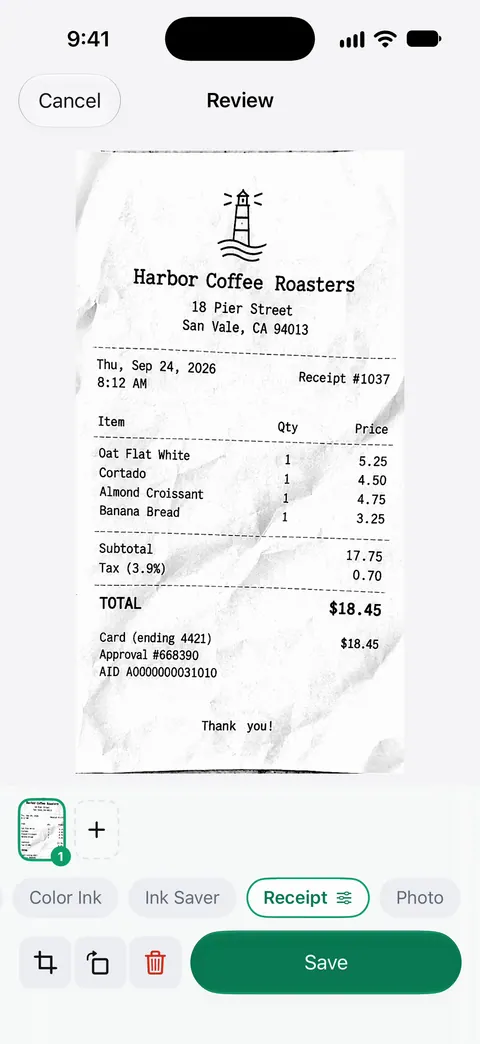
If receipts are your main reason to scan, our guide to scanning receipts on iPhone starts with Apple’s free way.
Pick TurboScan if
- You want to pay once, a small amount, for a fast and simple scanner.
- A Data Not Collected privacy label matters most to you.
- Your iPhone is too old for iOS 17, or you also use Android.
Pick Scanner One if
- You want every page searchable and documents filed for you.
- You need Word or Excel exports, merging, compression or form filling in the same app.
- You want to ask your papers questions without retyping them.
More one-time options are on scanner apps without a subscription.
Where Scanner One helps, and where it doesn’t
Scanner One helps when the scan is the start of the job: reading it, filing it, finding it, sending it as Word or a smaller PDF. Documents stay on your iPhone unless you share them or turn on iCloud Sync.
Where TurboScan is ahead:
- Price to own it. TurboScan Pro is $12.99 once. Scanner One’s lifetime option is $59.99 once, and its free version has caps.
- The label on your pages. On a free account, pages you share, print or export carry a small “Scanned with Scanner One” label at the bottom right. Pro removes it. Pro removes it.
- Older iPhones and Android. Scanner One needs iOS 17 or later. Scanner One runs on iPhone and iPad. There is no Android version.
- Privacy label. TurboScan’s label says Data Not Collected. Scanner One’s promise is No account, no tracking; read the privacy page for what that covers.
And for a single page now and then, Apple’s free scanner in Notes or Files is enough: see how to scan documents on iPhone.
Questions and answers
Is TurboScan a one-time purchase?
Yes, by its App Store pages. The free TurboScan lists one in-app purchase, TurboScan Premium at $14.99, and TurboScan Pro is a separate paid app at $12.99 with no in-app purchases listed. Scanner One also has a one-time option: one payment, yours forever, at $59.99 once.
Does TurboScan collect data?
Its App Store privacy label says Data Not Collected, and its description says the developer does not collect any data and all scanning happens on your iPhone. For Scanner One: Scanner One needs no account and does no tracking. Scanner One’s privacy manifest declares no tracking.
What is SureScan in TurboScan?
TurboScan’s description says SureScan takes three pictures of the same page for a sharper scan, which helps in low light.
What happens to my TurboScan scans if I delete the app?
TurboScan’s support page says you lose stored scans when you delete the app unless you back them up first with Settings > Backup & Restore, which can save to iCloud Drive.
Sources
What this page says about Scanner One was checked against the app on .
- TurboScan: document scanner on the App Store — the $14.99 TurboScan Premium purchase, Data Not Collected label, features, iOS 13 requirement and version 3.4.2 of November 4, 2026; read 2026-11-13
- TurboScan Pro: PDF scanner on the App Store — the $12.99 paid app; read 2026-11-13
- TurboScan support — Android version, Backup & Restore, faxing through Turbo Fax; read 2026-11-13
- Scanner One on the App Store — the app’s own listing
Get Scanner One
Scanner One is free, with generous limits: scanning, clean PDFs and text search never stop.

Scanner OneScan, sign and ask anything
Scanner One is free, with generous limits: scanning, clean PDFs and text search never stop.