
Comparison
Scanner One vs iScanner
Pick iScanner if you want a web version and cloud sync for your files, Android too, or extras like faxing, a math solver and measuring objects. Its App Store page lists Premium purchases from $3.99 to $19.99. Pick Scanner One if you want documents kept on your iPhone with no account and no tracking, text recognition free on every page, and AI that runs on the device first. Scanner One’s free version caps PDF tools at 3 a week and labels shared pages; Pro is $29.99 a year or $59.99 once.

Scanner One is our app. Everything said here about iScanner comes from its US App Store page and its Google Play listing, read on November 13, 2026.
Side by side
Checked on November 13, 2026, on the US App Store.
| iScanner | Scanner One | |
|---|---|---|
| Price model | Free download. Premium purchases listed at $3.99, $4.99, $9.99, $14.99 and $19.99, and SPECIAL OFFER - 75% OFF at $19.99. “iScanner Pro unlocks all scanner features” | Free download. Pro at $4.99 a month, $29.99 a year with a free week, or $59.99 once |
| Free version | Not spelled out on the App Store page | Scanning, clean PDFs and text search never stop. PDF tools and exports: 3 a week. A small “Scanned with Scanner One” label on shared pages |
| Where files live | Synced through AWS cloud storage, with a web version; scanning and editing work offline | Documents stay on your iPhone unless you share them or turn on iCloud Sync. |
| AI | AI Chat: summarize, translate, rewrite, answer questions | On-device AI, 3 questions a day free. Cloud AI is a separate plan at $149.99 a year |
| Privacy label | Tracking: Purchases, Location, Identifiers, Usage Data, Diagnostics, Other Data. Linked to you: the same plus User Content | No account, no tracking |
| Platforms | iPhone, iPad and Apple Vision; Android; web version | iPhone and iPad |
| Standout | Fax, math solver, measuring and counting objects, decoy password | Files each document by itself and answers with the page it came from |
iScanner needs iOS 18.0 or later; version 6.20 came out on November 12, 2026. Scanner One needs iOS 17 or later.
What iScanner does well
iScanner packs a lot into one app. Its App Store description lists export to PDF, JPG, DOC, XLS, PPT or TXT, signing, form filling, redaction, merge and split, faxing, and text recognition in 20+ languages. It has ID and passport modes, a math solver, and camera tools to measure objects and count similar ones.
Its AI Chat can summarize, translate, rewrite or answer questions about a document. For security it offers an app lock with a PIN, Face ID or Touch ID, password-protected PDFs, expiry dates on shared links, and a decoy password that opens a fake version of the app.
The other strength is reach. The description says files sync through AWS cloud storage and can be managed from any browser with a web version, and signing in on a new phone restores everything. It is also on Google Play. If you want your scans on a work computer or an Android tablet, iScanner does that and Scanner One does not.
Cloud sync or on the device
The two apps start from opposite places. iScanner syncs your files through cloud storage, which makes moving to a new phone easy and gives you a web version. Its description also says scanning, editing and viewing work offline, and only cloud sync and backups need a connection.
Scanner One keeps documents on the phone. Documents stay on your iPhone unless you share them or turn on iCloud Sync. Scanner One needs no account and does no tracking. You can lock the app with Face ID. Our guide to moving scans to a new iPhone covers changing phones.
The privacy labels follow from that. iScanner’s label lists six kinds of data under “Data Used to Track You”, including Location and Purchases. Scanner One’s privacy manifest declares no tracking. Our privacy label comparison sets many scanners side by side.
AI on the phone or in the cloud
Both apps can answer questions about a document. The difference is where it runs and what it costs.
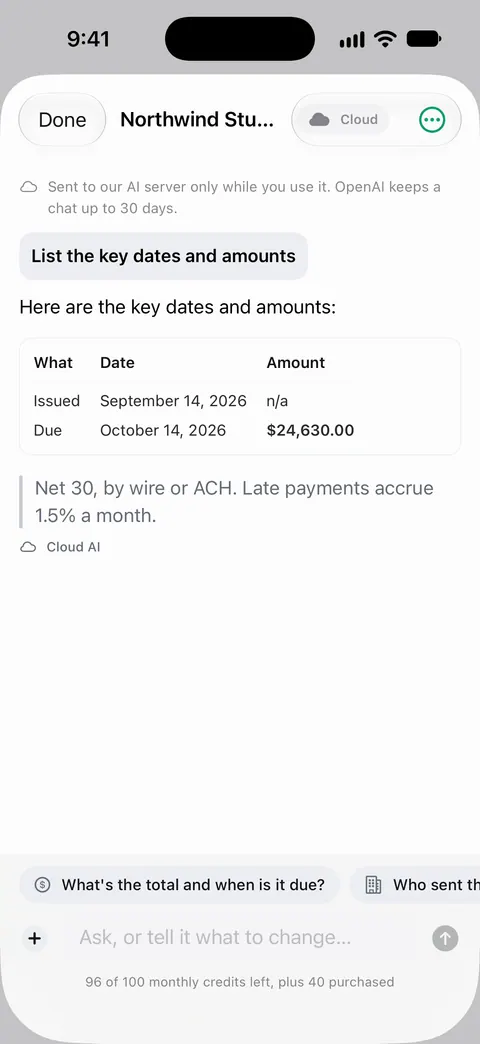
In Scanner One, the first answer comes from the iPhone itself. Ask your documents anything. When does the lease end? What did I spend at the shop? The answer comes back with the page it came from. Free accounts can ask the on-device AI 3 questions a day. Cloud AI is off until you switch it on, and page images are a separate permission. Cloud AI is a separate paid plan: Pro Max, the plan with cloud AI, costs $149.99 a year in the US. Credits for cloud AI come in packs of 100 for $2.99, 400 for $9.99 and 1,000 for $21.99 in the US.
iScanner’s App Store page describes its AI Chat but does not say where the processing happens or which plan it needs. If that matters to you, check its privacy policy, and see our guide to on-device AI vs cloud AI.
Pick iScanner if
- You want a web version and cloud sync, or you also use Android.
- You fax, solve math, or measure and count objects with the camera.
- You like a decoy password or expiring share links.
Pick Scanner One if
- You want papers on your iPhone, with no account and no tracking.
- You want every page read and searchable for free: Text recognition runs on every page for everyone, free or Pro.
- You want documents filed for you: Then it reads the text, names the document, tags it and puts it in the right folder.
- You would rather pay once: $59.99 once.
Where Scanner One helps, and where it doesn’t
Scanner One helps if your scans are personal papers you want to keep on the phone and find again by any word. Search looks inside the text of every document and shows the matching line and page. Redaction is permanent.
Where iScanner does more:
- Web and Android. Scanner One runs on iPhone and iPad. Scanner One has no web version and no Android app.
- Fax and camera tools. Scanner One does not send faxes.
- Limits and the label. On a free account, pages you share, print or export carry a small “Scanned with Scanner One” label at the bottom right. Pro removes it. PDF tools, signing and AI questions are capped on the free plan; Free and Pro lists every limit.
- Cloud AI costs extra. It sits in Pro Max, not in Pro.
If you only need to scan a form and send it, the free scanner in Notes or Files is enough: see how to scan documents on iPhone.
Questions and answers
How much does iScanner Premium cost?
The US App Store lists iScanner purchases named Premium at $3.99, $4.99, $9.99, $14.99 and $19.99, and a special offer at $19.99. The page doesn’t name the period of each, so check the plan screen in the app.
Where does iScanner keep my files?
Its App Store description says files sync through AWS cloud storage and can be managed from any browser with the web version, and that signing in on a new phone restores everything. Scanning, editing and viewing also work offline. In Scanner One, Documents stay on your iPhone unless you share them or turn on iCloud Sync.
Does iScanner have AI?
Yes. Its description lists an AI Chat that can summarize, translate, rewrite or answer questions about a document. Scanner One has on-device AI: Ask your documents anything. When does the lease end? What did I spend at the shop? The answer comes back with the page it came from. Free accounts can ask the on-device AI 3 questions a day. Cloud AI is off until you switch it on, and page images are a separate permission.
What does iScanner’s privacy label list?
On the US App Store it lists Purchases, Location, Identifiers, Usage Data, Diagnostics and Other Data under Data Used to Track You. For Scanner One: Scanner One needs no account and does no tracking. Scanner One’s privacy manifest declares no tracking.
Sources
What this page says about Scanner One was checked against the app on .
- iScanner: PDF Document Scanner on the App Store — in-app purchases, features, AWS cloud sync and web version, offline use, privacy label, compatibility and version 6.20 of November 12, 2026; read 2026-11-13
- iScanner on Google Play — the Android version, published by BP Mobile LLC; read 2026-11-13
- Scanner One on the App Store — the app’s own listing
Get Scanner One
Scanner One is free, with generous limits: scanning, clean PDFs and text search never stop.

Scanner OneScan, sign and ask anything
Scanner One is free, with generous limits: scanning, clean PDFs and text search never stop.