
Comparison
The best document scanner apps for iPhone, by what you need
For a few pages a month, the free scanner in Notes, Files or Preview is enough. Beyond that it depends on the job: Genius Scan for free scanning with no watermark, TurboScan for a Data Not Collected privacy label and a one-time price, Prizmo for text recognition bought once, Adobe Scan if you live in Acrobat, Scanner Pro for a polished all-rounder, and Scanner One, our app, if you want text recognition, search and filing on the free version. Prices and labels checked November 13, 2026.

Scanner One is our app. We include it with its limits stated and we don’t rank it first; you decide. Every fact about the other apps comes from its own App Store page or developer site, read on November 13, 2026, and the full dated data is in our scanner app audit.
Start with the scanner you already have
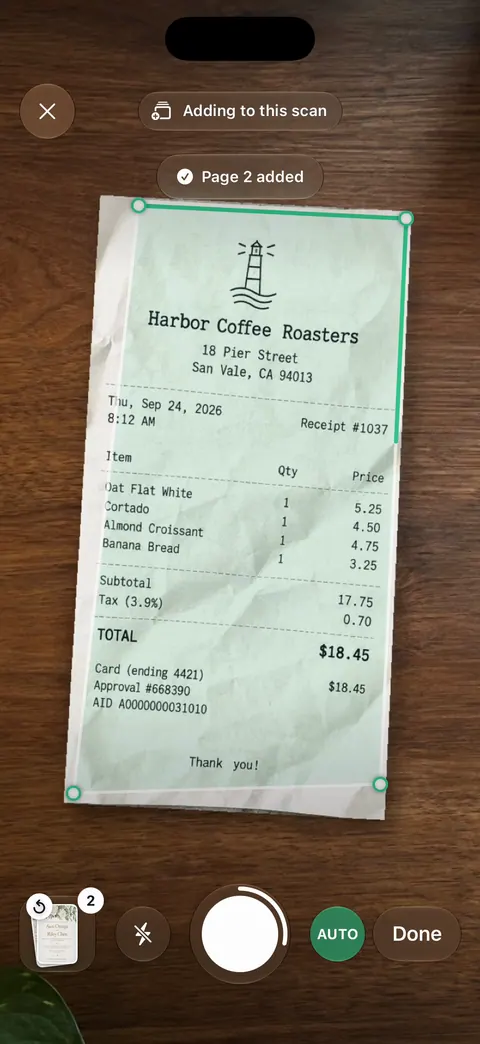
Apple’s steps, for iOS 26: open Notes, open or create a note, tap the Attachment button, then Scan Documents. Place the page in view. In Auto mode it scans by itself; otherwise tap the Shutter button, drag the corners to fit, and tap Keep Scan. Tap Done when you have all the pages. The Files app does the same from its More button and asks where to Save. On iOS 26 and 27, the Preview app has Scan Documents on its start screen.
That covers a lease, a form to email back or a doctor’s note. Our guide to scanning documents on iPhone has the details. A dedicated app is worth it when you scan every week, need the text in your scans to be searchable, or want the app to keep your papers in order.
The seven, side by side
Checked on November 13, 2026, on the US App Store and developer sites.
| App | Best for | Price model | Free version, per the developer | Data used to track you | Needs |
|---|---|---|---|---|---|
| Notes, Files, Preview (Apple) | A few pages a month | Built into iOS | All of it; nothing to buy | Part of iOS | Preview: iOS 26 or 27 |
| Genius Scan | Free scanning, no watermark | Free Basic, Ultra $39.99 a year | No document limit, no watermark; OCR in Ultra | None | iOS 17.0 |
| TurboScan Pro | A one-time price and a short label | $12.99 paid app | Not applicable: paid up front | Data Not Collected | iOS 13.0 |
| Prizmo | Text recognition bought once | Free, one-time Premium Pack $23.99 | Core features; pack removes limits and watermark | Data Not Collected | iOS 17.5 |
| Adobe Scan | People who use Acrobat | Free, subscriptions $3.99 to $69.99 | OCR up to 5 pages; scans go to Adobe Document Cloud | Identifiers | iOS 18.0 |
| Scanner Pro | A polished all-rounder | Free, Plus by the week or year | Scanning and sharing; watermark-free scans and OCR are Plus features | Identifiers | iOS 18.0 |
| Scanner One (ours) | Reading, search and filing | Pro comes monthly, yearly with a free week, or once for life. | Scanner One is free, with generous limits: scanning, clean PDFs and text search never stop. | No account, no tracking | iOS 17 or later |
Each app, honestly
Genius Scan: the free scanner to beat
The Grizzly Labs’ pricing page says Basic is free, with no limit on the number of documents and no watermark, and its help center says it has no ads. It covers the core well: auto-detection, perspective correction, batch scanning, multi-page PDFs. Text recognition, cloud exports and sync are in Ultra at $39.99 a year. The label lists nothing used to track you.
Pick it if you want free scanning with nothing added to your pages.
TurboScan Pro: pay once, collect nothing
A $12.99 paid app on the US App Store with no in-app purchases, and a privacy label that says Data Not Collected. Its description lists SureScan, which takes three shots of a page for a sharper scan, plus folders, smart search and Face ID lock. It runs on iOS 13.0, so it suits older iPhones. Its page doesn’t describe text recognition.
Pick it if you want one price and the shortest possible label.
Prizmo: for people who need the words
Prizmo’s description lists on-device OCR in 30 languages, optional Cloud OCR in 139, searchable PDF and Word (DOCX) export, flattening of curved book pages and reading aloud. The Premium Pack is a one-time purchase, per the description, that unlocks all limits including watermark removal; the list shows Premium Pack (non-recurring) at $23.99. Data Not Collected.
Pick it if text recognition is the main job and you don’t want a subscription.
Adobe Scan: inside Adobe’s world
Free to download, with business cards, whiteboards and a Magic eraser for shadows and creases. Its description says a subscription combines scans and raises OCR from 5 to 100 pages, and that scans save to Adobe Document Cloud automatically. The label lists Identifiers as used to track you; it needs iOS 18.0.
Pick it if you already pay for Acrobat or want your scans in Adobe’s cloud.
Scanner Pro: polished, with Plus for the extras
Readdle’s help page says the free app creates, organizes and shares scans, and lists watermark-free scans, OCR, auto-upload and a PDF converter among the Plus features, sold weekly or yearly. The description adds signing, filling forms and iCloud sync. Needs iOS 18.0.
Pick it if you use Readdle’s other apps and like a polished, familiar design.
Scanner One: ours
Point your camera at any piece of paper. Scanner One finds the edges, straightens the page, cleans it up and saves a real PDF. Then it reads the text, names the document, tags it and puts it in the right folder. Ask your documents anything. When does the lease end? What did I spend at the shop? The answer comes back with the page it came from. Text recognition runs on every page for everyone, free or Pro.
How to choose in one minute
- How often do you scan? A few pages a month: use Notes or Files. Weekly: get an app.
- Do you send scans to other people from a free plan? Then a watermark matters: Genius Scan Basic or the built-in scanner.
- Do you need to search the text? Prizmo, Scanner One, Adobe Scan for short documents, or Preview’s Embed Text on iOS 26 and later.
- Do you hate subscriptions? TurboScan Pro, Prizmo’s Premium Pack, or Scanner One Lifetime.
- Is your iPhone older? Check the “Needs” column. TurboScan goes back furthest.
Where Scanner One helps, and where it doesn’t
Where it helps: Text recognition runs on every page for everyone, free or Pro. Search looks inside the text of every document and shows the matching line and page. Book spreads are split into two pages and curved lines are flattened. ID cards and passports are scanned with both sides on one printable page. Scanner One needs no account and does no tracking.
Where it doesn’t: On a free account, pages you share, print or export carry a small “Scanned with Scanner One” label at the bottom right. Pro removes it. Free accounts can run the PDF tools and the Word, Excel and CSV exports 3 times a week, from one shared allowance. Free accounts can sign and mark up 3 documents a month. Scanner One runs on iPhone and iPad. If you only scan and send, Genius Scan Basic does that for free without a mark, and the built-in scanner costs nothing at all. For the free options in more depth, see the best free scanner apps for iPhone; for labels, scanner apps and their privacy labels.
Questions and answers
Do I need a scanner app on iPhone at all?
Often not. Notes and Files can scan a document to a PDF, and on iOS 26 and 27 Preview can scan, fill and sign forms, and make a PDF searchable when you export it. An app earns its place when you scan often, need text recognition, or want help keeping papers organized.
Which scanner app is free with no watermark?
Genius Scan’s pricing page says its Basic plan is free, has no document limit and produces documents without any watermark. Apple’s built-in scanners have nothing to buy. Scanner One’s free version adds a small label to shared pages, which Pro removes.
Which scanner app collects the least data?
On the labels we read on November 13, 2026, TurboScan and Prizmo say Data Not Collected. Genius Scan lists no data used to track you.
Is there a good scanner app without a subscription?
TurboScan Pro is a $12.99 paid app with no in-app purchases. Prizmo’s Premium Pack is described as a one-time purchase ($23.99 in its list). Scanner One Pro Lifetime is a one-time purchase of $59.99 in the US.
Sources
What this page says about Scanner One was checked against the app on .
- Apple Support, How to scan documents on your iPhone or iPad — Notes and Files scanning steps for iOS 26; page published 2026-02-13
- The Grizzly Labs, Genius Scan pricing — Basic free with no document limit and no watermark; Ultra $39.99 a year; read 2026-11-13
- TurboScan Pro on the App Store — $12.99 paid app, Data Not Collected, iOS 13.0; read 2026-11-13
- Prizmo on the App Store — one-time Premium Pack, OCR languages, Data Not Collected; read 2026-11-13
- Adobe Scan on the App Store — OCR 5 to 100 pages with a subscription, Adobe Document Cloud, privacy label; read 2026-11-13
- Scanner One on the App Store — the app’s own listing
Get Scanner One
Scanner One is free, with generous limits: scanning, clean PDFs and text search never stop.

Scanner OneScan, sign and ask anything
Scanner One is free, with generous limits: scanning, clean PDFs and text search never stop.