
Feature
Fill a form from your own documents
Fill Form lets you type into the fields of a PDF form. Fill Form fills a form from your own documents and shows where each answer came from. So your passport number, address or employer comes from the paper that holds it, and you can see which paper that was. Check every answer before you sign and send. Pro adds What changed, filling forms from your documents, Pack checks and folder sharing.

What it does
Forms ask for the same things again and again: your full name as it is on your passport, your address, your date of birth, your passport or license number and its expiry, your employer, your income. The answers are on papers you already have. Typing them in means finding each paper and copying each number by hand.
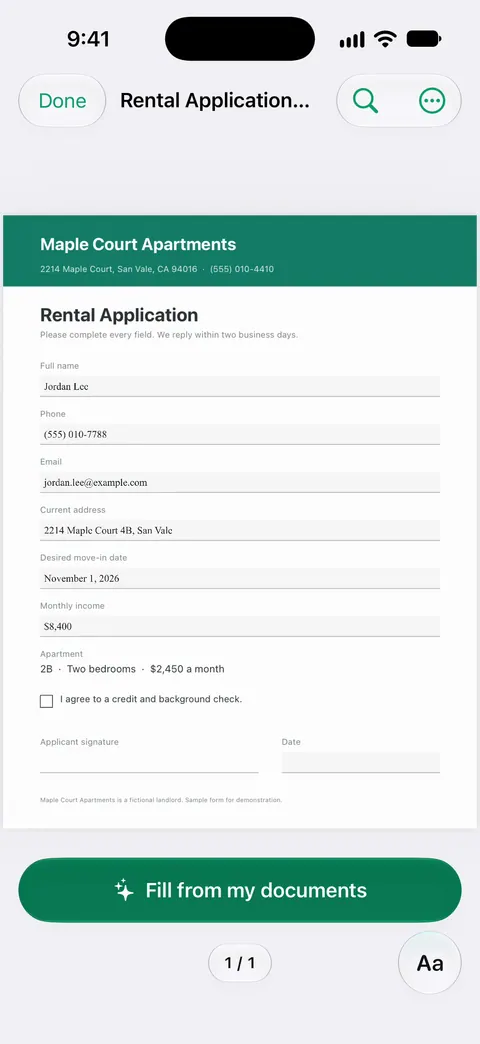
Fill Form lets you type into the fields of a PDF form. In 1.0.1 it goes a step further: Fill Form fills a form from your own documents and shows where each answer came from.
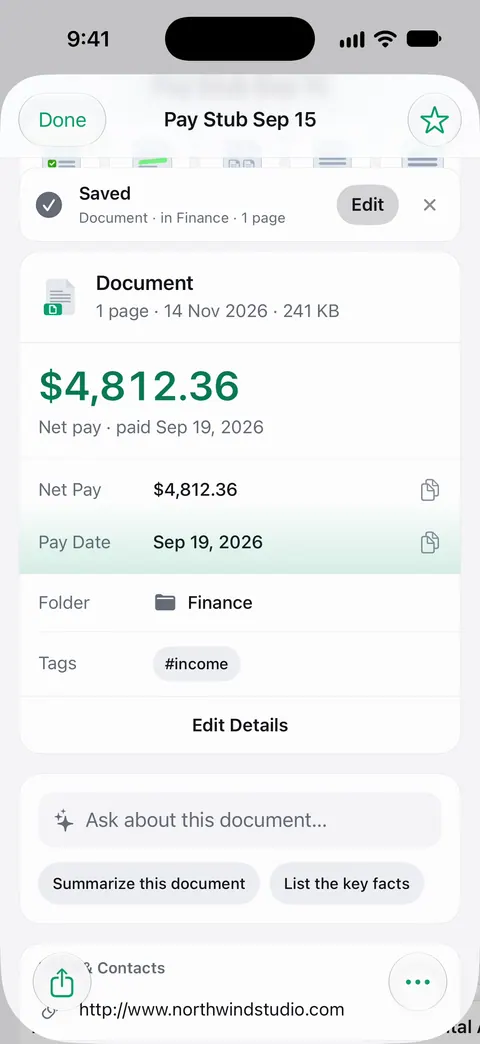
That second part matters. A form filled by software is only useful if you can check it quickly, and seeing that the passport number came from your scanned passport, or the salary from last month’s pay stub, makes the check fast.
How to use it
- Open the PDF form in Scanner One. A form that came by email can be sent in from Mail. Other apps can send a file to Scanner One with Save to Scanner One in their share sheet.
- Open Fill Form.
- Fill the form from your documents. Each answer shows where it came from.
- Check every answer against its source, and type over anything that is wrong or out of date.
- Fill in by hand what no paper holds, like today’s date or a choice only you can make.
- Sign the form if it needs a signature, then share it. You can sign and annotate documents.
Feed it the right papers
A form can only be filled from documents you have. The ones that come up most:
- Your passport and driver’s license, front and back. ID cards and passports are scanned with both sides on one printable page.
- A recent pay stub and last year’s tax forms, for employer and income questions.
- A recent utility bill or bank statement, for your address.
- Your lease or mortgage statement, for housing questions.
- Your children’s records, for school and health forms. See your child starts school.
Keep them current. If your address changed in March, an older statement can put the old address on the form.
What to watch for
- Old papers, old answers. An expired passport, a previous employer or an old address are the usual mistakes. The source shown for each answer is where you catch them.
- Same name, different form. Some forms want your name exactly as on your passport; some want a middle name; some want family name first. Read the label of each field.
- Questions that need judgment. “Have you ever been refused a visa?” or a tax status is your answer to give, not a document’s.
- Official forms. For immigration, tax and legal forms, the instructions from the agency decide what goes in each box. When in doubt, follow them.
Where Scanner One helps, and where it doesn’t
For a short form with a few fields, typing is quick. The iPhone can fill and sign a PDF form on its own, too: Apple’s page describes tapping a blank field to type, and AutoFill, which completes supported forms from your My Card in Contacts. If your name, address and phone are all a form asks, that is enough. Our guide to filling out a PDF form on iPhone starts with the built-in way, and signing a PDF on iPhone covers the signature.
Filling from your documents helps with long forms and forms you meet often: school, new jobs, rentals, visas. Pro adds What changed, filling forms from your documents, Pack checks and folder sharing. On a free account, pages you share, print or export carry a small “Scanned with Scanner One” label at the bottom right. Pro removes it. If the form is due today and there’s no printer, send a signed form without a printer walks through it. More new papers for a new job are on the paperwork for a new job.
Questions and answers
Can Scanner One fill out a form for me?
Fill Form fills a form from your own documents and shows where each answer came from. You can also type into a form’s fields yourself: Fill Form lets you type into the fields of a PDF form.
Is filling a form from my documents free?
Pro adds What changed, filling forms from your documents, Pack checks and folder sharing. Typing into a form’s fields yourself with Fill Form is the 1.0 feature.
How do I know an answer is right?
Fill Form fills a form from your own documents and shows where each answer came from. Open that paper, check the value, and fix the field if it is wrong. You sign the form, so the answers are yours.
Do my documents leave my phone when a form is filled?
Documents stay on your iPhone unless you share them or turn on iCloud Sync. Cloud AI is off until you switch it on, and page images are a separate permission. The privacy page has the details.
Sources
What this page says about Scanner One was checked against the app on .
- Apple Support, Fill out forms, sign documents, and create signatures on iPhone (iPhone User Guide, iOS 27) — the built-in way to fill a form, and AutoFill from your My Card in Contacts; read 2026-11-13
- Scanner One on the App Store — the app’s listing and 1.0.1 release notes: Fill Form fills a form from your own documents and shows where each answer came from (Pro)
Get Scanner One
Scanner One is free, with generous limits: scanning, clean PDFs and text search never stop.

Scanner OneScan, sign and ask anything
Scanner One is free, with generous limits: scanning, clean PDFs and text search never stop.