
Feature
Permanent redaction
Redaction is permanent. Open the document, choose Redact, mark each thing to hide, pick a style (solid black, pixelated or blurred) and apply. A black box drawn on top of a PDF is not the same: the text underneath can often still be copied. Pro adds redaction, the smart eraser, edit text, auto-export and five alternate app icons.

What it does
Redaction is permanent. When you apply a redaction, what was under it is gone from the document, not just covered.
That is the difference that matters. Many people “redact” a PDF by drawing a black rectangle over a line. On screen, it looks hidden. But in many PDFs, the text is still there under the box: it can be selected, copied into a message, or found by search. Real redaction removes the words and the image of them.
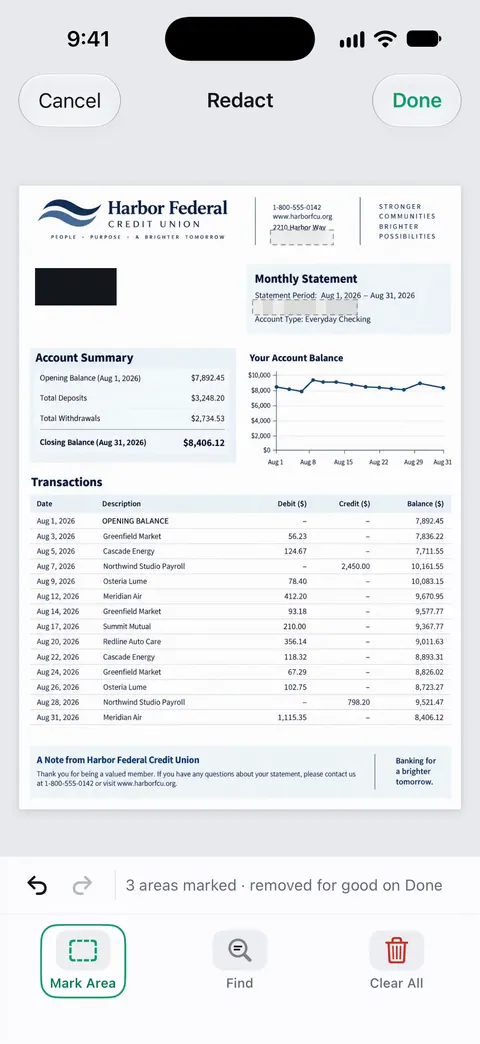
How to redact a document
- Open the document and choose Redact from its tools.
- Mark each thing to hide: a name, an address, an account number, a line of a table.
- Pick a style for each box: solid black, pixelated or blurred.
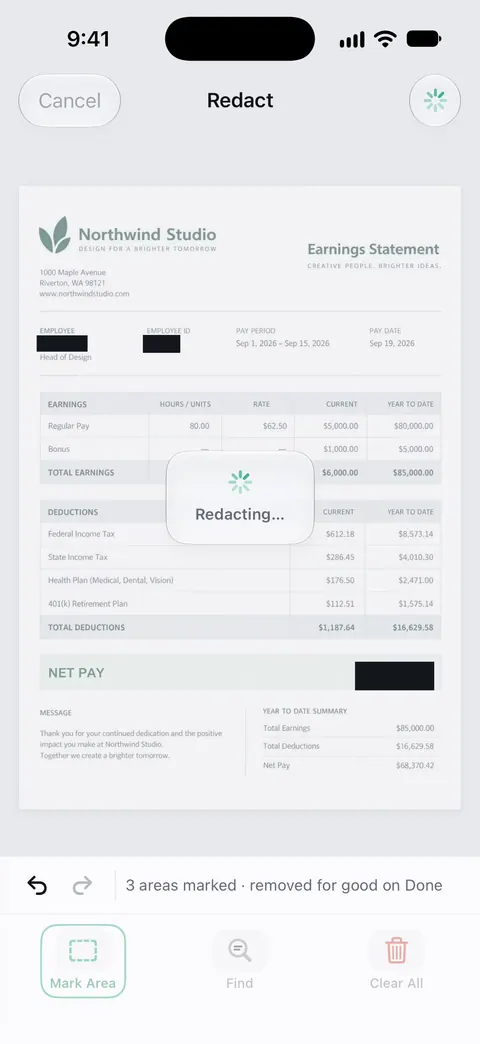
- Apply. The marked areas are sealed.
- Check the result. Search the document for a word you redacted; it should not be found. Zoom in on each box.
- Share the redacted document. On a free account, pages you share, print or export carry a small “Scanned with Scanner One” label at the bottom right. Pro removes it.
Which style to pick
- Solid black is the clearest signal that something was removed on purpose. Use it for official copies.
- Pixelated keeps the page’s look while hiding the detail, for screenshots and informal sharing.
- Blurred is the softest look. Use it when appearance matters more than making the removal obvious.
The style is only how the box looks. Redaction is permanent.
What people usually redact
- Account and card numbers, except the last four digits, on statements and bills.
- Social Security numbers, tax IDs and passport numbers when the person asking doesn’t need them.
- Other people’s details: a family member’s name on a joint statement, a colleague’s salary on a shared pay table.
- Medical details that have nothing to do with the request.
- Addresses on a document you share publicly, like a receipt in a marketplace listing.
Before you redact, ask what the person needs. A landlord may need your income but not your account numbers; see what a landlord can ask for. Some offices need the full document, unredacted, and will reject a redacted copy. When proving your address, the address itself has to stay visible.
What redaction is not
- It is not Clean Up. Clean Up erases stains and marks so a page looks better. Redaction removes information so no one can recover it.
- It is not reversible. Keep the original paper, or an unredacted copy stored safely, if you might need it.
- It doesn’t redact what you didn’t mark. A number can appear in more than one place: a header, a footer, a table. Search for it before you send.
Our guide to redacting a PDF properly covers the general method in any app, including how to test whether a redaction is real.
Where Scanner One helps, and where it doesn’t
If you only need to hide something in a picture, cropping it out or covering it in Photos and sending the picture, not the PDF, is a simple choice. For a PDF, the safe free option without a redaction tool is to print the document, black out the text with a marker, and scan the paper copy again.
Scanner One helps when you redact often or need it done properly on your phone. Redaction is permanent. Pro adds redaction, the smart eraser, edit text, auto-export and five alternate app icons. Pro removes every limit. The plans are on Free and Pro, and sending ID copies safely is on ID cards and passports.
Questions and answers
Is redaction in Scanner One permanent?
Redaction is permanent. After you apply it, check the result: search the document for a word you redacted, and it should not be found.
Is redaction free?
Pro adds redaction, the smart eraser, edit text, auto-export and five alternate app icons. The plans and prices are on our Free and Pro page.
Why isn’t a black box in Markup enough?
A box drawn on a PDF is a drawing on top of the page. In many PDFs the text is still underneath, and anyone can select, copy or search it. Redaction removes it.
What should I redact before sending a bank statement?
Usually account numbers except the last few digits, and transactions the person doesn’t need to see, if they allow it. Some offices need the full statement unredacted, so ask first.
Sources
What this page says about Scanner One was checked against the app on .
- Scanner One on the App Store — the app’s own listing: permanent redaction, and redaction as part of Pro
Get Scanner One
Scanner One is free, with generous limits: scanning, clean PDFs and text search never stop.

Scanner OneScan, sign and ask anything
Scanner One is free, with generous limits: scanning, clean PDFs and text search never stop.