
Who it’s for
An easy iPhone scanner guide for older adults
Open the Notes app, tap the paperclip, then Scan Documents, and hold the iPhone over the letter until it scans by itself. To hear any page read aloud, turn on Speak Screen in Settings, then Accessibility, then Read & Speak, and swipe down with two fingers from the top of the screen. Keep important papers in one place, shred old bills and offers, and ask someone you trust to help set it up once.

This page is for anyone who wants paperwork to take less effort: mail that is hard to read, bills to keep track of, and papers to find again. If you are helping a parent or relative, helping a parent with paperwork is written for you.
The papers that pile up
- Mail: letters from Medicare, Social Security, the bank, the pharmacy, the city.
- Bills: utilities, phone, insurance, medical.
- Statements: bank, pension, investment.
- Health papers: visit summaries, prescription lists, test results.
- Important papers: birth certificate, Social Security card, will, power of attorney, insurance policies.
Scan a letter in four steps
The Notes app that comes with every iPhone does this well.
- Open Notes and start a new note.
- Tap the paperclip (the Attachment button), then tap Scan Documents.
- Put the letter flat on a table in good light and hold the phone above it. In Auto mode it scans by itself. If it doesn’t, press a Volume button. Tap Keep Scan.
- Add the next page or tap Done. Type a title at the top of the note, such as “Medicare letter November”.
Tip: a dark tablecloth under white paper helps the iPhone find the edges.
Have it read aloud
If small print is tiring, the iPhone can read for you.
- Open Settings, tap Accessibility, then Read & Speak.
- Turn on Speak Screen. You can also turn on Speak Selection, which reads only the words you select.
- Open the scanned letter. Swipe down from the top of the screen with two fingers, and the iPhone reads the page. Controls appear to pause or slow down.
- Or ask Siri: “Speak screen.”
In the same place, Speaking Rate changes how fast the voice reads, and Accessibility Reader shows text full screen in a font and size you choose. The read mail aloud guide has more help for low vision.
Use the words on the page
In the Preview app, you can select text in a picture of a page with Live Text. Then tap Copy, Translate, or Call for a phone number, or Open Link for a web address. That saves typing a long account number or phone number from a letter.
Keep, shred, or keep forever
The FTC’s guide is a good rule of thumb:
| How long | Examples |
|---|---|
| About a year | Bank statements, utility and card bills, undisputed medical bills |
| At least 3 years | Tax returns and the papers behind them |
| While you own it | Car title, home deed, warranties, leases |
| Forever, stored securely | Birth certificate, Social Security card, passport, will, power of attorney, marriage and military records |
Shred ATM receipts, credit and insurance offers, cleared checks after 14 days, expired cards and old prescription information. If you don’t have a shredder, the FTC suggests looking for a community shred day. If a bill or statement is available online, you can shred the paper copy.
For the forever papers, an emergency document binder keeps the originals together, and a scan on your phone means a copy goes where you go.
Staying safe with papers
- Put a passcode on your iPhone so no one else can open your papers.
- Collect mail promptly, as the FTC suggests, so statements don’t sit in the mailbox.
- Be careful who you send copies to. If someone calls or texts out of the blue asking for a photo of your ID or a statement, don’t send it. Hang up and call the number printed on your card or letter.
- Ask someone you trust to help set things up once, then you can do it yourself.
Small habits that help
- One title style: who it is from, what it is, the month. “Electric bill, October”.
- Scan the day the mail comes, then put the paper in a “to shred” or “to keep” tray.
- Keep everything in one place on the phone, so you always know where to look.
The scan letters and mail guide has more on sorting the mail.
Where Scanner One helps, and where it doesn’t
Point your camera at any piece of paper. Scanner One finds the edges, straightens the page, cleans it up and saves a real PDF. Then it reads the text, names the document, tags it and puts it in the right folder. That means less naming and sorting by hand.
Listen reads any document aloud. With Siri and Shortcuts you can open, find, share and ask your documents by voice, and see what’s due. Search looks inside the text of every document and shows the matching line and page. So “find the water bill” works without remembering where you put it. Scanner One is available in 34 languages, including English, Spanish, Portuguese, French, German, Italian, Dutch, Swedish, Danish, Norwegian, Finnish, Polish, Czech, Greek, Ukrainian, Russian, Turkish, Arabic, Hebrew, Hindi, Thai, Vietnamese, Indonesian, Japanese, Korean and Chinese.
Documents stay on your iPhone unless you share them or turn on iCloud Sync. You can lock the app with Face ID. Scanner One needs no account and does no tracking.
What to know first:
- Scanner One is free, with generous limits: scanning, clean PDFs and text search never stop.
- Free accounts get smart filing for 10 documents a month.
- On a free account, pages you share, print or export carry a small “Scanned with Scanner One” label at the bottom right. Pro removes it.
- Scanner One needs iOS 17 or later.
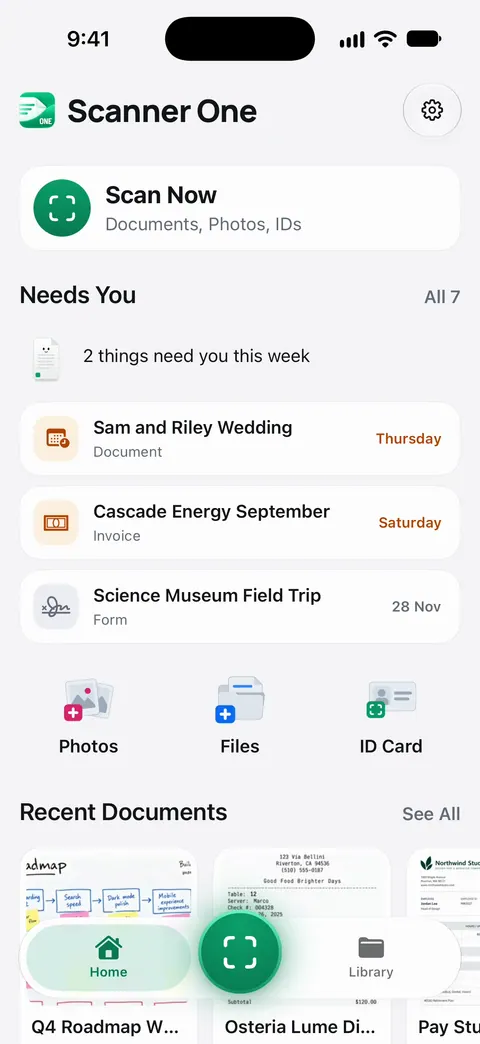
Bills and deadlines on Home. Needs You gathers bills due, return windows and IDs about to expire on Home, from your own papers.
If you scan a few letters a month and Speak Screen reads them well, the built-in Notes app is enough, and there is nothing else to learn.
Questions and answers
What is the easiest way to scan a letter on an iPhone?
Open Notes, start a new note, tap the paperclip, then Scan Documents. Hold the phone over the letter on a table. In Auto mode it takes the picture by itself; then tap Done. No extra app is needed.
Can my iPhone read a letter out loud?
Yes. Turn on Speak Screen in Settings, Accessibility, Read & Speak. Then open the scanned letter and swipe down with two fingers from the top of the screen, or ask Siri to speak the screen.
Which papers can I throw away?
The FTC suggests shredding ATM receipts, credit and insurance offers, cleared checks after 14 days, expired cards and old prescription information. Keep tax papers at least three years, and keep birth certificates, Social Security cards, wills and similar papers for good.
Is it safe to keep my papers on my phone?
It can be, if the phone has a passcode and you are careful about who you send files to. If someone calls or texts out of the blue asking for copies of your ID or bank statements, don’t send them; call the number printed on your card or letter instead.
Sources
What this page says about Scanner One was checked against the app on .
- Apple Support, Scan documents on your iPhone or iPad (article 108963) — Scan Documents in Notes and Files, Auto mode, Volume button capture, Keep Scan; page dated 2026-02-13
- Apple iPhone User Guide, Hear iPhone speak the screen, selected text, and typing feedback — Settings, Accessibility, Read & Speak: Speak Screen, Speak Selection, Accessibility Reader, the two-finger swipe and asking Siri to speak the screen; read 2026-11-13
- Apple iPhone User Guide, Interact with text in an image in Preview on iPhone — Live Text in Preview: copy, translate, call a number or open a link from text in an image; read 2026-11-13
- FTC, Protecting your personal information: Which documents to keep and which to shred — keep for a year, three years, while you own it, or forever; what to shred; dated 2025-06-10
- FTC, What To Know About Identity Theft — store papers with personal information securely, shred before throwing away, collect mail promptly; dated September 2024
- Scanner One on the App Store — the app’s own listing: Listen, Siri and Shortcuts
Get Scanner One
Scanner One is free, with generous limits: scanning, clean PDFs and text search never stop.

Scanner OneScan, sign and ask anything
Scanner One is free, with generous limits: scanning, clean PDFs and text search never stop.