
Who it’s for
Receipts, invoices and contracts: a freelancer’s iPhone system
Run a weekly routine: scan the week’s receipts the day you get them, save each invoice you send as a numbered PDF, and keep signed contracts and W-9s in a folder per client. Once a month, list the month’s expenses in a spreadsheet with date, payee, amount and purpose, the details the IRS says an expense record should show. Scanned records count if they are complete and legible; keep them at least 3 years after you file.

The starting as a freelancer page covers what to set up in your first week; the freelancer tax documents checklist is the list for year end. This page is the part in between: the weekly system that keeps receipts, invoices and contracts from piling up.
The papers a freelancer handles
- Receipts for software, equipment, supplies, travel, meals with clients and coworking.
- Invoices you send, and the payment confirmations that follow.
- Contracts, statements of work and NDAs, often sent to sign and return the same day.
- W-9s you send to clients, and the 1099s that come back in January.
- Statements: bank, card and payment platform.
- Mileage and travel records.
- Big purchases: the laptop, camera or desk you will use for years.
The weekly routine
Fifteen minutes, same day each week.
- Scan the week’s receipts. Flat, in good light, with Scan Documents in Notes or Files, or a scanner app. Many receipts are thermal paper that fades; scanning in the first week is what keeps them readable. Scan receipts for taxes has the details.
- Name each one by date, payee and purpose: “2026-11-10 Adobe, design software”. The purpose is the part you won’t remember in April.
- Save your sent invoices as PDFs with the invoice number in the name.
- File signed contracts in the client’s folder the day they come back.
- Check the business account for anything you don’t recognize, and mark paid invoices.
The monthly step: receipts to a spreadsheet
The IRS says an expense record should show the payee, the amount, proof of payment, the date and a description that shows it was a business expense. A spreadsheet with one row per receipt, using those columns, makes year-end a sum instead of a search:
| Date | Payee | Amount | Paid with | Purpose | File |
|---|---|---|---|---|---|
| 2026-11-03 | Office supply store | 42.18 | Business card | Printer ink for client proofs | 2026-11-03 office supply.pdf |
| 2026-11-07 | Coworking space | 180.00 | Bank transfer | November desk | 2026-11-07 coworking.pdf |
Keep the scans in a folder named for the month so the File column points somewhere real. Our expense report template has a layout to copy, and PDF to Excel on iPhone covers turning a table in a PDF into a spreadsheet.
Contracts and client paperwork
- Read before you sign. Look for payment terms, who owns the work, and how either side can end it.
- Sign and return as a PDF. The sign a PDF on iPhone guide shows Apple’s way with the Files app.
- Keep the signed version, not just the draft, and name it with the date.
- Send your W-9 once, then note which clients have it. The IRS describes the form as how you give your taxpayer identification number to someone who files an information return about income paid to you.
What the IRS says about scanned records
You can use any system that clearly shows your income and expenses, and the IRS says the requirements for paper records apply to electronic ones too. Publication 583 adds the rules for an electronic storage system such as scanning: it must index, store, preserve, retrieve and reproduce records in a legible form and give a complete and accurate record. Paper originals may be destroyed only after the system has been tested to show it meets those requirements. In practice, check each scan is readable before you shred anything.
How long: generally 3 years after you file, 6 years if you left out more than 25% of your gross income, 7 years for a bad debt or worthless securities loss, and records for equipment until the period ends for the year you sell or dispose of it. The business records guide puts it in a table, and our how long to keep calculator gives a date.
This page is general information, not tax advice. Tax rules change; check the IRS pages under Sources, or ask a tax professional about your own situation.
The mistakes that cost time
- Receipts with no purpose. “Amazon, 64.99” means nothing in April. Write why when you scan.
- Thermal receipts left for months until they are blank.
- Invoices only in your email. Keep a PDF of each one in your own folder.
- Personal and business spending mixed on one card, so every statement needs sorting.
- Sending your accountant a photo stream. One PDF per month is easier; send documents to your accountant shows how.
Where Scanner One helps, and where it doesn’t
Point your camera at any piece of paper. Scanner One finds the edges, straightens the page, cleans it up and saves a real PDF. Scans come with Auto Clean, Color, Grayscale and Receipt filters. The Receipt filter is made for faint thermal receipts.
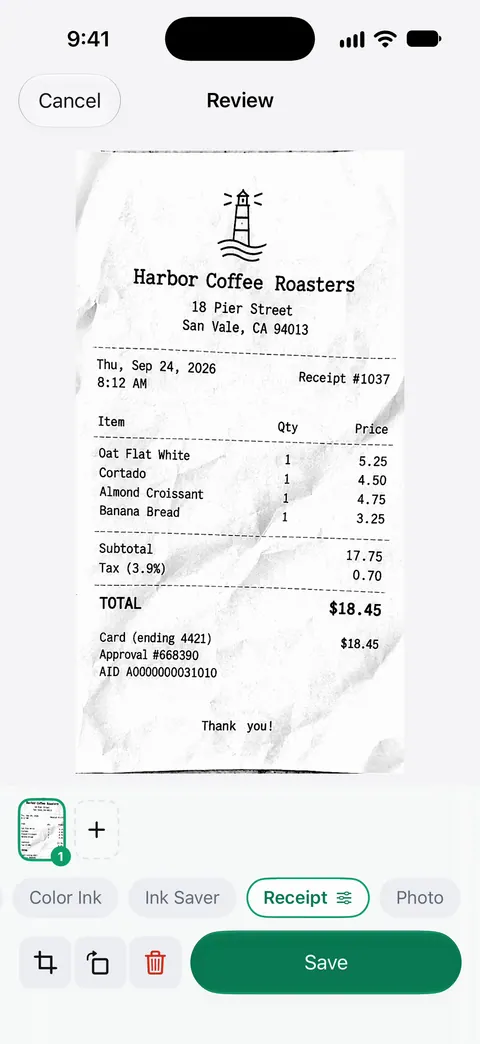
Then it reads the text, names the document, tags it and puts it in the right folder. Scanner One exports to Word, keeping headings, lists and tables, and to Excel and CSV. That covers the monthly spreadsheet step. Search looks inside the text of every document and shows the matching line and page. You can sign and annotate documents.
What to know first:
- Free accounts get smart filing for 10 documents a month. A month of receipts can go past that.
- Free accounts can run the PDF tools and the Word, Excel and CSV exports 3 times a week, from one shared allowance. The Excel and CSV exports count toward it.
- On a free account, pages you share, print or export carry a small “Scanned with Scanner One” label at the bottom right. Pro removes it. Clients will see it on invoices or signed contracts sent from a free account.
- Scanner One Pro costs $29.99 a year in the US, with a one-week free trial. Scanner One Pro Lifetime is a one-time purchase of $59.99 in the US.
It is not accounting software: it doesn’t send invoices, track who owes you, or work out your estimated tax. Pair it with a spreadsheet or bookkeeping tool. If you have a few receipts a month, Notes and a spreadsheet are enough.
Questions and answers
What is the best way for a freelancer to track receipts?
Scan each receipt the day you get it, write the business purpose on it or in the file name, and keep a folder per month. Once a month, put the month’s receipts in a spreadsheet with date, payee, amount and purpose. A simple routine you keep beats a complex app you abandon.
Can I throw away paper receipts after scanning them?
Publication 583 says paper originals may be destroyed once an electronic storage system has been tested and reproduces complete, legible records. Check each scan is readable before you shred, keep originals for big purchases, and ask your tax professional if you are unsure.
Do I need to keep invoices I send to clients?
Yes. The IRS lists invoices among the supporting documents for gross receipts, along with deposit records and 1099 forms. Number every invoice and keep a PDF copy of each one.
Should I keep the W-9s I send?
Keep a copy of your own current W-9 ready to send, and note which clients have one. If you hire other freelancers, ask each for a W-9 before you pay them and keep it with your records.
Sources
What this page says about Scanner One was checked against the app on .
- IRS, What kind of records should I keep — supporting documents for gross receipts, purchases, expenses, travel and assets; payee, amount, proof of payment, date and description; paper rules apply to electronic records; last reviewed 2026-08-03
- IRS, Recordkeeping — any system that clearly shows income and expenses; why records matter; last reviewed 2026-05-01
- IRS, Publication 583, Starting a Business and Keeping Records — electronic storage systems must reproduce legible, complete records; paper originals only after the system is tested; Rev. Proc. 97-22; revised December 2024
- IRS, How long should I keep records? — 3, 6 and 7 year periods and property records; last reviewed 2026-06-30
- IRS, About Form W-9 — giving your taxpayer identification number to a payer who files an information return; last reviewed 2026-06-27
- Scanner One on the App Store — the app’s own listing: Receipt filter, Excel and CSV export
Get Scanner One
Scanner One is free, with generous limits: scanning, clean PDFs and text search never stop.

Scanner OneScan, sign and ask anything
Scanner One is free, with generous limits: scanning, clean PDFs and text search never stop.