
Who it’s for
Scanning estimates, invoices and permits on iPhone
Scan receipts the day you buy materials, before thermal paper fades, and file them by job. Have the customer sign the estimate or change order, scan or sign it on the phone, and send a PDF copy right away. Keep one folder per job with estimate, change orders, permits, receipts and the final invoice. The IRS says expense records should show who you paid, how much, when and for what; EPA lead-safe renovation records for pre-1978 homes stay for 3 years.

This page is about the paper that follows a job from first estimate to final payment, handled from the truck. For a business choosing software for an office, see the scanner apps for small business comparison.
The papers a contractor handles every week
- Estimates and bids, often handwritten or printed and signed on site.
- Contracts and change orders, which matter most when a job goes sideways.
- Supply house and lumber yard receipts, many on thermal paper.
- Permits, inspection cards and sign-offs from the building department.
- Subcontractor invoices, W-9s and certificates of insurance.
- Plans, drawings and floor plans, sometimes large format.
- Your invoices, lien waivers and payment records.
- Vehicle and equipment papers: fuel receipts, mileage, repair bills.
A workflow from job site to paid
- Start a folder for the job when the estimate is signed: customer name and address.
- Get the estimate signed. Open the PDF in the Files app, tap a field to fill it, then tap Add Signature; the customer signs with a finger and you drag the signature into place. For a paper estimate, scan it with Scan Documents in Notes or Files. Send the customer a PDF copy before you leave.
- Scan receipts the same day. Flat on the dash or tailgate, in shade, one receipt per scan or several on one page if they fit. Write the job name on the receipt first if your bookkeeper wants it.
- Scan every change order and get it signed before the extra work starts.
- Photograph or scan the permit and inspection sign-offs as they happen.
- Invoice from the folder: the estimate, change orders and receipts are all there.
- Close the job: final invoice, payment record and lien waivers in the folder, then archive it.
The guide to organizing receipts for a small business has a system for the receipts side, and scan receipts for taxes keeps them readable.
What the iPhone already covers
Notes and Files scan clean multi-page PDFs, and the Files app fills form fields and adds a signature. That handles a signed estimate and a few receipts a week. It gets slow when you need every receipt from one job at tax time, or a spreadsheet of materials for a customer who asks where the money went.
The record rules that apply
Taxes. The IRS lists the documents that support a business’s numbers: for income, invoices, deposit records and 1099s; for purchases and expenses, receipts, canceled checks, card statements and invoices. Expense records should show the payee, the amount, proof of payment, the date and what it was for, and a combination of documents is often needed. Electronic records follow the same rules as paper. Keep records at least 3 years after you file in most cases, employment tax records at least 4 years if you have employees, and records for tools, trucks and equipment until the period ends for the year you sell them.
Subcontractors. Ask each sub for a W-9 before you pay them. It gives you their taxpayer identification number for the information return you may have to file. Keep it in your records, not in a text thread.
Lead-safe work. The EPA says firms paid to disturb paint in pre-1978 housing or child-occupied facilities must be certified in lead-safe work practices, sole proprietors included. Under 40 CFR 745.86, firms keep the records that show compliance for 3 years after the renovation, including signed receipts for the required lead pamphlet and records of work practices. A scan in the job folder is easier to produce than a paper file in the truck.
This page is general information, not legal or tax advice. Contractor licensing, contract and lien rules differ by state and change; check your state’s licensing board and the official pages listed under Sources.
The mistakes that cost time
- Receipts in the door pocket for months, faded and unreadable by tax time.
- Verbal change orders. Scan or sign it before the work, every time.
- One file per page. A contract with its change orders belongs in one PDF; merge PDFs on iPhone shows how.
- Personal and job purchases on one receipt without a note on which is which.
- Large plans photographed at an angle. Scan a floor plan or blueprint covers big sheets.
Where Scanner One helps, and where it doesn’t
Point your camera at any piece of paper. Scanner One finds the edges, straightens the page, cleans it up and saves a real PDF. Scans come with Auto Clean, Color, Grayscale and Receipt filters. The Receipt filter is the one for faded supply house slips.
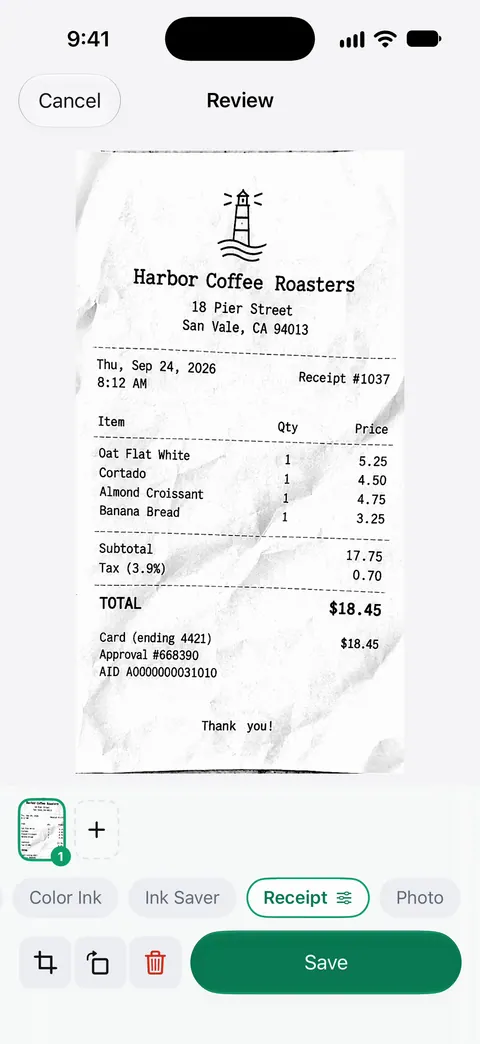
You can sign and annotate documents. Scanner One exports to Word, keeping headings, lists and tables, and to Excel and CSV. That turns a job’s receipts into a spreadsheet you can total. Then it reads the text, names the document, tags it and puts it in the right folder. Search looks inside the text of every document and shows the matching line and page.
What to know first:
- Free accounts can sign and mark up 3 documents a month. Free accounts can run the PDF tools and the Word, Excel and CSV exports 3 times a week, from one shared allowance.
- Free accounts get smart filing for 10 documents a month. A busy month goes past that.
- On a free account, pages you share, print or export carry a small “Scanned with Scanner One” label at the bottom right. Pro removes it. Customers will see it on estimates and invoices sent from a free account.
- Pro removes every limit. Pro comes monthly, yearly with a free week, or once for life.
It is not estimating, invoicing or bookkeeping software: it doesn’t price jobs, send invoices or track what is owed. Use it to get paper into clean, findable PDFs alongside those tools. For a handful of receipts a week, Notes is enough.
Questions and answers
Can a customer sign my estimate on my iPhone?
Yes, as a practical matter: open the estimate PDF in the Files app, tap Add Signature and hand them the phone, then send them a copy. Whether a phone signature is enough for a contract depends on your state, so check your state’s contractor licensing board for its rules on written contracts.
How long should a contractor keep receipts?
For taxes, the IRS’s general period is 3 years after you file, longer in some cases, and records for tools and vehicles stay until the period ends for the year you sell them. Your state, your insurer or a warranty you give may need longer.
Why do my supply house receipts fade?
Many are printed on thermal paper, which darkens with heat and fades with time and light. Scan them the day you get them, and keep them out of a hot truck cab.
Do I need to keep records for lead-safe work?
For paid work that disturbs paint in pre-1978 homes or child-occupied facilities, EPA rules say certified firms keep compliance records for 3 years after the job, including the signed receipt for the lead pamphlet.
Sources
What this page says about Scanner One was checked against the app on .
- IRS, What kind of records should I keep — gross receipts, purchases, expenses and assets, what an expense record should show, electronic records; last reviewed 2026-08-03
- IRS, How long should I keep records? — the 3, 6 and 7 year periods, 4 years for employment tax records, property records; last reviewed 2026-06-30
- IRS, About Form W-9 — providing your taxpayer identification number to someone who files an information return about income paid to you; last reviewed 2026-06-27
- U.S. EPA, Lead Renovation, Repair and Painting Program — firms paid to disturb paint in pre-1978 housing or child-occupied facilities must be certified; last updated 2026-11-12
- 40 CFR 745.86, Recordkeeping and reporting requirements (Cornell LII copy of the eCFR) — renovation firms keep compliance records 3 years after the renovation, including signed pamphlet receipts and work practice records; read 2026-11-13
- Apple iPhone User Guide, Fill out forms, sign documents, and create signatures on iPhone — typing into fields, Add Signature, Add Text Form Box and sharing the completed document; read 2026-11-13
- Scanner One on the App Store — the app’s own listing: Receipt filter, signing, Word, Excel and CSV export
Get Scanner One
Scanner One is free, with generous limits: scanning, clean PDFs and text search never stop.

Scanner OneScan, sign and ask anything
Scanner One is free, with generous limits: scanning, clean PDFs and text search never stop.