
Guide
Find a document with Siri and Shortcuts
Siri runs any shortcut when you say its name, so the dependable way is a shortcut. Apps that support it list App Shortcuts in the Shortcuts app, and you can run them by voice. You can also build your own, such as one that opens your insurance card, and name it something easy to say. With Siri AI (beta) on a supported iPhone, Siri can answer questions about a document on screen. For files by name, swipe down on the Home Screen and search.

Three ways to find a document by voice
Siri is most dependable when it runs an action an app or a shortcut provides. So the route depends on the app that holds the document.
| Route | What you need | Good for |
|---|---|---|
| App Shortcuts | An app that offers them | Opening, finding or sharing documents in that app |
| Your own shortcut | The Shortcuts app | One document you open often, such as an insurance card |
| Siri AI on screen | Siri AI (beta) on a supported iPhone | Questions about a document that’s already open |
And for files by name, Search on the Home Screen is often quicker than speaking.
Use an app’s built-in shortcuts
Many Apple and third-party apps come with ready-made shortcuts. Apple calls them App Shortcuts, and they need no setup.
- Open the Shortcuts app.
- Open the shortcuts collections (the button at the upper left on iPhone).
- Under App Shortcuts, tap the app’s name to see what it offers, and tap one to run it.
To run one by voice, activate Siri and say the shortcut’s name. Apple also lets you add an app shortcut to a shortcut of your own: tap the More button on the App Shortcut, then Use in New Shortcut.
Make a shortcut you can say
Siri runs any shortcut in your collection when you say its name. That makes a simple shortcut the most reliable way to open a document you need often, like a car insurance card or a vaccination record.
- In the Shortcuts app, create a new shortcut.
- Add an action that opens the document, from the app that holds it or from the Files actions.
- Name the shortcut the way you’ll say it: “Insurance card”, “Lease”, “Kids’ records”.
- Activate Siri and say the name.
Apple notes a few rules:
- After running a shortcut, Siri tells you the result.
- If the device is locked and the shortcut opens an app, Siri asks you to unlock first.
- If the shortcut’s name matches a standard Siri command, such as “What time is it?”, Siri runs the shortcut instead.
Shortcuts also run from the Home Screen, the Shortcuts widget and the share sheet, so the same shortcut works when you can’t speak.
Ask Siri about the document on screen
With Siri AI (beta), Siri can use what’s on your screen. Apple’s example: say “Which quarterly report grew faster?” with two documents selected in the Files app.
- Open the document, or select it in Files.
- Activate Siri and ask, for example “When is this bill due?”
- Swipe down on the answer to ask follow-up questions.
Apple says Siri AI is in beta on iOS 27 on Apple Intelligence iPhones (iPhone 15 Pro, 15 Pro Max, iPhone 16 or later), in English, French, Japanese, Korean, Portuguese and Spanish to start, not initially in the EU, and not for users under 13. Siri AI can also start from Spotlight.
Find a file by name with Search
Sometimes typing beats speaking.
- Swipe down on the Home Screen (or tap the Search button on models with Face ID).
- Type part of the document’s name.
- Tap the result to open it.
Shortcuts appear here too: type a shortcut’s name and tap Run. Apple notes that content from third-party apps appears only if the app supports Spotlight indexing, and you can choose which apps are searched under Settings > Search. Good names make all of this work: see how to name scanned documents.
When you can’t talk
A shortcut you’d say aloud works just as well with a tap, which helps in a waiting room or at a counter. Apple lists several places to run shortcuts from:
- The Home Screen, as an icon of its own.
- The Shortcuts widget, with several shortcuts on one tile.
- The share sheet of another app.
- Search: type the shortcut’s name and tap Run.
- Apple Watch, for shortcuts you’ve added there.
Put the two or three documents you need most often, such as an insurance card and a boarding pass, in the widget.
Tips for voice that works
- Use short, distinct names. “Lease” works; “the new lease document from June” doesn’t.
- Avoid names that sound like commands. “Open”, “Call” and “Play” confuse Siri.
- Name it for the moment you’ll need it. “Insurance card” for the roadside, “Boarding pass” at the airport.
- Test it once from the Lock Screen, so you know what happens before you need it.
Where Scanner One helps, and where it doesn’t
Your own shortcut for a few key documents, and Search for the rest, cover a lot with nothing to install.
Scanner One brings its documents to Siri and Shortcuts. With Siri and Shortcuts you can open, find, share and ask your documents by voice, and see what’s due. So you can ask for a document the way you’d ask a person, without building a shortcut for each one.
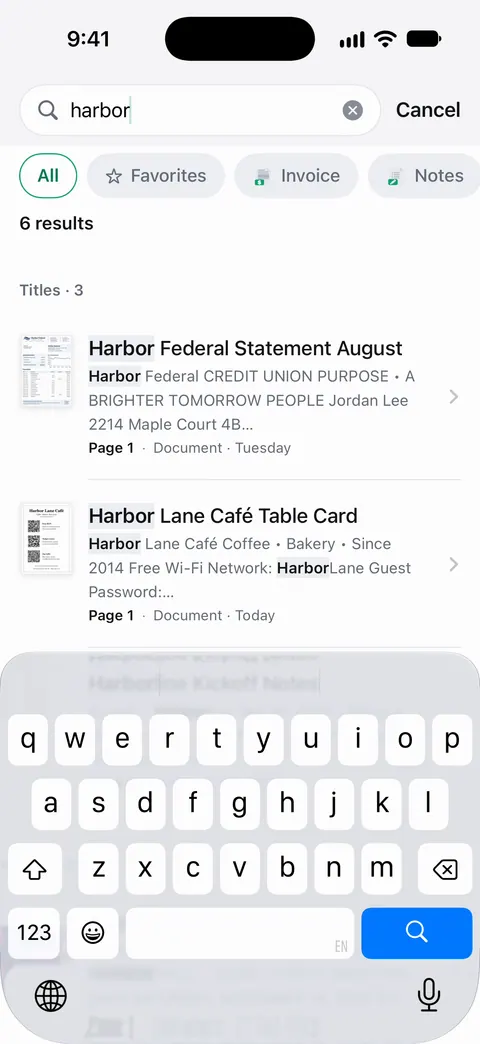
It works because the text of every page is read: Search looks inside the text of every document and shows the matching line and page. And Ask your documents anything. When does the lease end? What did I spend at the shop? The answer comes back with the page it came from.
The limits, plainly:
- Siri finds what’s in Scanner One, not files kept in other apps.
- Free accounts can ask the on-device AI 3 questions a day. Pro removes every limit.
The Siri and Shortcuts feature page lists what you can say, and finding a document by a word inside it covers search on screen.
Questions and answers
Can Siri search inside my PDFs?
It depends on the app that holds them. Siri runs shortcuts and actions that apps provide, and with Siri AI (beta) it can answer questions about a document on your screen. To search across many documents by voice, use an app whose shortcuts include a find action.
Why does Siri do something else when I say my shortcut’s name?
Pick a more distinctive name. Apple says that if a shortcut has the same name as a standard Siri command, Siri runs the shortcut, so the trouble is usually that Siri heard a different phrase. Short, unusual names work best.
Does it work when my iPhone is locked?
Siri can start the shortcut, but Apple says that when the device is locked and the shortcut opens an app, Siri asks you to unlock first.
What can I do with Scanner One by voice?
With Siri and Shortcuts you can open, find, share and ask your documents by voice, and see what’s due.
Sources
What this page says about Scanner One was checked against the app on .
- Apple Shortcuts User Guide, Use Siri to run shortcuts with your voice — running any shortcut by saying its name, name clashes with Siri commands, unlocking; read 2026-11-13, undated
- Apple Shortcuts User Guide, Run app shortcuts on iPhone or iPad — the App Shortcuts category and adding an app shortcut to your own; read 2026-11-13, undated
- Apple Shortcuts User Guide, Intro to Shortcuts on iPhone and iPad — what a shortcut and an action are, and where shortcuts can run; read 2026-11-13, undated
- Apple Shortcuts User Guide, Run shortcuts from the Search screen — finding and running a shortcut from Search; read 2026-11-13, undated
- Apple iPhone User Guide, Siri AI: Learn about what’s on your iPhone screen — asking Siri about documents on screen or selected in Files, and availability; iOS 27 guide, undated, read 2026-11-13
- Apple iPhone User Guide, Search with Spotlight on iPhone — searching the iPhone, and third-party apps appearing only with Spotlight indexing; iOS 27 guide, undated, read 2026-11-13
- Scanner One on the App Store — the app’s own listing: Siri and Shortcuts
Get Scanner One
Scanner One is free, with generous limits: scanning, clean PDFs and text search never stop.

Scanner OneScan, sign and ask anything
Scanner One is free, with generous limits: scanning, clean PDFs and text search never stop.