
Guide
Scan your mail and keep the paper out of the house
Open your mail at one spot every day. Recycle the junk unopened, and scan each letter you need with Scan Documents in Notes, Files or Preview: one letter, one PDF, named with the sender, what it is and the date. Save it in a few simple folders. Keep originals that are legal or hard to replace, shred anything else with personal details, and turn on the free USPS Informed Delivery to see letter-sized mail before it arrives.

This page is about the daily habit: what to do with each envelope as it arrives so paper stops piling up. If you’re clearing years of old papers in one go, start with going paperless at home, then use this routine to keep it that way.
Set up once: a spot, a phone, three folders
You only need a few things:
- One place where mail gets opened, close to the recycling bin and a shredder or a “to shred” envelope.
- A scanner app. Notes, Files and Preview all have Scan Documents built in.
- Three or four folders in Files, such as Bills, Money and tax, Home and car, Health. Fewer folders means faster decisions. If you prefer finer detail, organizing documents on iPhone has a fuller structure.
Turn on iCloud Drive or another backup before you start shredding originals, so the scans don’t live only on one phone.
The daily two-minute routine
Do this the day the mail comes. The FTC advises taking mail with personal information out of the mailbox as soon as possible, and it’s also easier to deal with three envelopes than thirty.
- Sort standing up. Junk and catalogs go straight into recycling unopened, unless they show your name with account details, in which case shred them.
- Open what’s left. Pull out the letter itself and throw away the envelope, inserts and return slips you won’t use.
- Act on anything urgent first. Pay the bill, put the appointment in your calendar, sign the form.
- Scan it. In Files, tap the More button, tap Scan Documents, hold the phone over the letter and let it capture the page. Add more pages for a multi-page letter, tap the Done button, choose the folder and tap Save. In Notes, the Attachment button leads to the same Scan Documents.
- Name it. Rename the file with the sender, what it is and the date: “Insurance, renewal notice, 2026-11-05”. More in how to name scanned documents.
- Decide on the paper: recycle, shred, or put it in the one box for originals you keep.
One letter, one PDF
Scan each letter as its own document rather than a week of mail in one file. You’ll search for “water bill October”, not “mail week 43”, and a single letter is easier to send to someone who asks for it.
Double-sided letters
Many statements print terms on the back. If the back has anything about your account, scan it as the next page. Blank or boilerplate backs can be skipped. See scanning double-sided documents for a quick way through a stack.
What to keep in paper, what to shred, what to recycle
Scanning gives you a copy; it doesn’t make every original disposable.
| Type of mail | After scanning |
|---|---|
| Junk mail, catalogs, flyers | Recycle unopened |
| Credit offers, anything with account numbers | Shred |
| Routine bills and statements | Shred once the scan is checked and backed up |
| Tax forms (W-2, 1099), year-end statements | Keep the paper with that year’s tax file |
| Legal notices, deeds, titles, court or government letters | Keep the original |
| Checks, gift cards, anything with value | Deposit or use; don’t rely on a scan |
The FTC suggests shredding financial records before you throw them away, and if you don’t have a shredder, using a community shred day or marking out account numbers. For how long to keep each kind of paper, see which papers to keep after scanning and the keep or shred chart.
Finding a letter later
Search is where a scanned mail pile beats a drawer.
- Files search finds a document by its file name, folder name or document type. That’s why the name matters: put the sender and the subject in it.
- Notes search looks at text inside scanned documents too, so a letter scanned into a note can be found by a word on the page.
- Folders by year help at tax time: inside Money and tax, a folder per year keeps the right statements together.
See your mail before it arrives
USPS Informed Delivery is free and shows grayscale preview images of the address side of incoming letter-sized mail, plus package updates, by daily email, on the dashboard or in the app. It doesn’t show what’s inside, but it tells you when an important letter is on its way and helps you notice if something you expected never came. You need an eligible address and a USPS.com account; USPS says most ZIP Codes are eligible, while some apartment buildings may not be.
Cut the paper at the source
The best letter to scan is one that never arrives on paper.
- Switch statements to paperless in your bank, utility and insurance accounts, and save the PDFs into the same folders as your scans.
- Unsubscribe from catalogs as they come, while the customer number is in front of you.
- Ask for email for appointment letters and notices where the sender offers it.
If reading small print on letters is the hard part, having mail read aloud covers the iPhone tools for that.
Where Scanner One helps, and where it doesn’t
The slow part of scanning mail every day is naming and filing each letter. Point your camera at any piece of paper. Scanner One finds the edges, straightens the page, cleans it up and saves a real PDF. Then it reads the text, names the document, tags it and puts it in the right folder. Free accounts get smart filing for 10 documents a month.
Search looks inside the text of every document and shows the matching line and page. So a letter can be found by a word printed in it, not only by its name.
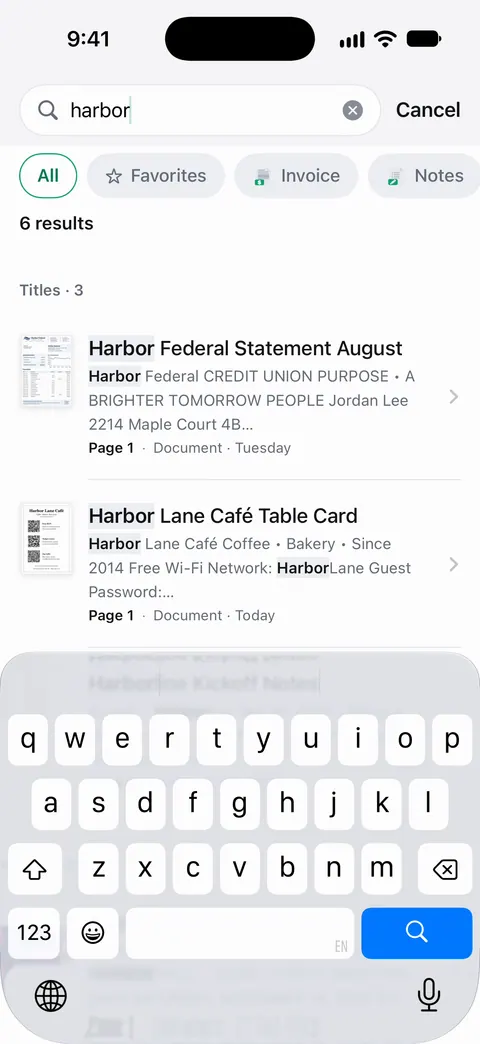
Documents stay on your iPhone unless you share them or turn on iCloud Sync. Deleted documents wait in Recently Deleted for 30 days before they are deleted for good.
What it doesn’t do: it doesn’t open your mail, connect to USPS, or tell you which originals the law says to keep. If you forward a scanned letter to someone from a free account, the page carries a small label: On a free account, pages you share, print or export carry a small “Scanned with Scanner One” label at the bottom right. Pro removes it.
When the built-in way is enough: if you get a handful of letters a week and don’t mind typing names, Files with Scan Documents and three folders is a complete system. More guides are in Guides.
Questions and answers
Is it safe to throw away mail after scanning it?
For most routine mail, yes, once you’ve checked the scan is readable and backed up. Keep originals of legal and official papers, and shred anything with account numbers or your Social Security number instead of putting it in the recycling.
Do I need a virtual mailbox service to go paperless with mail?
No. Those services open and scan your mail for a fee, which helps if you travel or run a business. For mail delivered to your home, a phone and five minutes a day do the same job.
Can USPS scan my mail for me?
Informed Delivery shows a free grayscale image of the outside of letter-sized mail, the address side only. It doesn’t open or scan what’s inside.
How should I name scanned letters?
Sender, what it is, and the date on the letter, such as "City water, bill, 2026-11-02". Putting the date in year-month-day order keeps files sorted by date in any folder.
Sources
What this page says about Scanner One was checked against the app on .
- Apple Support, Scan documents on your iPhone or iPad (article 108963) — Scan Documents in Notes and in Files, choosing a location and Save; page dated 2026-02-13
- iPhone User Guide (iOS 27), Find and view files and folders in Files — Files searches by file name, folder name or document type; read 2026-11-13
- USPS, Informed Delivery — free grayscale previews of the address side of letter-sized mail, eligibility and sign-up; no date shown; read 2026-11-13
- FTC Consumer Advice, What To Know About Identity Theft — take mail out promptly, keep financial records safe, shred before throwing away; dated September 2024
- Scanner One on the App Store — the app’s own listing
Get Scanner One
Scanner One is free, with generous limits: scanning, clean PDFs and text search never stop.

Scanner OneScan, sign and ask anything
Scanner One is free, with generous limits: scanning, clean PDFs and text search never stop.