
Guide
Send sensitive documents securely from your iPhone
First confirm who’s asking, using a phone number or website you already know. Use their secure upload portal if they have one. If you must email, lock the PDF with a password (in Preview, tap the Actions Menu button, then Lock) and send the password another way, such as a phone call. Send only the pages they asked for, black out numbers they don’t need, and delete extra copies afterwards.

An accountant wants last year’s W-2s, a landlord wants an ID and pay stubs, a bank wants a statement. Each copy you send is a copy you no longer control. This guide is the whole routine for sending sensitive papers from an iPhone: who to trust, which channel to use, and what to remove first. Locking a PDF has its own page, password-protecting a PDF, which this one builds on.
Step 1: make sure the request is real
Most document theft doesn’t involve hacking. Someone simply asks. The FTC’s advice: don’t click a link in an unexpected email or text, and contact the company using a phone number or website you know is real.
Warning signs:
- The request arrived out of the blue, by text or email.
- It’s urgent: “today or your application is cancelled”.
- The link goes to a site you don’t recognize, or a shortened link.
- They ask for more than the task needs: your full Social Security card when the last four digits would do.
IRS guidance for tax professionals makes the same point from the other side: a legitimate business won’t ask you to email sensitive information except through a secured mail service. If you’re unsure, call the office on a number from their official website or from paperwork you already have.
Step 2: pick the safest channel they offer
| Channel | How safe | Use it when |
|---|---|---|
| The organization’s secure upload portal | Best: they built it for this | They have one. Ask before you email |
| Hand delivery or a shared screen in person | Good: no copy in transit | You’re meeting anyway |
| iMessage to a confirmed person | Good: Apple says attachments can be encrypted between sender and receiver | A trusted person, blue bubbles |
| Email with a locked PDF, password sent separately | Acceptable | No portal exists |
| Plain email or SMS with an unlocked file | Weakest | Avoid for IDs, tax forms and statements |
The FTC’s own privacy page tells people to use caution emailing things like Social Security or bank account numbers, and to use secure online forms or the phone instead. It also notes that how safely email travels depends on the encryption settings of the sender’s email service, which you can’t see from your side.
Step 3: send less
The safest information is the information you don’t send.
- Only the pages asked for. A bank statement’s first page usually proves the account; the transaction pages show where you shop. Split the PDF and send the page that’s needed.
- Black out what they don’t need. An account number they won’t use, a child’s details, a medical line on a pay stub. Do it properly: a box drawn on top can be lifted off. See redacting a PDF properly.
- Watermark ID copies with who it’s for and why: “For Oak Street Apartments rental application, November 2026”. A copy marked like that is much less useful to anyone else. See watermarking a copy of your ID, or our free ID copy watermark tool, which runs in your browser.
Step 4: lock the file if it goes by email
Preview, on iPhone, can add a password to a PDF. Apple’s steps:
- Open the PDF in Preview.
- To keep an unlocked copy, tap the Actions Menu button and tap Duplicate first.
- Tap the Actions Menu button next to the file name, then tap Lock.
- Enter the same password in the Password and Verify fields. Require Password turns on by itself.
- Tap the Done button.
Then:
- Send the password a different way. Email the file, phone or text the password. Never both in one email.
- Make it long and not guessable: not your birthday, not “1234”. A short phrase works.
- Check the portal rules first. Some official upload sites reject locked files: USCIS, for example, says not to password-protect uploads.
IRS guidance for tax preparers asks them to send only password-protected and encrypted documents by email, or to use secure file transfer instead. The same standard is a good one for you.
Step 5: clean up afterwards
- Delete sent copies you don’t need from Mail’s Sent folder and from chats, once the person confirms they have it.
- Delete extra exports, like the locked duplicate or the watermarked copy, once they’ve done their job.
- Turn on two-factor authentication for your email and Apple Account. The FTC notes that a thief with your password still can’t sign in without the second factor.
- Keep one record of what you sent, to whom and when, in case questions come up later.
For the passport question specifically, see should you email a copy of your passport.
Where Scanner One helps, and where it doesn’t
You can do every step above with Apple’s own apps: Preview locks PDFs, and Files splits and shares them. If that works for you, you don’t need anything else.
Scanner One puts the three protections in one place. The PDF tools merge, split, compress, password-protect, add page numbers and watermarks, and extract text. So you can lock a copy, watermark it and send only the pages needed from the same document. Redaction is permanent. Redaction is a Pro feature: Pro adds redaction, the smart eraser, edit text, auto-export and five alternate app icons.
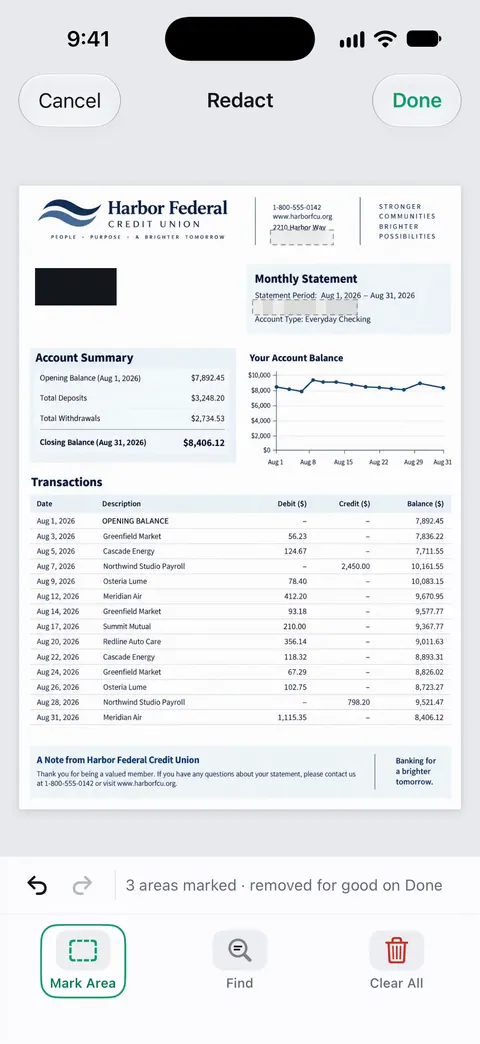
Documents stay on your iPhone unless you share them or turn on iCloud Sync. Scanner One needs no account and does no tracking. You can lock the app with Face ID.
The limits, plainly:
- Free accounts can run the PDF tools and the Word, Excel and CSV exports 3 times a week, from one shared allowance. Pro removes every limit.
- On a free account, pages you share, print or export carry a small “Scanned with Scanner One” label at the bottom right. Pro removes it.
- No app makes plain email safe. A portal, or a locked file with the password sent separately, is still the way to send.
More on privacy is on the privacy page.
Questions and answers
Is it safe to email a copy of my Social Security card or ID?
Plain email isn’t a secure channel. The FTC asks people to use caution emailing numbers like these and points to secure online forms or phone instead. If email is the only option, lock the PDF and share the password another way.
Is iMessage secure enough for sending documents?
Apple says iMessage attachments can be encrypted so only you and the recipient can access them, which is better than plain email. The copy still stays on both phones and in their backups, so send only what’s needed.
How do I send the password for a locked PDF?
By a different route from the file: a phone call, or a text if you emailed the file. Never put the password in the same email as the attachment.
How can I tell if a request for my documents is a scam?
Be wary of urgency, unexpected links and requests that arrive by text or email out of the blue. Contact the organization using a phone number or website you already know is real, not the one in the message.
Sources
What this page says about Scanner One was checked against the app on .
- FTC, Privacy Policy FAQs — use caution emailing sensitive information such as Social Security or bank account numbers; prefer secure online forms or phone; secure email transmission depends on the sender’s email service; undated, read 2026-11-13
- FTC Consumer Advice, Protect Your Personal Information From Hackers and Scammers — don’t click links in unexpected emails or texts; contact the company using a number or website you know is real; two-factor authentication; dated November 2024
- IRS Publication 4557, Safeguarding Taxpayer Data (Rev. 6-2024) — tax professionals should send only password-protected and encrypted documents by email, or use secure file transfer instead; a legitimate business won’t ask for sensitive information by email unless through a secured mail service
- iPhone User Guide, Lock PDFs in Preview on iPhone — Actions Menu, Lock, Password and Verify, Duplicate to keep an unlocked copy; undated guide page, read 2026-11-13
- iPhone User Guide, Take and edit photos or videos in Messages on iPhone — iMessage attachments may be uploaded to Apple and encrypted so only sender and receiver can access them; undated guide page, read 2026-11-13
- Scanner One on the App Store — the app’s own listing: password-protect, watermark, redaction
Get Scanner One
Scanner One is free, with generous limits: scanning, clean PDFs and text search never stop.

Scanner OneScan, sign and ask anything
Scanner One is free, with generous limits: scanning, clean PDFs and text search never stop.