
Situation
Signing a lease from another city
Make sure the place and the landlord are real before you pay or sign anything: have someone you trust visit, or ask for a live video tour, and search the address and owner. Read the whole lease and ask for any changes in writing. Then sign through the landlord’s e-signature link, or sign the PDF on your phone. Pay by a method you can trace, never by wire, gift card or crypto, and keep the signed lease, receipts and move-in photos.

Before anything: make sure it is real
Renting from far away is exactly the situation rental scams aim at. The FTC’s warning signs:
- The rent is much lower than similar places nearby.
- Someone pushes you to decide quickly.
- The “owner” can’t show you the place, often because they are away.
- They want money by wire transfer, gift card or cryptocurrency.
- They want your Social Security number or credit details before you have agreed to rent.
- The same address appears in other ads under another name, or it is listed for sale.
And the checks that help from a distance:
- Search the address together with the owner’s or company’s name.
- Check the listing on the rental company’s own website, not only on a listing site.
- Look up the owner in city or county property tax records.
- Send someone you trust to see it, or ask for a live video tour where you choose what they show you.
- Contact the company using details you found yourself, not the ones in the message.
The FTC notes that even a visit is not a guarantee, but together these checks make a fake much harder to pull off.
What to ask for before you sign
Ask for the complete lease as a PDF, with every addendum, before you agree to anything. Also ask for:
- The building rules and any HOA rules.
- The move-in date, and how you get the keys.
- The deposit amount, where it is held, and how it is returned.
- What is included: utilities, parking, appliances.
- Who to call for repairs, and how.
- The move-in inspection checklist.
Read it from a distance
Without a meeting to ask questions, the lease has to answer them. Read it all, and look closely at:
- The term, the start date and what happens at the end: renewal, notice periods.
- Rent, the due date, and late fees.
- The deposit and the conditions for getting it back.
- Fees beyond rent.
- Repairs and maintenance: who does what.
- Early termination: what it costs to leave early.
- Pets, subletting and guests.
- Entry: when the landlord can come in.
Anything you agreed on the phone or by email that isn’t in the lease, ask to have added in writing. Our guides on what to check in a contract before signing and getting the gist of a long contract go further.
Signing it
How you sign depends on how they send it:
- An e-signature link. Use it. Check that the email comes from the company you have been dealing with before you click.
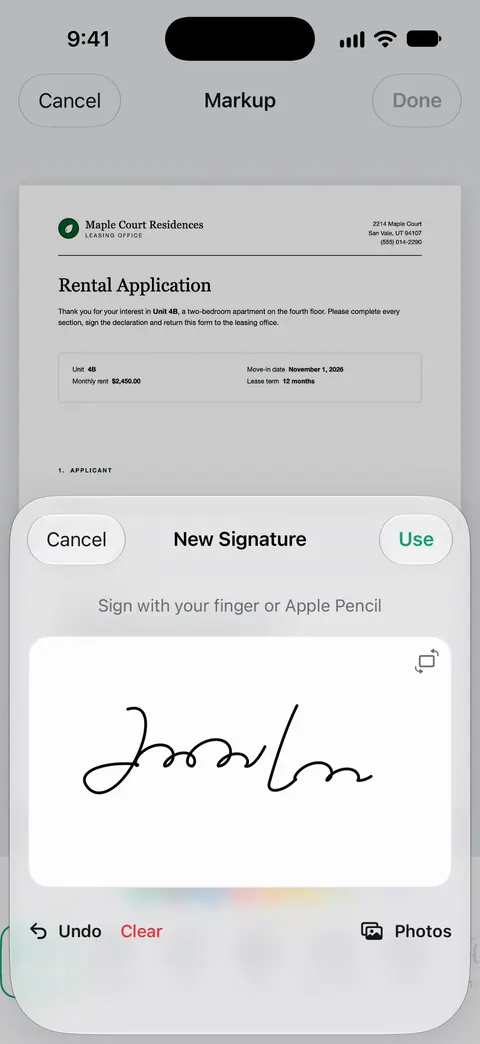
- A PDF by email. Sign it on your phone. Open it in the Files app, tap the markup button, tap the add button and Add Signature, sign with your finger, tap Done, and drag it into place. Our guide to signing a PDF on iPhone has the full steps.
- Paper only. If they mail it, sign it, scan it and return the scan if they accept it, then post the original as they ask. See sending a signed form without a printer.
Initial each page if the lease asks for it, date your signature, and get back a copy signed by both of you. Until the landlord has signed, it isn’t finished.
Paying from far away
- Never pay by wire, gift card or crypto. The FTC says it is the same as sending cash, and it is usually gone.
- Don’t pay a deposit or first month’s rent before you, or someone you trust, have seen the place and you have signed a lease.
- Use a method you can trace, such as the company’s payment portal, a check or a card, and get a receipt for every payment.
Before move-in day
- Arrange the keys in writing: who, where, when.
- Set up the utilities and renters insurance for the start date.
- On the first day, walk through with the move-in checklist and take dated photos of every room, before you unpack.
- Change your address; our page on moving house paperwork lists who to tell.
If the landlord also wants your documents in a hurry, see the landlord wants your documents by tonight, and the checklist for renting an apartment.
This page is general information, not legal advice. Tenant law differs by state and city. If something in the lease worries you, ask a local tenant organization or a lawyer before you sign.
Where Scanner One helps, and where it doesn’t
It can’t tell you whether a listing is real or whether a lease is fair. The checks above are yours.
Where it helps is the reading and the signing. Ask your documents anything. When does the lease end? What did I spend at the shop? The answer comes back with the page it came from. Free accounts can ask the on-device AI 3 questions a day. Ask “How much notice do I need to give?” and then read the clause it points to yourself. Search looks inside the text of every document and shows the matching line and page.
You can sign and annotate documents. Fill Form lets you type into the fields of a PDF form. Free accounts can sign and mark up 3 documents a month.
On a free account, pages you share, print or export carry a small “Scanned with Scanner One” label at the bottom right. Pro removes it. A signed lease you send back from a free account will carry that label, so if that matters to you or the landlord, sign it in the Files app instead. Documents stay on your iPhone unless you share them or turn on iCloud Sync.
What changed compares the new version of a lease or policy with the one you signed. Useful when next year’s renewal arrives.
Questions and answers
Can I sign a lease without seeing the apartment?
You can, but be careful. The FTC advises against paying a deposit or first month’s rent before you have seen the place and signed a lease. If you can’t go yourself, send someone you trust or ask for a live video tour, and check the owner in city or county property records.
Is an electronic signature on a lease valid?
Often it is accepted, and many landlords send leases for e-signature themselves. Rules differ by state, so if you are unsure, ask the landlord how they expect it signed, or a local tenant organization or lawyer.
How do I pay a security deposit safely from another state?
Pay by a method you can trace, such as through the management company’s portal, a check or a card, and get a receipt. Never pay by wire transfer, gift card or cryptocurrency: the FTC says that is like sending cash, and the money is usually gone for good.
What should I get after I sign?
A copy of the lease signed by both you and the landlord, with every page and addendum, receipts for anything you paid, and the move-in checklist. Keep them until you move out and get your deposit back.
Sources
What this page says about Scanner One was checked against the app on .
- FTC Consumer Advice, Rental listing scams — warning signs, checking the listing and owner, visiting or sending someone you trust, and never paying by wire, gift card or crypto or before seeing the place and signing a lease; dated June 2026
- Apple Support, Fill out forms, sign documents, and create signatures on iPhone (iPhone User Guide) — signing a PDF with Add Signature and sharing it; no date shown, read 2026-11-13
- Scanner One on the App Store — the app’s own listing: signing, Fill Form, ask your documents, search
Get Scanner One
Scanner One is free, with generous limits: scanning, clean PDFs and text search never stop.

Scanner OneScan, sign and ask anything
Scanner One is free, with generous limits: scanning, clean PDFs and text search never stop.