
Situation
Tax season: get your papers together in one evening
Give it 2 hours and work in order. Start with last year’s return and your bank details, then gather your income forms (W-2s, 1099s, 1095-A), then proof for deductions and credits, then any side-income records. Scan or save each paper into one folder for the tax year, name every file, and write a list of what is missing. If a form never arrived, ask the payer, or look in your IRS online account.

Before you start
You need three things on the table, and one decision.
- Last year’s return. You need its adjusted gross income (AGI) to e-file, and it reminds you of every form you had last year. If you can’t find it, your IRS online account shows prior-year AGI and transcripts.
- This year’s mail pile. The envelopes that say “Important tax document”, plus anything from your bank, brokerage, employer, school or health plan.
- One folder for the tax year. A real folder, a folder in the Files app, or one in a scanner app. Name it after the year the return covers, not the year you file in.
The decision: will you do the return yourself or hand it to a preparer? If it is a preparer, ask now how they want the papers. That changes how you send them, not what you gather.
The evening, in order
The order matters. Each step uses what the step before it found.
Step 1: You and your household (15 minutes)
From the IRS list of what to gather:
- Social Security numbers or ITINs for you and everyone on the return.
- Your name exactly as Social Security has it, and your current address.
- Bank account and routing numbers, for a refund by direct deposit or to pay what you owe.
- Last year’s AGI and refund amount, and your self-select PIN if you e-filed.
- Your Identity Protection PIN, if the IRS sent you one.
Step 2: Income forms (30 minutes)
Lay each form out as you find it, then tick it off against last year’s list.
- W-2 from every employer you had, including a job you left in March.
- 1099s: 1099-INT (interest), 1099-DIV (dividends), 1099-NEC (freelance pay), 1099-K (payment apps and card payments), 1099-R (retirement withdrawals), 1099-G (government payments such as unemployment) and 1099-MISC.
- SSA-1099 if you receive Social Security.
- W-2G for gambling winnings.
- 1095-A if you had a plan from the Health Insurance Marketplace.
- Records of digital asset sales if no form came for them.
Step 3: Deductions and credits (30 minutes)
Only gather what you might claim:
- Childcare or dependent care costs, with the provider’s details.
- Mortgage interest and property tax records, if you itemize.
- Charitable donation receipts.
- Health savings account or flexible spending account contributions, and medical costs if you itemize.
- Retirement contributions.
- Tuition, books and other education costs for students and teachers.
Step 4: Side income (20 minutes)
If you did any freelance or gig work, the IRS also wants statements from banks, payment apps, card processors or marketplaces, checks paid to you, receipts and mileage logs, office expenses, and records of the estimated tax you paid. The freelancer tax documents checklist goes deeper.
Step 5: Write the “still missing” list (10 minutes)
For each gap, write who owes you the paper and how to ask. This list is what stops a half-finished pile from turning into a late return.
Scan as you go, not at the end
Scanning in the same sitting means you only handle each paper once.
- Scan each form into its own PDF. In Notes, tap the Attachment button and choose Scan Documents; in Files, tap the More button and choose Scan Documents. Save into the tax-year folder.
- Put multi-page forms, such as a brokerage statement, into one PDF in page order.
- Name every file the same way: year, form, sender. “2026 1099-INT First Bank” sorts itself.
- Receipts go in a single PDF per month or per category. The guide to scanning receipts for taxes shows how to keep them readable.
Then do a final check against the documents you need to file your taxes.
If a form is missing or wrong
- Ask the sender first. Employers and banks can reissue forms, and many have them online.
- Look in your IRS online account. It shows transcripts, prior-year AGI and information return documents. You can also order a transcript by mail or by phone.
- A wrong form needs a corrected form. If a W-2 shows the wrong amount, ask the employer for a corrected W-2 rather than adjusting the numbers yourself.
- Don’t file on a guess. If a form is late, wait for it or get help; an IRS letter later takes longer than a short wait now.
What to keep afterwards
When the return is filed, keep the whole folder together with a copy of the return. The IRS periods of limitations set how long:
- 3 years in most cases.
- 6 years if you did not report income that you should have, and it was more than 25% of the gross income shown on the return.
- 7 years if you claim a loss from worthless securities or a bad debt deduction.
- Indefinitely if you did not file a return.
- Property records until the period runs out for the year you sell or dispose of the property.
Our guide on how long to keep tax records explains each case.
Make next year a 20-minute job
Create next year’s folder tonight. Each time a tax form or a receipt arrives, scan it straight in. By next spring the evening is already done.
This page is general information, not tax advice. Tax rules and forms change: check the IRS pages linked here, or a tax professional, for your own situation.
Where Scanner One helps, and where it doesn’t
Notes and Files scan tax forms well, and for a short list they are enough. Scanner One helps with the sorting and the finding. Point your camera at any piece of paper. Scanner One finds the edges, straightens the page, cleans it up and saves a real PDF. Then it reads the text, names the document, tags it and puts it in the right folder. Free accounts get smart filing for 10 documents a month.
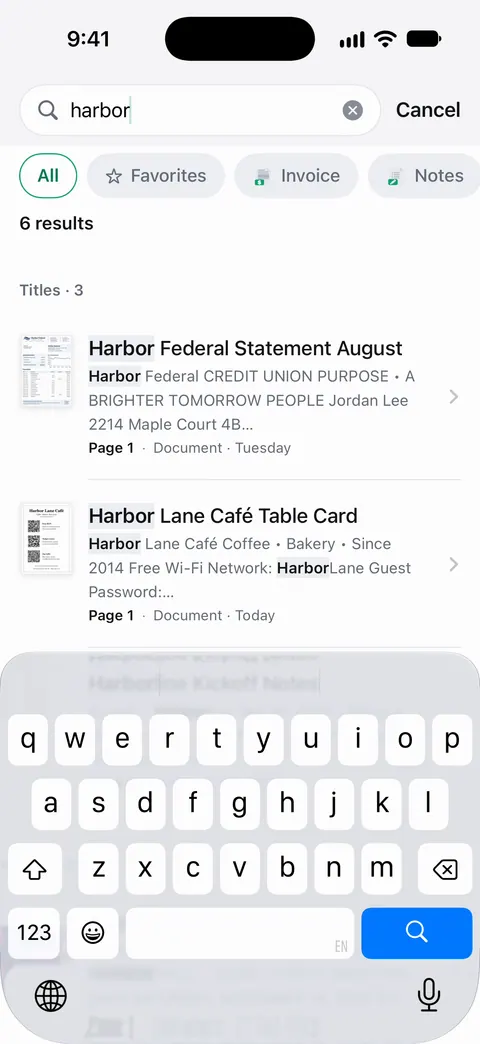
Search looks inside the text of every document and shows the matching line and page. Search a year’s folder for “1099” or a bank’s name and every match comes up, with the line it was found on.
The PDF tools merge, split, compress, password-protect, add page numbers and watermarks, and extract text. That means you can merge the year into one PDF for a preparer and lock it with a password. Free accounts can run the PDF tools and the Word, Excel and CSV exports 3 times a week, from one shared allowance. On a free account, pages you share, print or export carry a small “Scanned with Scanner One” label at the bottom right. Pro removes it. Documents stay on your iPhone unless you share them or turn on iCloud Sync.
Packs: say what you’re applying for, like a visa, a lease or your taxes, and see which papers you have and what’s missing. For taxes, that means a list of the papers you have for the year and the ones still missing.
What it doesn’t do: it does not prepare or file a return, it does not fetch forms from the IRS or your employer, and it does not check your numbers. You still read every form yourself.
Questions and answers
What documents do I need to file my taxes?
The IRS lists your Social Security number or ITIN, last year’s adjusted gross income, your bank details for a refund, every income form (W-2, 1099s, SSA-1099, 1095-A), and records for any deductions or credits you claim, such as childcare, mortgage interest, donations or education costs.
What do I do if my W-2 or 1099 hasn’t arrived?
Ask the employer or payer for it first. You can also sign in to your IRS online account, which shows wage and income statements and information return documents, or ask for a transcript by mail.
How long should I keep my tax documents?
The IRS says 3 years in most cases, 6 years if you left out income worth more than 25% of the gross income on your return, and 7 years for a claim for worthless securities or a bad debt. Keep property records until the period ends for the year you sell or dispose of the property.
Can I give my tax preparer scans instead of the paper?
Most preparers work from PDFs, and many have a secure upload portal. Ask yours what they accept and use their portal rather than ordinary email if they offer one. Keep the originals until your return is accepted.
How should I organize tax documents?
One folder per tax year, with the same few groups each year: you and your household, income, deductions and credits, side income, and taxes paid. Name each file with the year, the form and who sent it, such as 2026 W-2 Acme.
Sources
What this page says about Scanner One was checked against the app on .
- IRS, Gather your documents — the list of personal details, income forms, deduction and credit records and side-job records to gather; page last reviewed 2026-10-26
- IRS, How long should I keep records? — the 3, 6 and 7 year periods, property records and keeping copies of returns; page last reviewed 2026-06-30
- IRS, Get transcript — transcripts, wage and income statements and information return documents in the IRS online account; page last reviewed 2026-06-27
- Apple Support, How to scan documents on your iPhone or iPad (article 108963) — Scan Documents in Notes and Files; published 2026-02-13
- Scanner One on the App Store — the app’s own listing: scanning, smart filing, search, PDF tools
Get Scanner One
Scanner One is free, with generous limits: scanning, clean PDFs and text search never stop.

Scanner OneScan, sign and ask anything
Scanner One is free, with generous limits: scanning, clean PDFs and text search never stop.